UFW, the Uncomplicated Firewall, is the standard firewall front end on Ubuntu 26.04 LTS and Ubuntu 26.10. It is installed by default but switched off. This guide shows how to enable it safely, open and close ports, manage rules and read the firewall log, with copy-ready examples and a free cheat sheet.
sudo ufw status verbose.sudo ufw allow OpenSSH before sudo ufw enable on any remote machine.sudo ufw status numbered then sudo ufw delete N removes one rule cleanly.sudo ufw limit OpenSSH slows brute-force attempts against SSH.Download the Ubuntu UFW Firewall Commands Cheat Sheet
Every command from this guide on one printable sheet. Grab the PDF, or pick EPUB, DOCX, MOBI or AZW3 for your reader.
Also see Linux security commands, Linux networking commands, Systemctl and journalctl commands in Ubuntu and Chmod and chown commands in Ubuntu.
Turn on UFW safely
Set the defaults and allow SSH first, then enable. On a desktop without an SSH server you can skip the SSH rule.
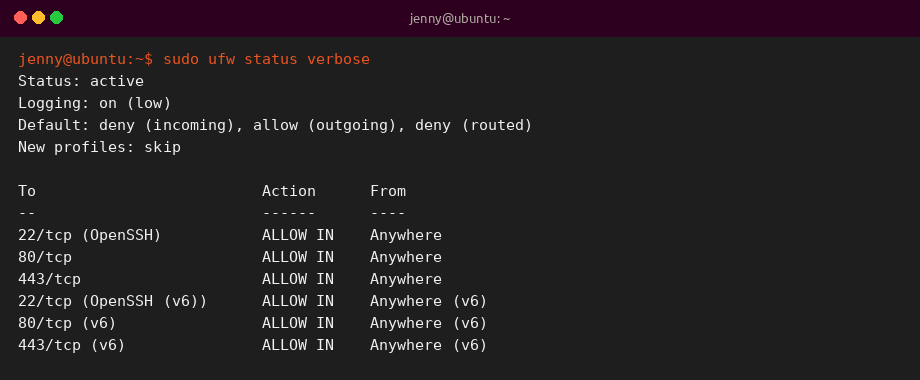
1. Check firewall status
Shows whether ufw is active, the default policies and every rule.
2. Set the default policies
Blocks unsolicited incoming connections and lets the machine connect out.
3. Allow SSH before enabling
Uses the OpenSSH app profile, which opens port 22/tcp. The profile appears once openssh-server is installed.
Without the profile, use sudo ufw allow 22/tcp.
4. Enable the firewall
Activates ufw now and at every boot. It asks for confirmation because it may disrupt SSH sessions.
Allow and deny traffic
Rules are matched top to bottom and the first match wins. ufw adds IPv4 and IPv6 versions of each rule automatically.
5. Allow a port
Opens a TCP port, here for a web server.
6. Allow a service by name
ufw looks up names in /etc/services.
7. Allow a port range
Ranges need a protocol.
8. Allow one IP address
Trusts every port from a single machine.
9. Allow a subnet to one port
Lets only your LAN reach SSH.
10. Deny a port or address
Drops matching traffic silently.
11. Reject instead of deny
Sends an error back so the client fails fast instead of timing out.
12. Rate-limit SSH
Blocks an address that opens 6 or more connections within 30 seconds.
13. Rule for one interface
Applies the rule only to traffic arriving on the named network card. Find names with ip -br a.
14. Block outgoing traffic
Outgoing rules work the same way with out.
15. Add a comment to a rule
Comments show in ufw status and remind you why a port is open.
List, delete and reorder rules
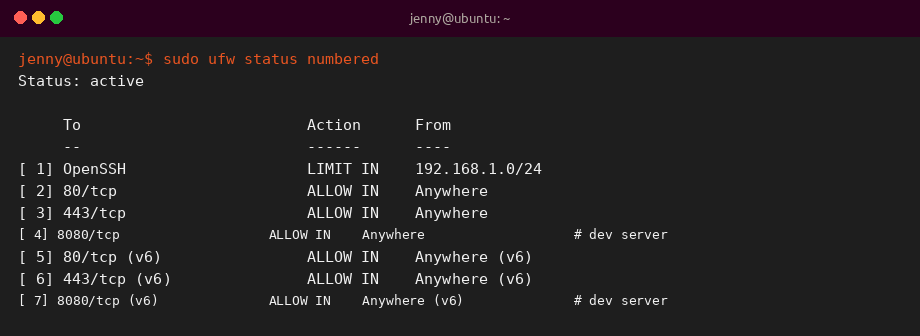
Numbered output makes it easy to remove or insert rules without retyping them.
16. Show numbered rules
Lists rules with an index number.
17. Delete a rule by number
Removes rule 3 after a confirmation. Numbers shift after each delete, so list again before the next one.
18. Delete a rule by its text
Repeat the original rule after delete.
19. Insert a rule at the top
Puts a block rule before existing allow rules so it matches first.
20. Preview a change
–dry-run prints the resulting rules without applying them.
21. Show rules you added
Lists your rules as commands, even while ufw is disabled.
22. Reload, disable or reset
reload re-reads the rules. disable turns the firewall off. reset disables ufw and deletes all rules, after making backups.
App profiles and logging
Packages can ship app profiles in /etc/ufw/applications.d so you can allow a service by name instead of remembering ports.
23. List app profiles
Shows the profiles available on this machine.
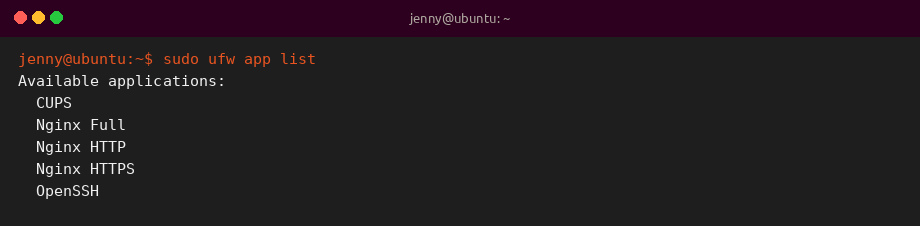
24. Show what a profile opens
Prints the ports and protocols behind a profile.
25. Turn on logging
low is the default level. medium also logs invalid and new connections.
26. Read the firewall log
Blocked packets are tagged [UFW BLOCK] in the kernel log.
27. Check IPv6 is covered
IPV6=yes in this file makes ufw manage IPv6 rules too. It is the default.
28. See the generated nftables rules
On Ubuntu 26.04, ufw drives the kernel firewall through the nftables based iptables backend.
Common UFW rules
| Goal | Command |
|---|---|
| SSH from anywhere | sudo ufw allow OpenSSH |
| SSH from LAN only | sudo ufw allow from 192.168.1.0/24 to any port 22 proto tcp |
| Web server | sudo ufw allow 80/tcp && sudo ufw allow 443/tcp |
| Slow down brute force | sudo ufw limit OpenSSH |
| Block an attacker first | sudo ufw insert 1 deny from 203.0.113.7 |
| Remove a rule | sudo ufw status numbered, then sudo ufw delete N |
| Start over | sudo ufw reset |
Tips and best practices
Keep a second SSH session open while you change firewall rules on a remote server. If a rule locks you out of new sessions, you can still fix it from the open one.
Docker publishes container ports with its own rules that can bypass ufw. If you run Docker, bind published ports to 127.0.0.1 or check the Docker documentation on firewall rules.
Related Ubuntu command guides
- Top 40 Linux commands for Ubuntu 26.04
- Apt and snap commands in Ubuntu
- Systemctl and journalctl commands in Ubuntu
- Disk and partition commands in Ubuntu
- Chmod and chown commands in Ubuntu
- Linux networking commands
- Advanced Linux commands
- Linux security commands
- Sudo command cheat sheet
- Grep command cheat sheet
- Tar command cheat sheet
- Wget command cheat sheet