
These are the must-know Linux networking commands for Ubuntu 26.04 LTS and Ubuntu 26.10. The list leads with modern tools (ip, ss, resolvectl, nmcli). Legacy ifconfig and netstat appear only at the end as net-tools holdovers.
Download the Linux Networking Commands Cheat Sheet
All 20 networking commands from this guide in one file. Pick PDF for printing, or EPUB / DOCX / MOBI / AZW3 for your reader.
New to Ubuntu networking? Start from a clean install via the Ubuntu 26.04 LTS download page or see Top 40 Linux commands for Ubuntu 26.04 for everyday shell skills.
Modern networking commands on Ubuntu
Work through these in order on Ubuntu 26.04. Each block has a copy button so you can paste into your terminal.
1. ip
Show and change addresses, links and routes. This is the modern replacement for most ifconfig and route usage.

2. ss
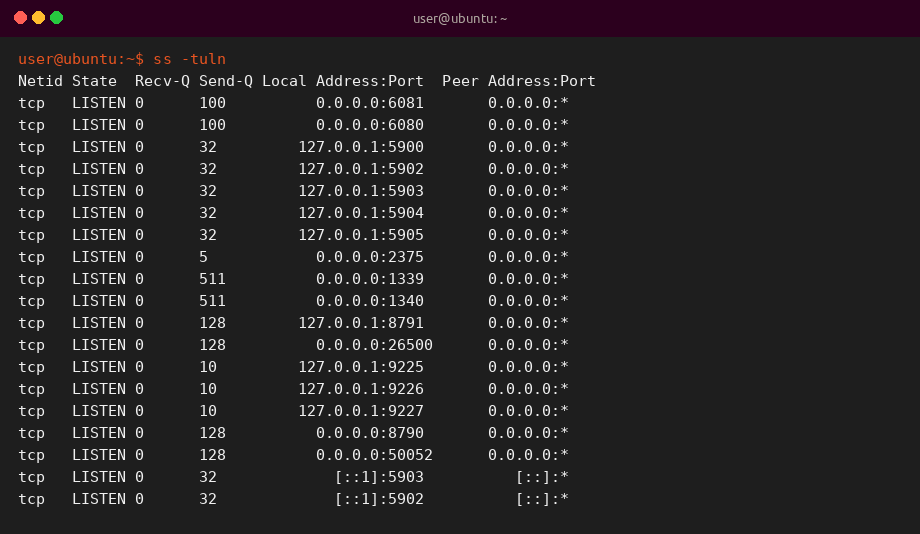
Socket statistics. Faster and better maintained than netstat for listening ports and connections.
3. resolvectl
Query and inspect systemd-resolved on Ubuntu. Use it to check DNS servers, domains and stub listener status.
4. nmcli
NetworkManager command-line client on Ubuntu Desktop. List devices, connections and Wi-Fi networks without opening Settings.

5. ping
Test reachability and round-trip time with ICMP echo requests. Limit the count so it stops cleanly.

6. traceroute
Show the hop-by-hop path to a host. Install with apt if missing: sudo apt install traceroute.
7. dig
Detailed DNS lookups. Prefer dig over older tools when you need full answer and authority sections.
8. nslookup
Quick interactive or one-shot DNS queries. Still handy; dig is usually clearer for scripts and debugging.
9. curl
Transfer data with HTTP and many other protocols. Great for APIs and header checks.
10. wget
Download files over HTTP, HTTPS or FTP. See also the dedicated wget command guide.
11. nmap
Port and host discovery scanner. Only scan networks you own or have explicit permission to test.
12. tcpdump
Capture packets on an interface for troubleshooting. Needs sudo for most interfaces.
13. ethtool
Query Ethernet driver and link settings such as speed and duplex.
14. ip neigh
Neighbor (ARP/NDP) table via the ip suite. Prefer this over the standalone arp command on modern Ubuntu.
15. whois
Look up domain registration data. Install with sudo apt install whois if needed.
16. scp
Copy files over SSH. For many files or resumes, prefer rsync.
17. rsync
Efficient local or remote sync over SSH. -avz is a solid everyday starting set of flags.
18. iftop
Live bandwidth view by connection. Install with sudo apt install iftop.
Legacy net-tools commands
Ubuntu still lets you install the net-tools package for older scripts. Prefer ip and ss for new work. Install only when you must: sudo apt install net-tools.
19. ifconfig
Legacy interface configuration from net-tools. Use ip address and ip link instead on Ubuntu 26.04.
Tip: treat ifconfig as compatibility only. New docs and scripts should call ip.
20. netstat
Legacy socket and routing summary from net-tools. Use ss -tuln and ip route instead.
Tip: ss is faster and maintained. Keep netstat only for old how-tos that still quote it.
Quick reference table
A compact map of all 20 networking commands in this guide.
| Range | Focus | Commands |
|---|---|---|
| 1-4 | Modern core | ip, ss, resolvectl, nmcli |
| 5-10 | Reachability and transfers | ping, traceroute, dig, nslookup, curl, wget |
| 11-18 | Scan, capture, sync | nmap, tcpdump, ethtool, ip neigh, whois, scp, rsync, iftop |
| 19-20 | Legacy net-tools | ifconfig, netstat |
Why these commands matter
Connectivity checks, DNS, and socket inspection cover most Ubuntu network troubleshooting. Learn ip and ss first, then add dig, curl and tcpdump when you need deeper detail. Firewall policy belongs with Linux security commands (ufw and nftables).
Still on Ubuntu 24.04? Plan your move with the upgrade to Ubuntu 26.04 LTS guide.