15 Advanced Linux Commands for Ubuntu 26.04 (2026): Cheat Sheet

Share

Fifteen advanced Linux commands for Ubuntu 26.04 LTS and Ubuntu 26.10 power users: archives, sync, multiplexers, search, disks, processes and sockets. Socket checks use ss rather than the older netstat workflow.

Before You Start
Ubuntu version
Examples target Ubuntu 26.04 LTS and 26.10. Install extras with apt when a tool is missing.
Terminal
Open with Ctrl + Alt + T. Practice risky flags only inside a test folder.
Modern sockets
Use ss -tuln for listening ports on current Ubuntu releases.
KEY TAKEAWAYS
01Power-user toolkit
tar, rsync, tmux, find and journalctl cover backups, remote sessions, search and logs.
02ss for sockets
Socket inspection on Ubuntu 26.04 should call ss. It is faster and actively maintained.
03Cheat sheet included
Download the free advanced commands cheat sheet in PDF or ebook formats.
04Pair with Top 40
Start from the everyday Top 40 list, then return here for multiplexers and sync tools.
05Disks and memory
df, du and free answer capacity questions before you grow disks.
06Logs via journalctl
On systemd Ubuntu systems, journalctl is the first stop for service logs.
Free Cheat Sheet

Download the Advanced Linux Commands Cheat Sheet

Fifteen advanced commands from this guide in one file. Pick PDF for printing, or EPUB / DOCX / MOBI / AZW3 for your reader.

Also see Top 40 Linux commands for Ubuntu 26.04 and the Ubuntu 26.04 LTS download page.

Advanced commands list

1. tar

Create and extract archives, often with gzip. See also the tar command cheat sheet.

tar -czvf backup.tar.gz Documents/
tar -xzvf backup.tar.gz

2. rsync

Fast incremental copy locally or over SSH.

rsync -avz Documents/ [email protected]:~/Documents/
rsync -avh --progress /data/ /mnt/backup/

3. screen

Persistent terminal sessions that survive disconnects.

screen -S work
screen -S work
screen -ls
screen -r work

4. tmux

Modern terminal multiplexer with panes and sessions.

tmux new -s work
tmux new -s work
tmux ls
tmux attach -t work

5. locate

Instant filename search from a database. Update it with sudo updatedb.

locate nginx.conf
locate nginx.conf
sudo updatedb

6. grep

Search text patterns inside files. Deep dive: grep command cheat sheet.

grep -RIn "TODO" ~/projects
grep -n "error" /var/log/syslog

7. find

Precise filesystem search by name, type or time.

find ~ -name "*.log" -mtime -7
find /var/log -type f -size +50M

8. df

Report free disk space on mounted filesystems.

df -h
df -h
Sample terminal output of df -h showing disk usage on Ubuntu
Sample output: df -h (generated for this guide).

9. du

Estimate directory disk usage.

du -sh ~/Documents
du -sh ~/Documents
du -h --max-depth=1 ~ | sort -h

10. top

Interactive process monitor. Press q to quit.

top
top

11. htop

Friendlier process monitor. Install with sudo apt install htop.

htop
htop

12. ss

View sockets and listening ports. The modern choice on Ubuntu 26.04.
ss -tuln
ss -tuln
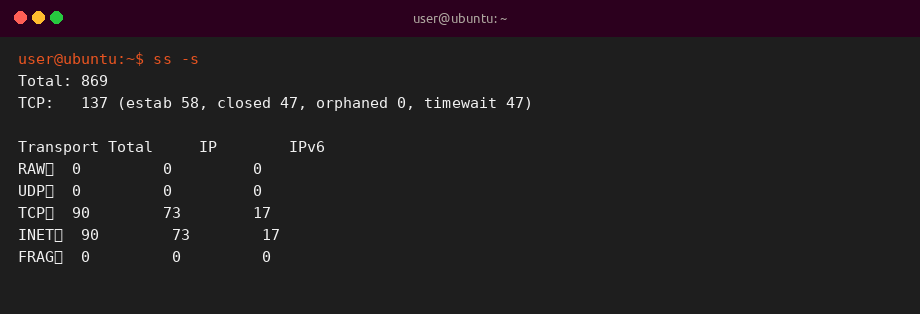
ss -s
Sample terminal output of ss -s socket summary on Ubuntu
Sample output: ss -s socket summary (generated for this guide).

13. lsof

List open files and the processes that hold them.

sudo lsof -i :22
sudo lsof -i :22
lsof +D ~/Documents

14. ps

Snapshot of running processes.

ps aux | head
ps aux | head
ps -ef | grep ssh

15. journalctl

Read the systemd journal for service and boot logs.

journalctl -u ssh -xe –no-pager | head
journalctl -u ssh -xe --no-pager | head
journalctl -b -p err

Quick reference table

Range Focus Commands
1-4 Archive and sessions tar, rsync, screen, tmux
5-7 Search locate, grep, find
8-11 Disks and processes df, du, top, htop
12-15 Sockets and logs ss, lsof, ps, journalctl

Why these commands matter

Advanced shell work on Ubuntu is mostly backup, remote sessions, search and observability. Learning ss and journalctl keeps you aligned with systemd-based Ubuntu 26.04.