To install Claude Desktop on Ubuntu, add Anthropic’s apt repository and run sudo apt install claude-desktop. There is no file to download and no installer to click through, on x86_64 or arm64 alike.
That is a real difference from most desktop apps on Ubuntu. Because the app arrives from a signed repository rather than as a one-off package, new versions come down with your ordinary system updates and you never go looking for a newer build. This guide adds the repository, installs the app, signs you in, and gets Cowork’s virtual machine running when the tab comes up grey. If a step does not work on your system, leave a comment below or contact us and we will help you sort it out.
The signed-by part is the whole point of the exercise. It ties this one repository to that one key, so nothing else on your system gains any trust from it. That is the same arrangement Google Chrome and Visual Studio Code use on Ubuntu, and it is why a vendor repository set up this way is not the same risk as pasting in an unknown PPA.
Let it install the packages it recommends. Among them are QEMU and some firmware, which look unrelated to a chat app and are not: they are what Cowork runs on. Saying no here, or installing with --no-install-recommends, gives you an app with one tab permanently greyed out.
3
Step 3: Launch and sign in
Press the Super key, type Claude, and press Enter. From a terminal the command is claude-desktop.
Sign in with your Claude account, or your organisation’s single sign-on.
Prefer to watch someone do it
The same install on a Linux desktop, followed by the Cowork fix covered further down this page.
Installing Without the Repository
Most readers should skip this section. It is for the two situations where the repository route is not available: a machine whose network blocks the repository, and a machine where policy says no third-party apt sources.
The package itself still comes from the same place. This command reads the repository index, finds the newest package for your architecture, and downloads just that file into the current folder:
Installing the file still adds the repository. The package registers /etc/apt/sources.list.d/claude-desktop.list on its own, which is exactly what you want if you only took this route because a download was easier, and exactly what you do not want if the whole point was to avoid the repository.
To stop that, create /etc/default/claude-desktop containing the line CLAUDE_DESKTOP_ADD_REPO="false"before you install. The trade is that nothing will ever update the app again: you repeat the download by hand, or you add the repository later and go back to normal.
What the App Does
This is not the website in a window. It is the same application Anthropic ships on macOS and Windows, with three things in it: ordinary chat, Claude Code for working in your repositories, and Cowork for longer jobs you hand over and come back to.
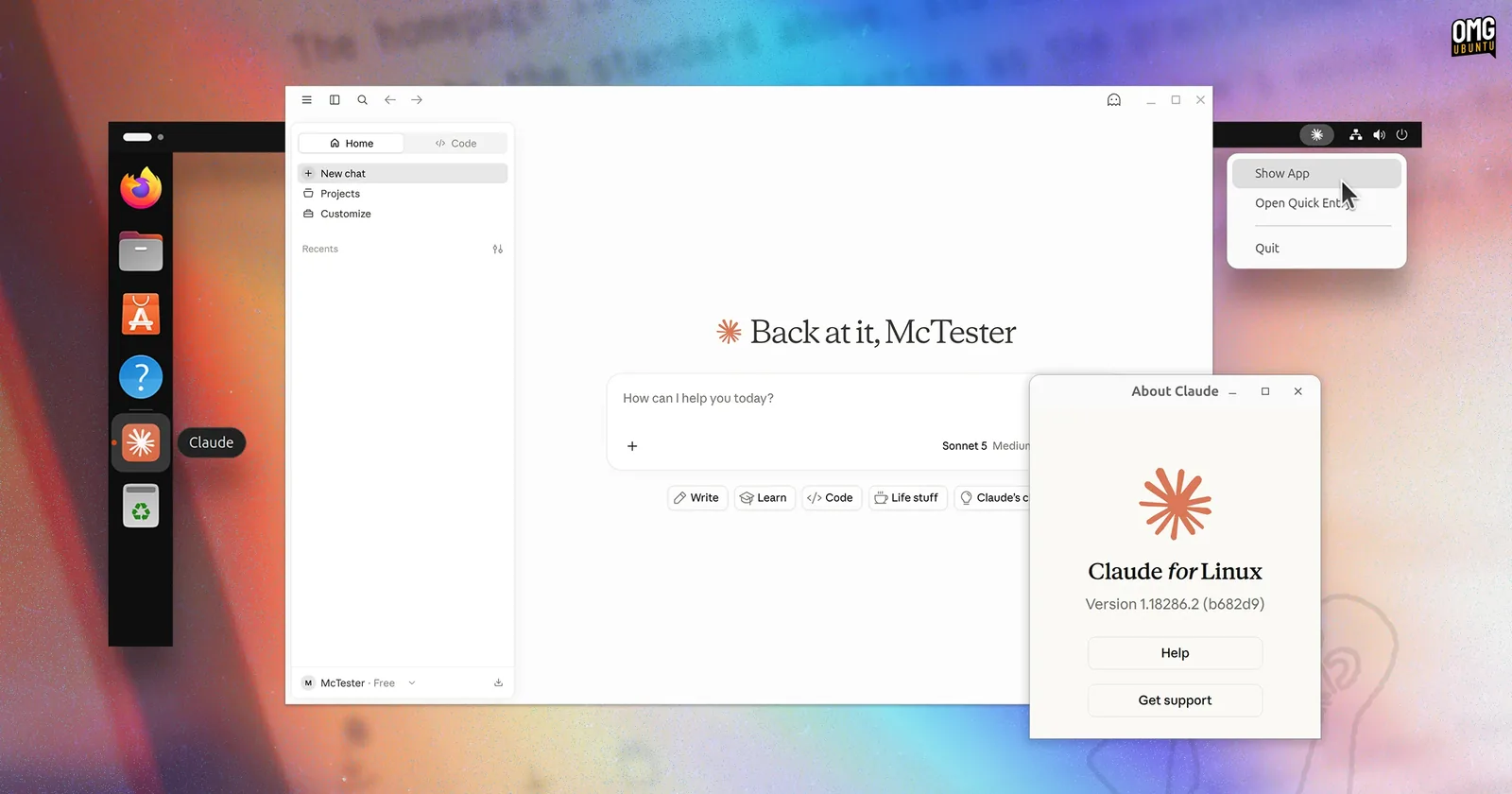
The app on an Ubuntu desktop: an icon in the dock, a tray menu with Show App and Open Quick Entry, and the About dialog naming the build. Screenshot by OMG! Ubuntu.
Everything you type is answered by Anthropic’s servers. Nothing in this app runs a model on your own machine, and a file it reads is a file that is sent.
Claude Code in the App
This is what most people install the app for on Linux. The same Claude Code you run in a terminal, with what a terminal cannot give you.
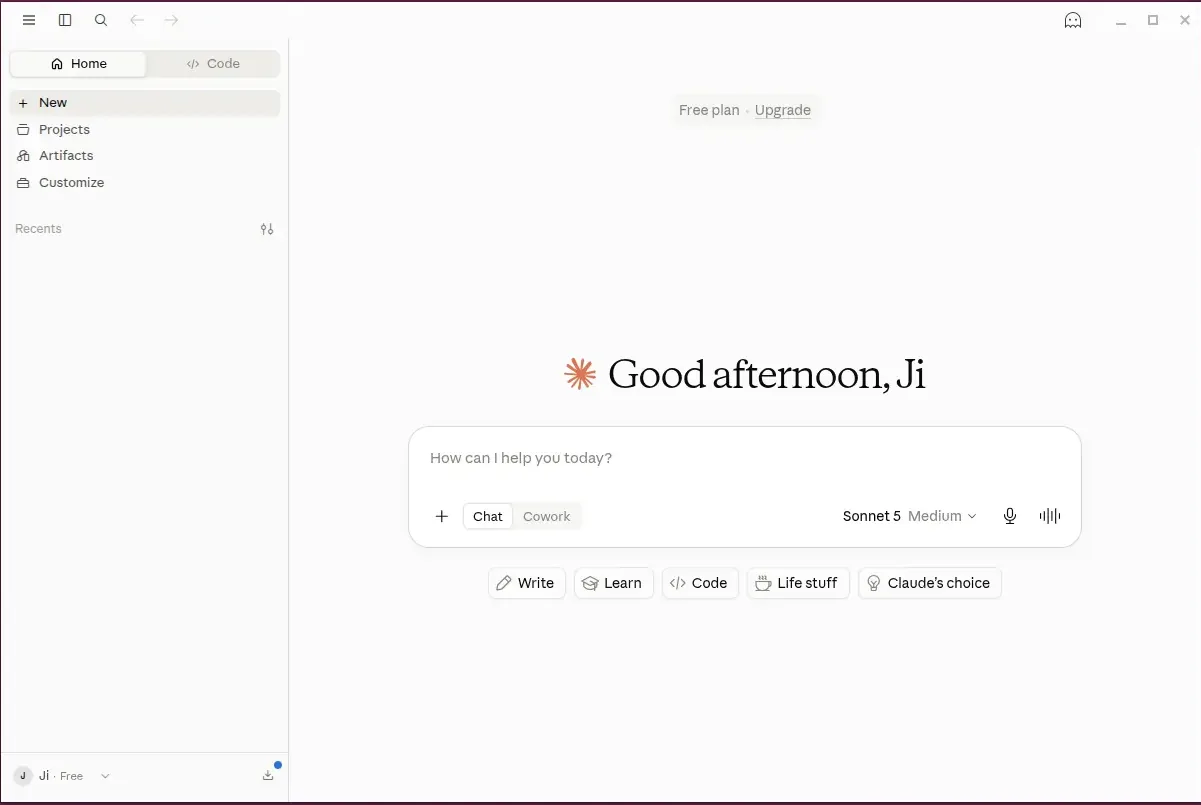
The Code tab sits beside Home in the sidebar, and the message box switches between Chat and Cowork. Screenshot by UbuntuHandbook.
Point a session at a folder and the sidebar runs several in parallel, each with its own history and project folder. The worktree option gives a session its own checkout, so two branches do not collide.
Changes arrive as a diff you approve, not edits that already happened. Read them file by file, comment on a line, accept or reject. Manual shows you everything, Accept edits stops asking, Plan works out an approach first. Switch mode next to the send button.
Terminal, editor and browser are panes in the same window, and Claude can start your dev server to check its own work in that pane.
All of it runs on your real files, with your permissions. That is the difference from Cowork, and why Cowork needs a virtual machine and this does not.
Turn On Cowork
On Linux, Cowork starts a virtual machine on your computer and does its work inside that. This is the part of the app with real requirements, and it is why a chat application pulled in QEMU during the install.
Four things have to be true before the tab will open.
1
Hardware virtualization, turned on in your firmware
On most machines bought in the last decade it already is. On some it is off by default, and it is called Intel VT-x, AMD-V or sometimes just “virtualization” in the firmware settings you reach by holding a key at boot.
2
The QEMU packages for your architecture
Architecture
Packages Cowork needs
x86_64, which apt calls amd64
qemu-system-x86, ovmf, virtiofsd
arm64
qemu-system-arm, qemu-efi-aarch64, virtiofsd
A normal apt install claude-desktop brings these in as recommended packages, so on an ordinary desktop install they are already there. On Ubuntu 22.04 there is no virtiofsd package at all, and the app carries its own copy for that case, so nothing is missing on 22.04 even though the package list looks short.
3
Your user in the kvm group
This is the requirement most likely to bite, because it looks satisfied when it is not:
Join the kvm group
sudo usermod -aG kvm $USER
Then log out and back in. Group membership is decided when you log in, so the change does nothing until you do. And join the group even if you already have access to /dev/kvm: some desktop environments hand the logged-in user that one device without the group, but Cowork also opens /dev/vhost-vsock, and only members of the group can open that.
4
The vhost_vsock kernel module, loaded
This is what lets the app talk to the machine it started. Load it now, and tell the system to load it at every boot:
Load the module, now and at boot
sudo modprobe vhost_vsock
echo vhost_vsock | sudo tee /etc/modules-load.d/vhost_vsock.conf
The one thing to remember
The app checks all four of these once, when it starts. Installing a package or joining a group while it is open changes nothing on screen. Close it and open it again after installing anything, and log out and back in after joining the group. A grey Cowork tab that you have already fixed is almost always an app that has not been restarted.
When Cowork Will Not Start
The Cowork tab tells you which requirement it is missing. Each message below is the app’s own wording, so match yours to the heading and take the fix under it. Restart the app afterwards in every case.
What you see
Cowork requires hardware virtualization (KVM)
FIX Turn virtualization on in your firmware settings, not in Ubuntu.
Restart and open your firmware settings, then look for Intel VT-x, AMD-V, SVM or a plain Virtualization switch. Nothing you install in Ubuntu will help.
What you see
Cowork requires QEMU
FIX Install the packages the message lists, then restart the app.
The app shows the exact command for your machine. On x86_64 it is:
These normally arrive with the app, so this message means recommended packages were skipped. On Ubuntu 22.04 drop virtiofsd from the command: the package does not exist there and the app bundles its own. On arm64 the packages are qemu-system-arm, qemu-efi-aarch64 and virtiofsd.
What you see
Claude doesn’t have permission to use virtualization (/dev/kvm)
FIXsudo usermod -aG kvm $USER and then log out and back in.
Logging out is not optional. Your session is given its groups at login. A reboot works too.
You can confirm it took effect before reopening the app:
mike@ubuntu:~$ groups
mike adm cdrom sudo dip plugdev kvm lpadmin
What you see
Cowork requires the vhost_vsock kernel module
FIXsudo modprobe vhost_vsock, then restart the app.
modprobe lasts until reboot, so make it permanent:
mike@ubuntu:~$ echo vhost_vsock | sudo tee /etc/modules-load.d/vhost_vsock.conf
One case cannot be fixed. If your running kernel has no module directory under /lib/modules, there is nothing to load. That is normal in containers and on ChromeOS. Chat and Claude Code still work there, Cowork does not.
Other Things That Go Wrong
What you see
NO_PUBKEY BAA929FF1A7ECACE
FIX The key is missing or wrong. Run Step 1 again, then sudo apt update.
Apt found the repository and refused to trust it. Either the download returned a web page instead of a key, or the keyring path differs between the two commands. Copy them rather than typing them.
What you see
E: Unable to locate package claude-desktop
FIX Run sudo apt update, then install again.
Apt does not see a repository added since the last update. If refreshing does not fix it, check the file has something in it:
Empty or missing means the echo command did not land, so run it again. Otherwise check that dpkg --print-architecture prints amd64 or arm64. Anything else has no package to find.
What you see
Depends: libc6 (>= 2.34) but it is not installable
FIX Upgrade the machine. Ubuntu 22.04 or later, or Debian 12 or later.
Ubuntu 20.04 ships libc6 2.31 and the app needs 2.34. There is no workaround worth having, since replacing the C library by hand breaks the machine. Upgrade, or use the Claude Code CLI, which runs on far more.
What you see
Running as root without –no-sandbox is not supported
FIX Start it as yourself. Never with sudo.
Installing needs sudo. Running does not. Do not add the flag in that message: launch Claude from your applications menu instead.
What you see
The Quick Entry keyboard shortcut does nothing
FIX Use the tray menu’s Open Quick Entry, or log in to an X11 session.
On Wayland a global shortcut needs the desktop’s GlobalShortcuts portal, and not every desktop has one. On X11 it works.
To switch, pick Ubuntu on Xorg from the gear icon on the login screen. Otherwise the tray menu does the same job.
Updating
The app has no updater on Linux. New versions arrive with your system updates.
Update
Update everything, including Claude
sudo apt update && sudo apt upgrade
Ubuntu’s Software Updater picks it up too, so if you already let that run there is nothing to do here.
To see which version you have:
Check the installed version
apt policy claude-desktop
Remove It
Remove the app
sudo apt remove claude-desktop
That also removes the repository entry and signing key the package registered. If you added the repository yourself in Step 1, it is still there and apt still checks it, so remove it too:
Your conversations live in your Claude account, so nothing you wrote is deleted. sudo apt autoremove will offer to take the QEMU packages as well. Keep them if you run virtual machines by any other means.
r/ClaudeAI ↗Where the Linux app gets discussed and argued about
Frequently Asked Questions
Is Claude Desktop free to install on Ubuntu?
The app is free and there is no separate Linux tier. What you can do inside it follows the Claude plan your account is on, the same as on the web. You do need an account: there is no signed-out mode.
Does it work offline, or run a model on my own machine?
No to both. Every message goes to Anthropic’s servers, and anything it reads on your machine is sent with it. The virtual machine Cowork uses is a boundary around what Claude can touch, not a model running locally.
Is the Linux app finished, or should I wait?
The Linux version arrived in June 2026 with a beta label. Three things are missing against macOS and Windows: Computer Use, dictation, and a Quick Entry shortcut that needs help on Wayland. None of them stop you chatting, writing code or using Cowork, and because it installs through apt, waiting gains you nothing.
Can it control my desktop the way it does on Mac and Windows?
No. Computer Use and dictation are macOS and Windows only. Linux gets chat, Claude Code in your own repositories with changes shown as diffs you approve, and Cowork.
Why does Cowork need a virtual machine on Linux?
Cowork runs commands and edits files without you approving each step. The virtual machine keeps that off your desktop, and only the folders you share cross into it. That is why installing a chat app also installs QEMU.
Which Ubuntu versions does it support?
Ubuntu 22.04 and later, so 26.04, 24.04 and 22.04, plus Debian 12 and later. Ubuntu 20.04 cannot run it: the package needs a newer C library than 20.04 ships. On Fedora, RHEL or Arch there is no desktop package, so use the CLI.
Next step
Two commands, then apt keeps it current
Anthropic’s own desktop app for Ubuntu and Debian, on x86_64 and arm64, from a signed repository.