How to Install Devin Desktop on Ubuntu 26.04 and 24.04

Share
5 Min Read · Official App · Beginner Friendly

Devin Desktop on Ubuntu

Devin Desktop is the new name for Windsurf. To install it on Ubuntu, add the official apt repository and run sudo apt install devin-desktop. It is the same AI code editor, and it runs on amd64 machines.

There is a free plan. If a step does not work on your system, leave a comment below or contact us and we will help you sort it out.

Cost: Free plan, Pro $20
Install: apt repository
Machines: amd64 only
Updates: Through apt
Before You Start
Ubuntu version
Any current release. 26.04, 24.04 and 22.04 all work, and so does Debian.
Plan
Free works. Every plan includes the editor. Paid plans add more agent use.
Machines
amd64 only. There is no arm64 build. Run dpkg –print-architecture if you are unsure.
Disk space
About 1.2 GB installed, from a 248 MB download.
Terminal
Needed for the repository. Devin Desktop is not in the Ubuntu archives or App Center.
Account
A Devin account. Your old Windsurf account still works.

Install Devin Desktop in 3 Steps

Three steps, five minutes. The repository addresses still say windsurf. That is expected.

1

Step 1: Add the signing key

Open a terminal with Ctrl + Alt + T and fetch the key the packages are signed with:

Download the signing key
curl -fsSL https://windsurf-stable.codeiumdata.com/wVxQEIWkwPUEAGf3/windsurf.gpg | gpg --dearmor | sudo tee /etc/apt/keyrings/windsurf-stable.gpg > /dev/null

Silence means it worked. If the shell answers command not found, run sudo apt install curl gpg and try again.

2

Step 2: Add the repository

Write the repository into apt’s list of sources. Copy it rather than typing it:

Register the repository
echo "deb [arch=amd64 signed-by=/etc/apt/keyrings/windsurf-stable.gpg] https://windsurf-stable.codeiumdata.com/wVxQEIWkwPUEAGf3/apt stable main" | sudo tee /etc/apt/sources.list.d/windsurf.list > /dev/null
3

Step 3: Install and open it

Install Devin Desktop
sudo apt update && sudo apt install devin-desktop

About 248 MB to download. Devin Desktop is then in your applications menu, and devin-desktop opens it from a terminal.

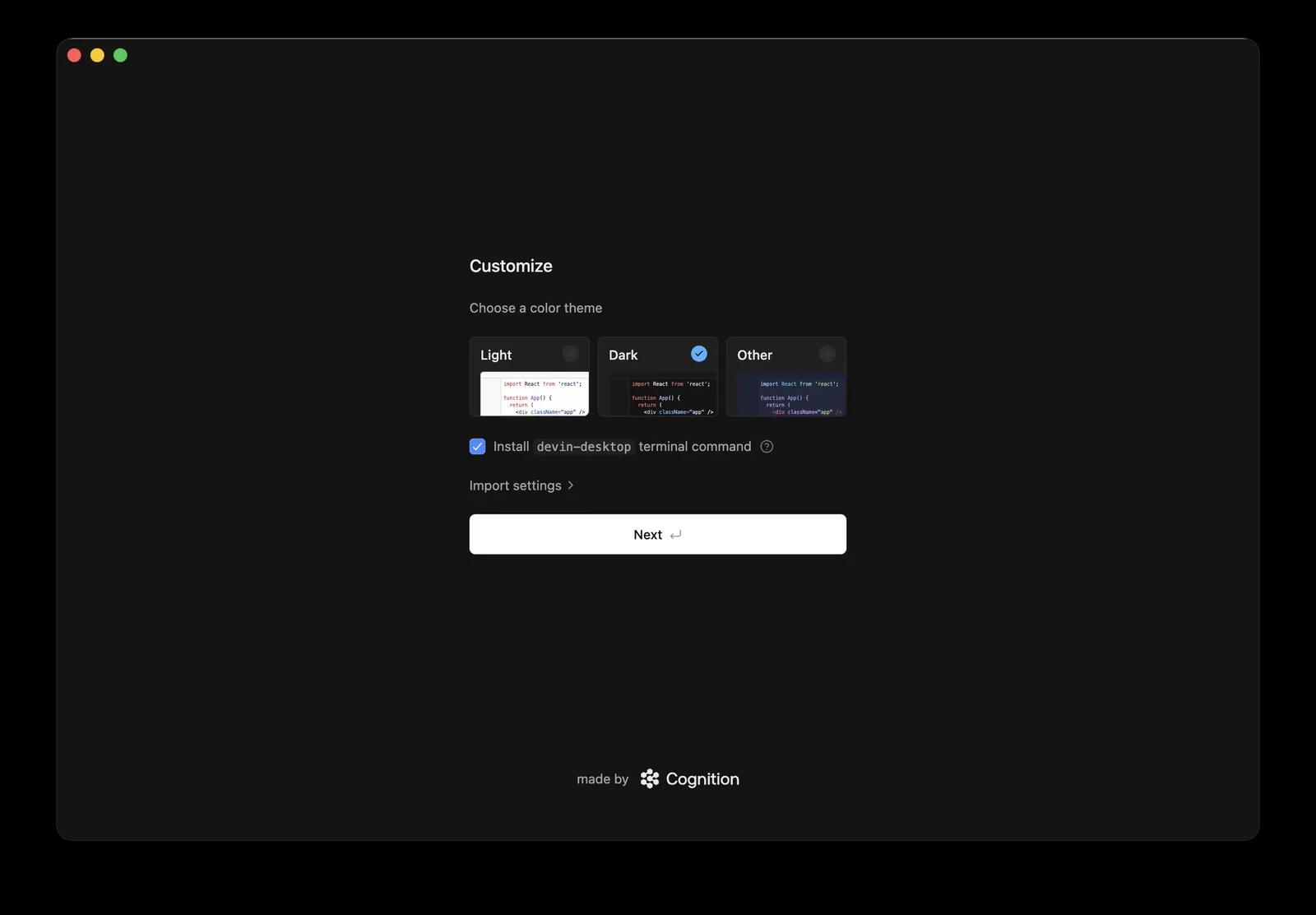
On first run, choose Sign up or Log in and finish in your browser. The setup screen can also import your VS Code or Cursor settings.

The Other Way: the Tarball

The Linux button on devin.ai/download gives you a .tar.gz file. It runs without installing anything:

Unpack and run the tarball
cd ~/Downloads && tar -xzf Devin-linux-x64-*.tar.gz
./Devin/devin-desktop
Worth knowing

The tarball never updates itself and adds no menu entry. On Ubuntu, the repository is the better choice.

What Devin Desktop Is

Devin Desktop is an AI code editor built on VS Code. Your VS Code extensions, keyboard shortcuts and themes work in it.
Agents write and change code for you. You describe the job in the side panel, and an agent edits files and runs commands in your project. You review and accept each change.
Tab completion predicts your next edit as you type. It is unlimited on every plan, including Free.

Devin Desktop first-run setup screen with theme choice, the devin-desktop terminal command option and Import settings
The first-run setup screen: pick a theme, add the terminal command, or import settings.

Plans: Free, Pro at $20 a month, Max at $200 and Teams. They differ in how much agent work you get, not in which features the editor has.

Already Had Windsurf?

Update as usual and you get Devin Desktop. The old windsurf package now pulls in devin-desktop, so there is nothing new to add:

Move from Windsurf to Devin Desktop
sudo apt update && sudo apt upgrade
  • Your settings stay. They live in ~/.codeium/windsurf, and Devin Desktop reads the same folder.
  • The windsurf command still works. It now opens Devin Desktop.
  • Your account and plan carry over. Sign in with the same login.

Once Devin Desktop is installed, you can drop the leftover package with sudo apt remove windsurf. It holds no files.

How Updates Reach You

New versions arrive with your system updates.

Update
Check the installed version
apt policy devin-desktop

Run sudo apt update && sudo apt upgrade, or let Software Updater do it.

The tarball never updates. Download a new one to upgrade.

When Something Goes Wrong

What you see

E: Unable to locate package devin-desktop

FIX Check dpkg --print-architecture says amd64, then redo Step 2.

The repository only serves amd64, so arm64 machines never see the package. On amd64, it means the repository line is missing or mistyped.

What you see

The tarball never opens and mentions the SUID sandbox

FIX Use the repository instead.

Unpacked as a normal user, the sandbox helper loses the root ownership it needs. The installed package sets it up correctly.

What you see

Sign-in finishes in the browser, but the app never logs in

FIX Choose Enter your auth token manually on the welcome screen.

The browser shows a token to copy. Paste it into the app.

Remove It

Remove Devin Desktop and its repository
sudo apt remove devin-desktop windsurf
sudo rm /etc/apt/sources.list.d/windsurf.list /etc/apt/keyrings/windsurf-stable.gpg

Your settings stay in ~/.codeium/windsurf in case you reinstall. Delete that folder to remove them too.

Helpful Resources

Official setup guide Install steps for each system, first run and importing settings
Devin Desktop downloads The Linux tarball, plus the Windows and Mac installers
Plans and pricing What Free, Pro, Max and Teams each include
r/windsurf The community for Windsurf and Devin Desktop users

Frequently Asked Questions

Is Devin Desktop the same as Windsurf?

Yes. Devin Desktop is the new name for Windsurf. It is the same editor, with the same settings folder and the same account.

Is Devin Desktop free?

Yes. The Free plan includes the editor, unlimited Tab completion and a small amount of agent use. Pro costs $20 a month.

Does the windsurf command still work?

Yes. The package keeps windsurf as a second name for devin-desktop, so old scripts and shortcuts still open the editor.

Does Devin Desktop run on arm64 Linux?

No. The Linux builds are amd64 only.

Can I use my VS Code extensions?

Yes. Devin Desktop is built on VS Code, and the first-run screen can import your VS Code or Cursor settings.

Next step
Install it, sign in, open a project

The official guide covers first run and importing your settings.

Related guides: Install Cursor on Ubuntu · Install Grok Bot on Ubuntu · Install Google Antigravity on Linux · Install Claude Desktop on Ubuntu · Install ChatGPT on Ubuntu · More AI guides for Ubuntu