15 Linux Security Commands for Ubuntu 26.04 (2026): Cheat Sheet

Share

Fifteen Linux security commands for Ubuntu 26.04 LTS and Ubuntu 26.10: privilege elevation, secure remote access, firewalls (ufw, nftables and iptables), scanners and permission tools.

Before You Start
Ubuntu version
Targets Ubuntu 26.04 LTS and 26.10. ufw is the friendly front end; nftables is the modern packet filter.
Permissions
Many examples need sudo. Confirm commands on a test machine before changing production firewall rules.
Firewall stack
Prefer ufw for everyday rules. Use nft for advanced sets. iptables remains available for legacy examples.
KEY TAKEAWAYS
01Start with sudo and ssh
Least privilege and encrypted remote login are the foundation of Ubuntu server hygiene.
02ufw plus nftables
On Ubuntu 26.04, manage day-to-day rules with ufw and inspect advanced policy with nft.
03iptables still exists
iptables remains useful for older rulesets, but new designs should learn nftables too.
04Cheat sheet included
Download the free security commands cheat sheet in PDF or ebook formats.
05Scan only what you own
nmap belongs on networks you administer or have written permission to test.
06Permissions matter
chmod and chown prevent accidental world-writable files after ownership fixes.
Free Cheat Sheet

Download the Linux Security Commands Cheat Sheet

Security-focused commands from this guide in one file. Pick PDF for printing, or EPUB / DOCX / MOBI / AZW3 for your reader.

Also see Linux networking commands and sudo on Ubuntu.

Security commands list

1. sudo

Run a command as root or another user. Prefer sudo over logging in as root.

sudo apt update
sudo apt update
sudo -u www-data id

2. ssh

Encrypted remote shell. Use keys instead of passwords when you can.

ssh [email protected]
ssh -i ~/.ssh/id_ed25519 user@host

3. scp

Copy files over SSH.

scp notes.txt [email protected]:~/
scp -r logs/ user@host:/var/tmp/

4. sftp

Interactive secure file transfer over SSH.

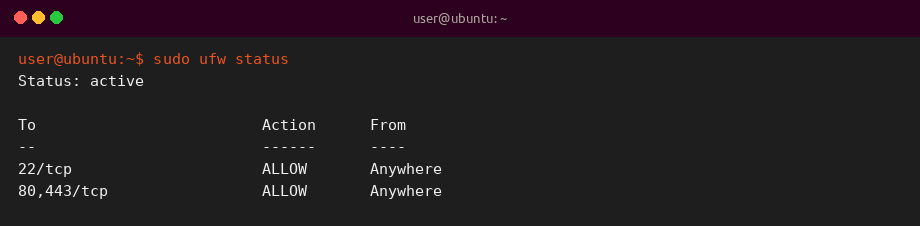
5. ufw

Uncomplicated Firewall front end on Ubuntu. Allow SSH before enabling.

sudo ufw allow OpenSSH
sudo ufw enable
sudo ufw status
Illustrative sample output of sudo ufw status on Ubuntu
Illustrative sample output: sudo ufw status (sample for this guide).

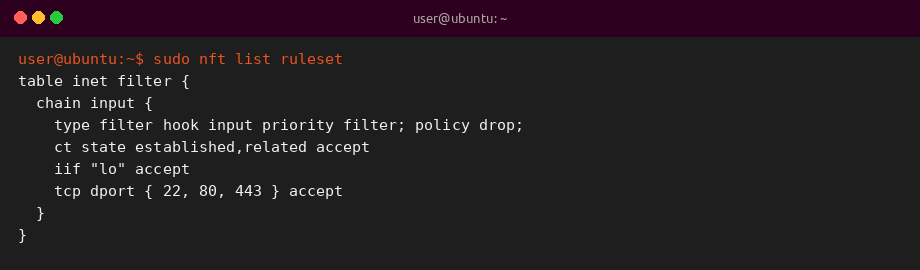
6. nft

nftables CLI for modern packet filtering tables and chains.

sudo nft list ruleset
sudo nft list tables
Illustrative sample output of sudo nft list ruleset on Ubuntu
Illustrative sample output: sudo nft list ruleset (sample for this guide).

7. iptables

Legacy iptables interface still present for older rulesets and tutorials.

sudo iptables -L -n -v
sudo iptables -A INPUT -p tcp --dport 22 -j ACCEPT

8. fail2ban

Ban repeat offenders via jail configs. Install with sudo apt install fail2ban.

sudo systemctl status fail2ban
sudo fail2ban-client status sshd

9. nmap

Port and service discovery. Scan only permitted targets.

nmap -sV 192.168.1.10
nmap -Pn -p 22,80,443 host

10. chmod

Change file mode bits.

chmod 600 ~/.ssh/id_ed25519
chmod 755 ~/bin/backup.sh

11. chown

Change file owner and group.

sudo chown $USER:$USER notes.txt
sudo chown -R www-data:www-data /var/www/html

12. chkrootkit

Rootkit detection helper. Install with sudo apt install chkrootkit.

sudo chkrootkit
sudo chkrootkit

13. rkhunter

Rootkit scanner. Update its data before scanning.

sudo rkhunter –update
sudo rkhunter --update
sudo rkhunter --check --sk

14. lynis

Security auditing tool for hardening tips.

sudo lynis audit system

15. openssl

Certificates, keys and quick TLS checks.

openssl version
openssl version
openssl s_client -connect example.com:443 </dev/null | head

Quick reference table

Range Focus Commands
1-4 Access sudo, ssh, scp, sftp
5-7 Firewalls ufw, nft, iptables
8-9 Monitoring fail2ban, nmap
10-15 Hardening toolkit chmod, chown, chkrootkit, rkhunter, lynis, openssl

Why these commands matter

Ubuntu security work mixes identity, transport encryption and host firewalls. Learning ufw for daily rules and nftables for deeper policy matches Ubuntu 26.04, while iptables remains useful when you inherit older documentation.