
The short version: NVIDIA released the 620.70.06 Linux graphics driver on 4 November 2026. It is the first production build of the R620 branch, with better Wayland performance, an OpenGL visual indicator for every Vulkan backend, and fixes for several games and installer bugs. Here is what is new and how to install it on Ubuntu today.
What is new in NVIDIA 620.70.06
A quieter feature release with useful Wayland work: NVIDIA positions 620.70.06 as the current production-ready branch for Linux, FreeBSD and Solaris. The headline changes are on the Wayland and Vulkan side rather than a pile of brand-new APIs.
- Better explicit sync on Wayland: high-framerate benchmarks that rely on explicit synchronization should feel smoother.
- OpenGL OSD on every Vulkan backend:
__GL_SHOW_GRAPHICS_OSDnow works for Wayland and direct-to-display as well as the older paths. - Multi-GPU Wayland fix: corruption and flickering with Vulkan apps under Wayland when
__VK_ENABLE_DEVICE_GROUPSis set should be gone. - Assassin’s Creed Shadows: fixes a regression from the 595.xx series that could hang the game with Vulkan device-lost errors.
- Final Fantasy VII Rebirth: intermittent crashes with
VKD3D_CONFIG=descriptor_heapare fixed. - Other fixes: an invalid head number error when VT-switching away from X, frame-limit bugs in
VK_NV_low_latency2with frame generation, a kernel crash on NUMA systems with empty memory nodes when using the open GPU kernel modules, and an installer path bug that could place libraries outside the dynamic loader search path.
How to install NVIDIA 620 on Ubuntu
Honest status on 6 November 2026: the Ubuntu ubuntu-drivers tool and the community graphics-drivers PPA still top out below the 620 branch. If you need 620.70.06 today, download the official Linux installer from NVIDIA. If you prefer packaged drivers and can wait, keep using the newest Ubuntu or PPA build until 620 lands there.
Prefer the packaged route when it catches up: our full guide covers Additional Drivers, ubuntu-drivers and the graphics-drivers PPA for everyday installs: How to Install NVIDIA Drivers on Ubuntu.
1. Check what Ubuntu currently offers:
2. Download the official 620.70.06 .run file for 64-bit Linux (or AArch64 if you are on ARM) from NVIDIA’s driver download page, then install it:
Tips before you run it:
- Install the kernel headers for your running kernel first:
sudo apt install linux-headers-$(uname -r) build-essential. - On a desktop session, either switch to a TTY and stop the display manager, or reboot to multi-user target before the installer builds the kernel module.
- Accept the offer to update your X configuration, or run
nvidia-xconfigafterwards if you stay on Xorg. - Hybrid laptop GPUs vary by vendor. If the runfile cannot disable the integrated GPU path your machine needs, stay on the packaged Ubuntu driver until a 620 package appears.
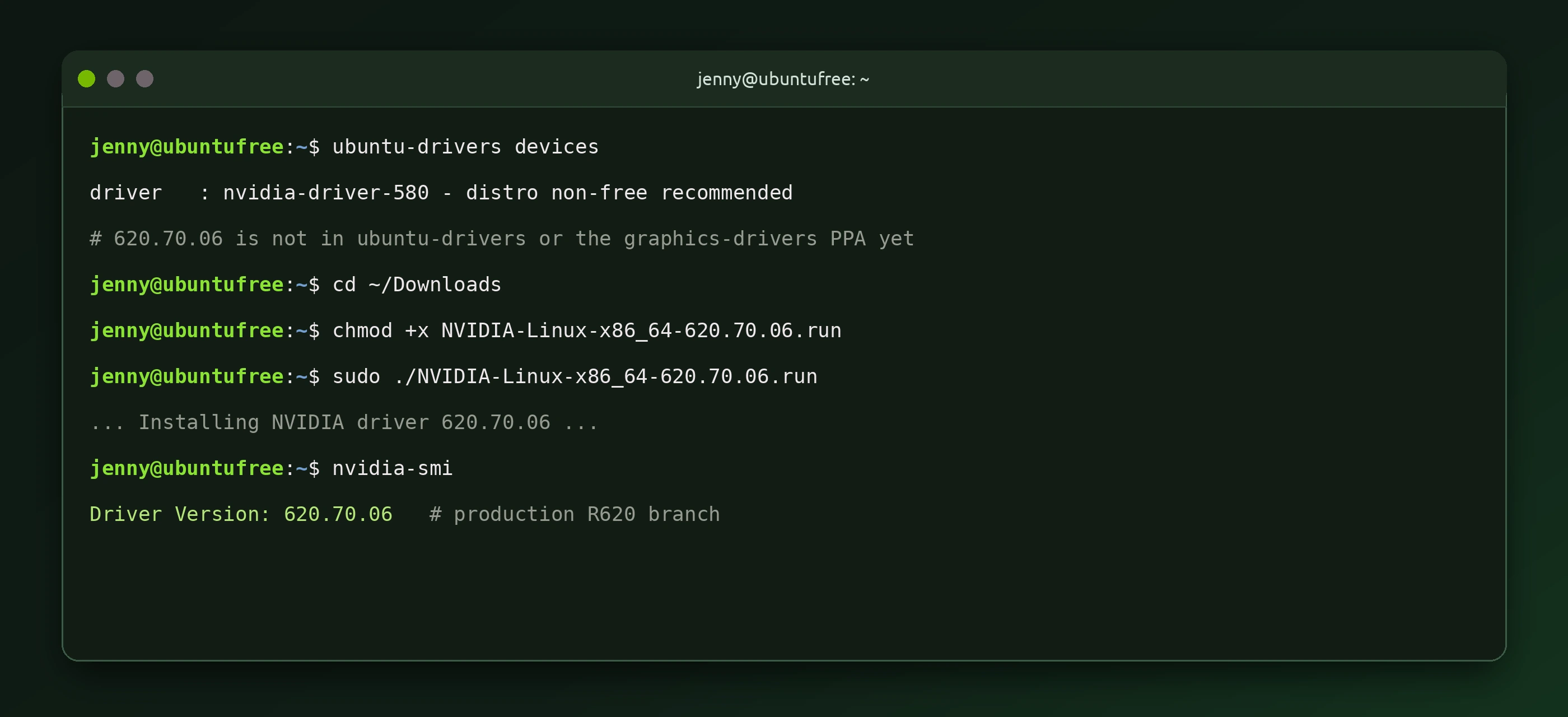
3. Confirm the driver after reboot:
You should see Driver Version: 620.70.06 in the header. For Wayland testing, the OpenGL OSD can be enabled with __GL_SHOW_GRAPHICS_OSD=1 when you launch a Vulkan title.
Should you upgrade from 590 now?
Yes if you care about Wayland gaming or hit one of the fixed bugs. NVIDIA recommends 620 as a direct upgrade from the 590 series. If your machine is stable on a packaged 580/590 build for work and you do not want an out-of-tree .run install, waiting for the graphics-drivers PPA or Ubuntu’s archive is the lower-risk move.