The short version: the private keys of the eMudhra Certificate Authority (CA) were shown to be compromised on 20 October 2026. Ubuntu has already shipped fixes in the ca-certificates package and the libnss3 library for every release from 14.04 to 26.10. For most desktop users, a normal system update is all it takes, plus one extra step if you use Java apps.
What happened
A trusted signer lost its keys: a Certificate Authority is a company that vouches for websites by signing their security certificates. On 20 October 2026 it was demonstrated that the private keys of the eMudhra CA had been compromised. Anyone holding those keys could sign fake certificates that look valid.
Why that is dangerous: Ubuntu’s security team explains that a fake certificate could pass the checks that apps run when they open a secure (TLS) connection. That could let an attacker pretend to be a real website or service, sit in the middle of your connection, and read or change the traffic.
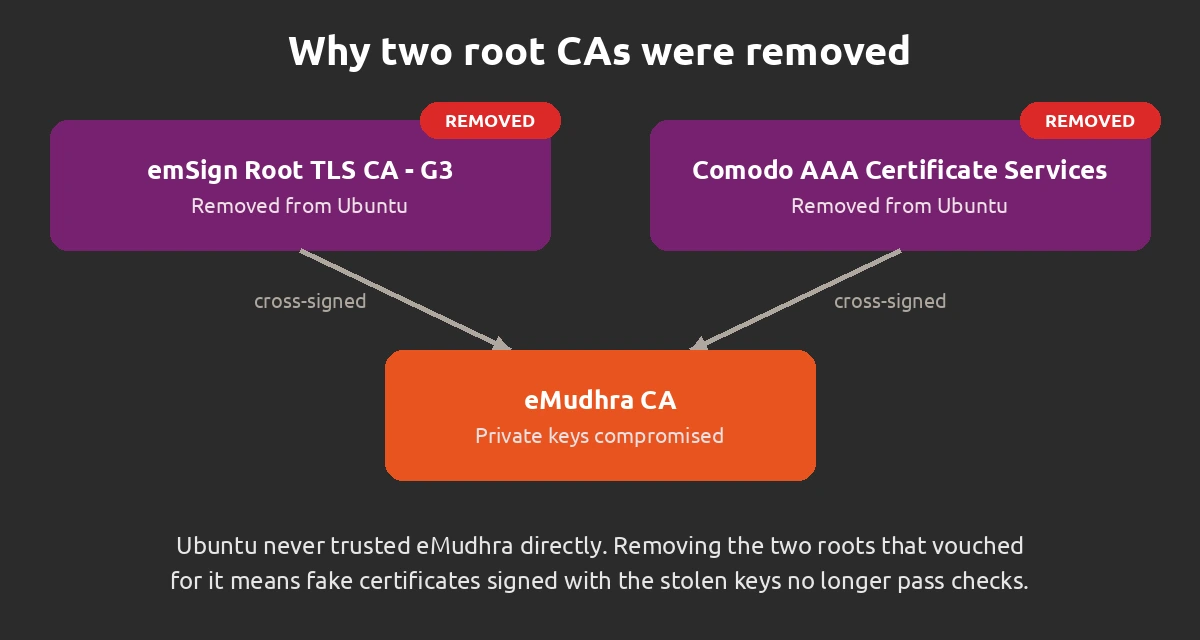
How Ubuntu fixed it: Ubuntu never trusted the eMudhra CA directly. Instead, two other root CAs had cross-signed it, which made it trusted indirectly: emSign Root TLS CA - G3 and Comodo AAA Certificate Services. Ubuntu removed both roots from its trusted stores, so the compromised eMudhra CA is no longer trusted. Ubuntu notes that Comodo AAA Certificate Services had already been removed from the CA bundles in Ubuntu 22.04 and newer.
Timeline: Ubuntu released the ca-certificates updates on 20 October and the libnss3 updates on 21 October. Also on 21 October, Oracle issued CVE-2026-91403 for the same problem in Oracle Java. Canonical updated its announcement on 22 October with extra details about libnss3 and Java.
Who is affected
Every supported Ubuntu release: the fix covers Ubuntu 14.04 LTS through Ubuntu 26.10, on desktops and servers alike.
Side effect to know about: any legitimate website whose certificate chain leads back to one of the two removed roots will no longer be trusted. Ubuntu says this is unlikely, but a few sites or services could become unreachable after the update.
Java users: OpenJDK from the Ubuntu archive is not affected by Oracle’s CVE because it uses the system certificate store. However, an unrelated issue currently stops the Java certificate store from syncing automatically, so a manual step is needed (see Step 4).
Fixed versions for each Ubuntu release
These versions come from Ubuntu’s official announcement and security notices. If your installed version is the same or newer, you have the fix.
| Release | ca-certificates | libnss3 | Support |
|---|---|---|---|
| Ubuntu 26.10 Stonking |
20260816ubuntu0.26.10.1 |
2:3.127-1ubuntu0.1 |
Standard |
| Ubuntu 26.04 LTS Resolute |
20260816ubuntu0.26.04.1 |
2:3.120-1ubuntu2.2 |
Standard |
| Ubuntu 24.04 LTS Noble |
20260816ubuntu0.24.04.1 |
2:3.98-1ubuntu0.3 |
Standard |
| Ubuntu 22.04 LTS Jammy |
20260816ubuntu0.22.04.1 |
2:3.98-0ubuntu0.22.04.5 |
Standard |
| Ubuntu 20.04 LTS Focal |
20240203~20.04.1ubuntu0.1~esm2 |
2:3.98-0ubuntu0.20.04.2+esm2 |
ESM |
| Ubuntu 18.04 LTS Bionic |
202402031ubuntu0.18.04.1+esm3 |
2:3.35-2ubuntu2.16+esm2 |
ESM |
| Ubuntu 16.04 LTS Xenial |
202402031~16.04.1~esm3 |
2:3.28.4-0ubuntu0.16.04.14+esm6 |
ESM Legacy |
| Ubuntu 14.04 LTS Trusty |
20230311~14.04.1~esm3 |
2:3.28.4-0ubuntu0.14.04.5+esm14 |
ESM Legacy |
Older releases: on Ubuntu 16.04 and 14.04, the libnss3-1d and libnss3-nssdb packages get the same version number as libnss3.
Step 1: Install the updates
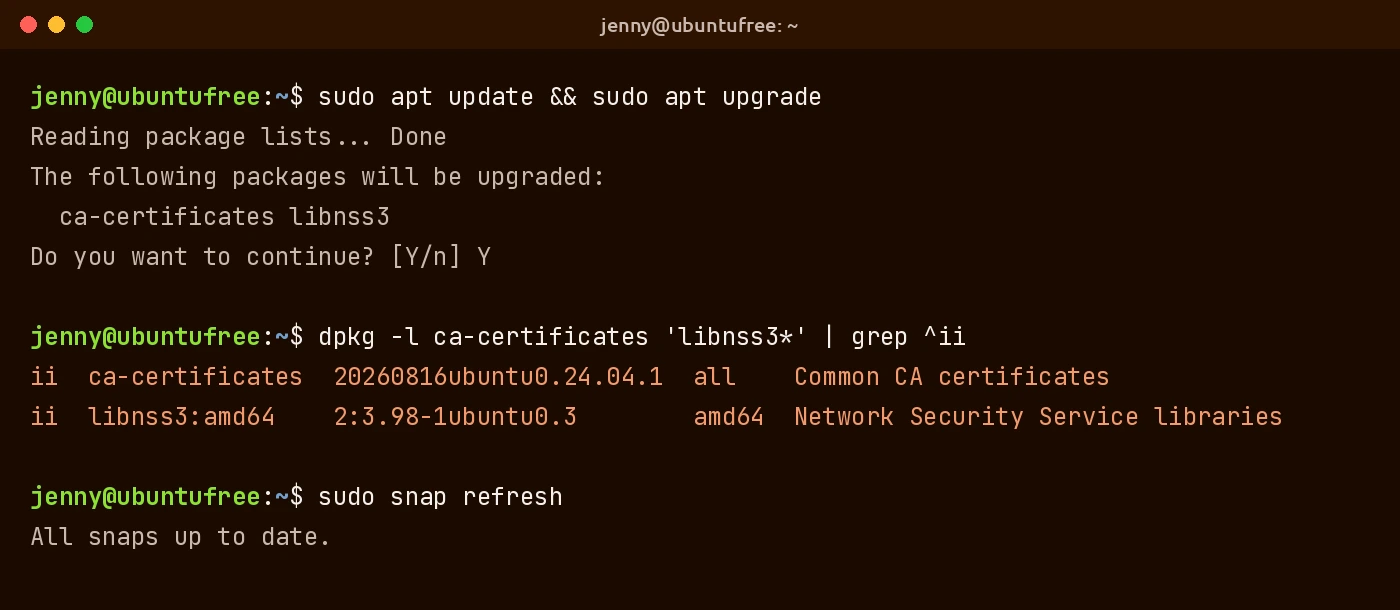
Recommended: open a terminal and upgrade all packages. This picks up both fixes along with any other pending security updates. Our apt and snap commands guide explains what each part does.
Targeted option: if you cannot upgrade everything right now, update only the affected packages:
Already automatic for many: unattended-upgrades is on by default since Ubuntu 16.04 LTS and applies security updates every 24 hours, so your PC may already have the fix. Running the commands above does no harm either way.
Step 2: Check your installed versions
This command shows the installed versions of ca-certificates and libnss3. Compare them with the table above:
Step 3: Refresh your snap browsers
Why browsers are different: on Ubuntu Desktop, your browser is the app that makes the most secure connections. Firefox and Chromium are usually installed as snaps, and snaps do not use the certificate store from the ca-certificates package. They update themselves four times a day by default, but if you turned off automatic updates, refresh them yourself:
Just the browser: you can also refresh a single snap, for example Firefox:
Using a browser from somewhere else? Our best web browsers for Ubuntu roundup covers how the popular options are installed.
Step 4: Rebuild the Java certificate store (Java users only)
Skip this if you do not use Java apps. The Java certificate store is normally synced from the system store, but that sync is currently broken by an unrelated issue. Until it is fixed, Ubuntu says you need to rebuild it by hand after updating ca-certificates.
Before you start: if you added your own certificates to the Java store that are not part of the system store, you will need to add them again after these commands.
First, delete the existing Java root CA store:
Then regenerate it from the system CA store:
New to Java on Ubuntu? See our OpenJDK install guide.
Older Ubuntu releases and Ubuntu Pro
Standard support: Ubuntu 26.10, 26.04 LTS, 24.04 LTS and 22.04 LTS get these fixes through the normal update channels.
Expanded Security Maintenance: Ubuntu 20.04 LTS and older receive the fix through ESM, which is part of Ubuntu Pro. Ubuntu 16.04 LTS and 14.04 LTS also need the Legacy Support add-on. Ubuntu Pro is free for up to 5 machines, or up to 50 machines for Ubuntu community members.
Another recent security fix: if you run PHP on any Ubuntu machine, also check our guide to the php2shell PHP vulnerability fix.
Bottom line
The eMudhra compromise sounds alarming, but the fix is simple for most Ubuntu users. Run a system update, confirm the new ca-certificates and libnss3 versions, make sure your snap browsers are current, and rebuild the Java store if you use Java apps.
Source: Ubuntu blog.