

The Snap Store added 164 new snaps on 14 November and 122 on 15 November. A normal day is about 20. Most of them came from four publisher accounts. The apps tested so far are not harmful, but many are near-copies of each other, and some borrow the names of well known paid products.
topaz-video-ai.snap info to see who made a snap before you install it.What the Snap Store numbers show
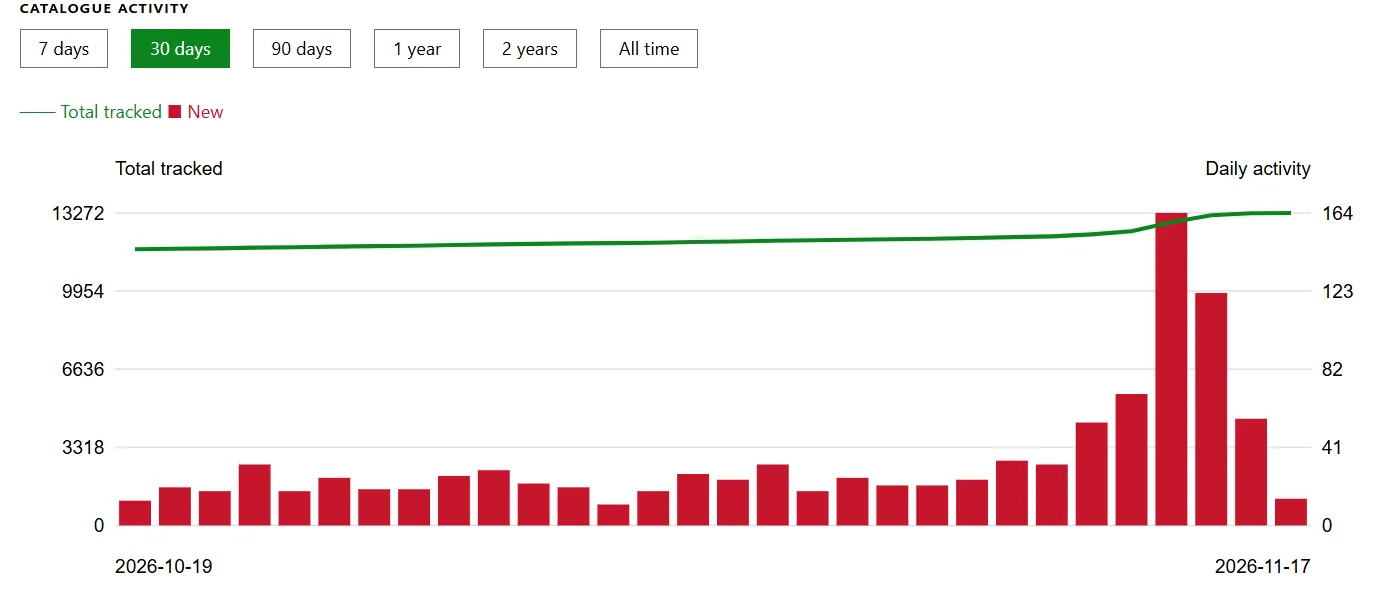
The SnapUpdates chart counts the new snaps added to the store each day.
| Date | New snaps |
|---|---|
| 12 November | 54 |
| 13 November | 69 |
| 14 November | 164 Peak |
| 15 November | 122 |
| 16 November | 56 |
In the three weeks before that, the daily count never went above 34. By 17 November it was back to normal.
Four accounts behind the surge
Four accounts did most of the publishing: TC Studio with 260 snaps, Nguyen Van Thanh with 227, TC Tools with 191 and TC Software with 191.
Joey Sneddon at OMG! Ubuntu thinks one person runs all four, though he says he cannot prove it. Most of the apps share the same design, the same Vietnamese and English language switch, and a donation banner for a developer named Nguyen Van Thanh. One account published more than 114 apps in a single day.
The apps are listed under an open source licence, but they do not link to any source code.
Why lookalike listings matter on Ubuntu
Ubuntu’s App Center pulls from the Snap Store, so these apps show up when you search for something like “PDF editor”.
Several look like the same PDF tool under different names. Others use the names of paid products. Video Frame Upscaler Studio, for example, uses the package name topaz-video-ai and calls itself “Topaz Video AI for Linux”. It is not from Topaz Labs, and its publisher is not verified.
So someone looking for Topaz Video AI could install something else. Nothing Sneddon tested was harmful, and most snaps run in a sandbox that limits what they can touch. Still, check who made an app before you install it.
How to check a snap before you install it
Our apt and snap cheat sheet covers more everyday commands.