The short version: two critical PHP vulnerabilities, CVE-2026-109618 and CVE-2026-109619, nicknamed php2shell, let an attacker run code on a server without logging in. They affect any PHP application. Ubuntu has already shipped fixed PHP packages for every supported release, from 14.04 to 26.10, so the fix is one update and a restart away.
What happened
Two flaws, one nickname: Canonical’s security team says the bugs result in unauthenticated remote code execution (RCE) for any PHP application. In plain terms, anyone who can reach your PHP site over the network could run commands on the server with the same rights as the PHP application, without a password.
A leak sped things up: the PHP Foundation was working with Linux distributions on a coordinated release planned for 22 October 2026 at 14:00 UTC. Because details leaked publicly, the disclosure was moved forward to 21 October 2026 at 14:00 UTC, and Ubuntu published its fixes the same day.
Who needs to act
You should update if you run PHP on Ubuntu: that includes a WordPress site, a LAMP or LEMP stack, a home server with Nextcloud, a VPS hosting a PHP app, or a local PHP development setup on your laptop. If it runs PHP and other machines can reach it, treat this as urgent.
You can relax if PHP is not installed: a regular Ubuntu desktop does not ship with PHP, so it is not affected. The check command below shows an empty list in that case.
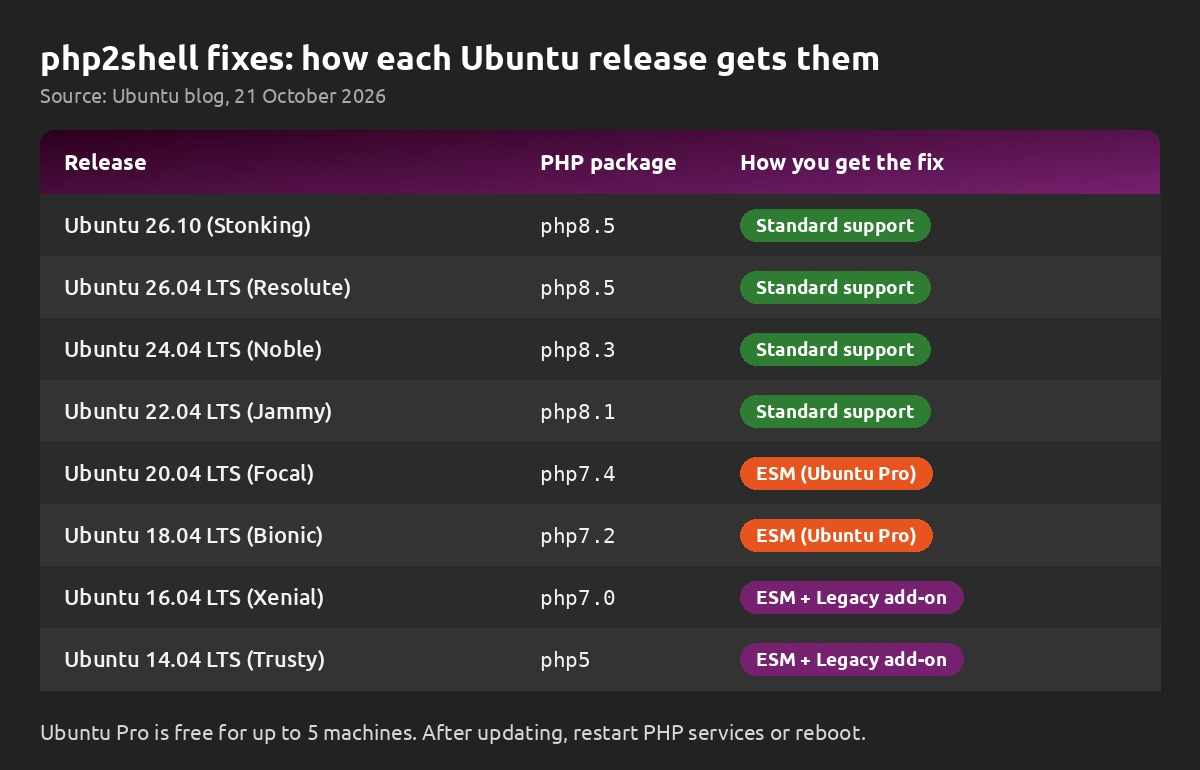
Fixed PHP versions for each Ubuntu release
These versions come from Ubuntu’s official announcement. If your installed version is the same or newer, you have the fix.
Step 1: Check if PHP is installed
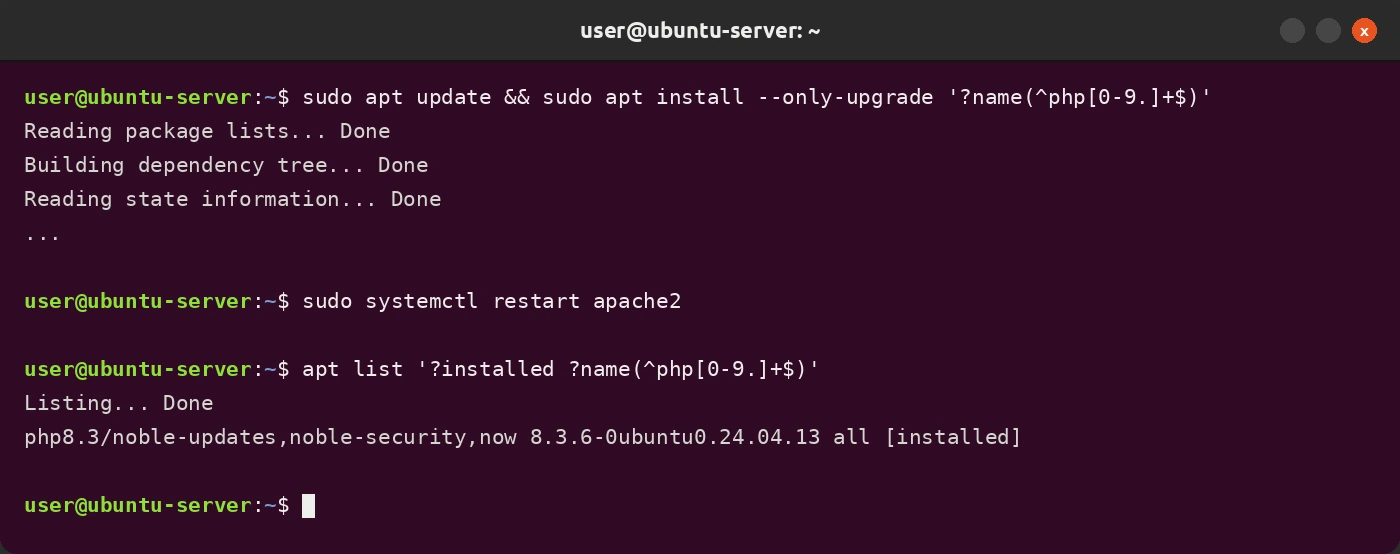
Open a terminal and run this command. It lists any installed PHP interpreter packages and their versions:
Reading the result: if nothing is listed after “Listing… Done”, PHP is not installed and you are not affected. If you see a package such as php8.3, compare its version with the table above.
Step 2: Install the fix
Recommended: upgrade all packages. This picks up the PHP fix along with any other pending security updates. Our apt and snap commands guide explains what each part does.
Targeted option: if you cannot upgrade everything right now, update only the PHP interpreter packages:
Step 3: Restart PHP or reboot
This step matters: a running web server keeps using the old PHP code until it restarts. If your site uses Apache with mod_php, restart Apache:
Using PHP-FPM with Nginx or Apache? Restart your phpX.Y-fpm service instead. For example, on Ubuntu 24.04 with PHP 8.3 that would be the command below. Not sure of the service name? Our systemctl and journalctl guide shows how to list running services.
Simplest option: reboot, so every application loads the updated PHP packages:
What about automatic updates?
Mostly covered, but not finished: unattended-upgrades is turned on by default since Ubuntu 16.04 LTS and installs security updates every 24 hours. That means many servers will already have the patched packages. Ubuntu notes that the affected applications still need a restart or a reboot before the fix takes effect, so do Step 3 even if you did not run apt yourself.
Older Ubuntu releases and Ubuntu Pro
Standard support: Ubuntu 26.10, 26.04 LTS, 24.04 LTS and 22.04 LTS get these fixes through the normal update channels.
Expanded Security Maintenance: Ubuntu 20.04 LTS and 18.04 LTS receive the fix through ESM, which is part of Ubuntu Pro. Ubuntu 16.04 LTS and 14.04 LTS need ESM plus the Legacy add-on. Ubuntu Pro is free for up to 5 machines, so home server owners on an older LTS can enable it at no cost.
Good habit for servers: while you are patching, it is a good time to review which ports your server exposes. Our UFW firewall commands guide and the Ubuntu Server 26.04 LTS manual cover the basics.
Bottom line
php2shell is about as serious as PHP bugs get, but the fix is simple. Run the check command, install the update, and restart your web server or PHP-FPM. If you do not have PHP installed, there is nothing to do.
Sources: Ubuntu blog, USN-8948-1, PHP.net.