Install Qwen on Ubuntu
Two commands. Qwen is not a program you install, it is a file Ollama downloads and runs, so Ollama goes on first and Qwen arrives the moment you ask for it.
The walkthrough below covers the same ground on video if you would rather watch it happen. It was recorded on Qwen 3.6, before 3.8 existed, so treat the version numbers as a snapshot. The commands have not changed.
Pick the Size That Fits Your Machine
This is the part that matters, and it is the part most guides skip. Qwen ships in more sizes than any of its rivals, from a 1GB file that runs on a ten year old laptop to an 81GB one that does not fit on most desktops. Picking wrong is the difference between useful and unusable.
The rule of thumb is simple. A model needs roughly its download size in memory, plus headroom. If it fits in your graphics card’s memory it will be fast. If it only fits in system RAM it still works, just slowly. If it fits in neither, Ubuntu will swap and the machine will crawl.
Download sizes are Ollama’s published figures. The memory column is the usual rule of thumb rather than an official requirement, because Ollama does not publish one.
Qwen used to cover the whole range in one generation. It does not any more. Qwen 3.5 goes from 0.8b up to 122b. Qwen 3.6 and Qwen 3.8 start at 27b and stop there. The newer generations are aimed at bigger machines, and nothing smaller was released alongside them.
So the usual instinct, install the highest number, is the wrong move on a laptop. If you have 16GB of RAM or less, 3.5 is not the old version, it is the only version that fits. Move up to 3.6 or 3.8 when you have the memory to hold them, not because they sound newer.
Swapping is cheap, so try one and change your mind. Each model is a separate download that sits alongside the others, and you remove any of them with ollama rm and the name. If you want to compare Qwen against the other families before settling, our guides to installing Llama on Ubuntu and installing DeepSeek on Ubuntu set them up exactly the same way.
Point Qwen at Your Code
Qwen’s coding models are the reason a lot of people try the family at all. They are a different download from the general model, trained specifically for reading repositories, calling tools and working through a task rather than answering a question.
Be warned about the size before you start. The current generation, qwen3-coder, is a 19GB download and the smallest version they made. There is no laptop sized option in that generation:
If that is too big, and for most laptops it is, the previous generation still has small versions. qwen2.5-coder:7b is 4.7GB and runs comfortably in 16GB of RAM, and there is a 1.5b version at under a gigabyte for very old machines:
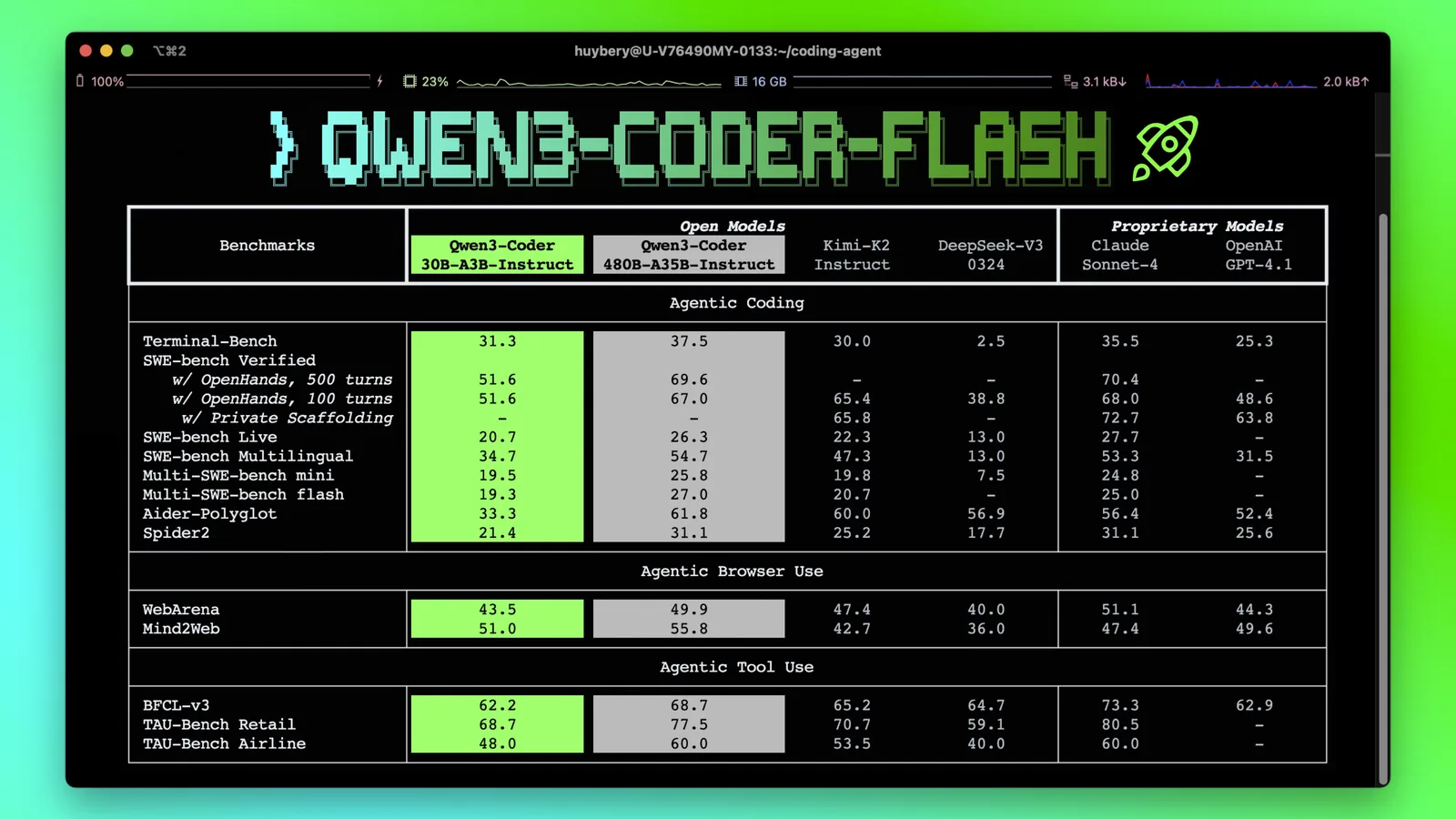
Read that table the way you would read any vendor’s chart. The useful signal is not that the numbers are high, it is that the 30B model lands within a few points of the 480B one on several tasks, which is why the small coder model is worth bothering with at all.
Once it is running, you have two ways to actually use it. The quickest is Ollama’s own launcher, which starts a coding tool already pointed at your local model instead of a paid API:
The second way is to run a proper agent on top, which reads your files and runs commands rather than just suggesting text. Our guide to installing DeepSeek Harness on Ubuntu sets one up against a local Ollama model, and a Qwen coding model drops into the same provider slot. If you would rather keep it inside the editor you already use, see our roundup of code editors for Ubuntu, most of which now take a local model through an extension.
Turn Thinking On or Off
Qwen models reason before they answer, and unlike some families this is a switch you control rather than a fixed behaviour. Thinking is on by default for the models that support it, which makes answers better and makes them slower.
Inside a running session, turn it off and on with a slash command. Turning it off is the single biggest speed win when you are asking something simple and do not need the model to deliberate:
Or decide when you start, which is the form you want in a script:
--hidethinking is the one worth remembering. It keeps the reasoning but stops printing it, so you get the better answer without scrolling past the model’s working. If you are calling Ollama from your own code instead, the same control is the think field in the API, which takes true or false, and on newer models a level of low, medium, high or max.
What Qwen Actually Is

Qwen is a family of open weight models built by Alibaba’s Qwen team. Open weight means the model file itself is published, so you can download it, run it on your own hardware and keep using it offline. That is what makes this guide possible at all, and it is the difference between Qwen and a service you send your text to.
The models are released under the Apache 2.0 licence, which is unusually permissive for a family this capable. You can use them commercially, and you are not agreeing to a usage policy that can be changed later.
What sets Qwen apart in practice is breadth. Alongside the general models there are coding models, vision models that read images, and embedding models for search, all sharing the same naming and all installed the same way. Qwen tends to be the family with a version that fits, whatever you are doing and whatever you are running it on.
One honest note on where it comes from, because people ask. The model runs entirely on your machine and sends nothing anywhere, which is a property of running it locally rather than a promise from anyone. What a model will and will not discuss is baked into it during training, and Qwen, like every model, carries the assumptions of the people who made it. That matters for some topics and not at all for summarising a document or fixing a shell script. If you want to weigh it against the alternatives, our roundup of open source AI tools for Ubuntu covers the wider picture.
Fix Common Problems
Everything is painfully slow
Almost always the model is too big for your memory, so it is being served from disk. Check with ollama ps, which shows how much of the model is on the processor and how much is on the graphics card. If it says 100% CPU on a machine with a capable card, the model did not fit in the card’s memory. Drop to the next size down and it will usually fit entirely, which is far faster than a bigger model that does not.
model “qwen3.5” not found, try pulling it first
The name has to match a tag that exists, including the generation number. Qwen moves quickly and tags come and go, so if a command from an older guide fails, check the current list at Ollama’s Qwen library rather than guessing a number. This is also why ollama run qwen3 still works but gets you a model several generations old.
The download stops partway through
Run the same command again. Ollama resumes rather than starting over, so a dropped connection on a 19GB model is an annoyance rather than a disaster. If it fails at the same point repeatedly, you have probably run out of disk. Models live in /usr/share/ollama/.ollama/models when Ollama runs as a service, which is on your root partition.
It forgets things partway through a long document
Qwen advertises a 256K context window, but Ollama does not give you all of it by default, and the overflow is dropped silently rather than reported. Raise it when you start the server, for example OLLAMA_CONTEXT_LENGTH=32768 ollama serve. Be aware that a bigger context costs memory on top of the model itself, so raising it can push a model that previously fitted on your card back onto the processor.
It answers in Chinese
Qwen is trained heavily on both Chinese and English and will sometimes reason or reply in Chinese, particularly with a short or ambiguous prompt. Asking in the language you want the answer in fixes it nearly every time, and adding “answer in English” to a system prompt fixes the rest. This is a quirk of the family rather than a fault.
Remove It Cleanly
Models are files, so removing one is a single command and it frees the full download size straight away. Remove each tag you pulled by name, because they are stored separately:
mike@ubuntu:~$ ollama rm qwen3.5
mike@ubuntu:~$ ollama rm qwen3-coder
That removes Qwen but leaves Ollama installed and any other models untouched. To remove Ollama itself as well, stop and disable the service, delete the binary at /usr/local/bin/ollama and remove the model directory. Run ollama list first if you are unsure what you would be deleting.
Qwen comes in more sizes than anything else here, so it is the family most worth trying side by side. Pull two and our guide to installing Open WebUI on Ubuntu lets you swap between them mid-conversation in a browser tab.
Frequently Asked Questions
Which Qwen model should I install on Ubuntu?
Start with qwen3.5, which is a 6.6GB download and wants about 16GB of RAM or an 8GB graphics card. If your machine is lighter than that, qwen3.5:4b is 3.4GB and runs on an ordinary laptop. Only move up to qwen3.6 or qwen3.8 if you have 32GB of RAM or a 24GB card, because those generations only ship in large sizes.
Is Qwen free to use?
Yes. The open weight models are released under the Apache 2.0 licence, which permits commercial use, and running them locally through Ollama costs nothing beyond the electricity. There is no account, no API key and no usage limit. Alibaba also sells a cloud service, but nothing in this guide touches it.
Do I need a graphics card to run Qwen?
No. Every model here runs on the processor alone, just more slowly. A card helps a great deal, but only if the whole model fits in its memory, so an 8GB card running a model that fits will beat a 24GB card running one that does not. Check which you have with ollama ps.
Is qwen3.8 better than qwen3.5?
On a big enough machine, yes. On most machines the question does not arise, because qwen3.8 is only published at 27b, an 18GB download. Qwen 3.5 is the generation that still covers small and mid sized hardware, so for a laptop it is not the compromise choice, it is the only one that fits.
Does anything I type get sent to Alibaba?
No. Once the model file is downloaded it runs entirely on your machine, and you can disconnect from the internet and keep using it. That is a property of running a model locally rather than a promise anyone is making to you, which is the reason local models are worth the disk space.
One command installs it, one more starts it, and the right size is the one your memory can hold rather than the highest number on the list.
Related guides: Install Ollama on Ubuntu · Install DeepSeek on Ubuntu · Install Llama on Ubuntu · Install DeepSeek Harness on Ubuntu · Best Open Source AI Tools for Ubuntu · Install Mistral on Ubuntu