To install Grok Bot on Ubuntu, add its apt repository and run sudo apt install grok-bot. It is the same repository the official .deb sets up, and it works on amd64 and arm64.
Grok Bot comes with every paid Cursor plan. If a step does not work on your system, leave a comment below or contact us and we will help you sort it out.
About 103 MB to download, 350 MB installed. If you install the .deb later, nothing changes.
3
Step 3: Open it and sign in
Grok Bot is in your applications menu. From a terminal, grok-bot opens it.
Choose Sign in on the welcome screen and finish in your browser with your Cursor account. Have SuperGrok or X Premium+ instead? The app offers to link it.
The Other Two Ways to Install It
Under “More downloads” on x.ai/bot there is a .deb, an .rpm and an AppImage. The .rpm is for Fedora.
Method
Updates
Menu entry
Best for
apt repository
With your system
Yes
Everyone on Ubuntu
.deb file
With your system, after it adds the repository itself
Yes
Installing from a download
AppImage
Never. You re-download it
No
Other distributions
The .deb file
Download the x64 or arm64 .deb, then:
Install a downloaded .deb
cd ~/Downloads && sudo apt install ./grok-bot_*.deb
Worth knowing
The .deb adds the Grok Bot apt repository for you, so it updates like the repository install. It also adds the security permission Ubuntu 24.04 and newer need before it will start.
No menu entry and no updates. On Ubuntu 24.04 and newer it usually will not start, so use the .deb there. See When Something Goes Wrong.
What Grok Bot Is
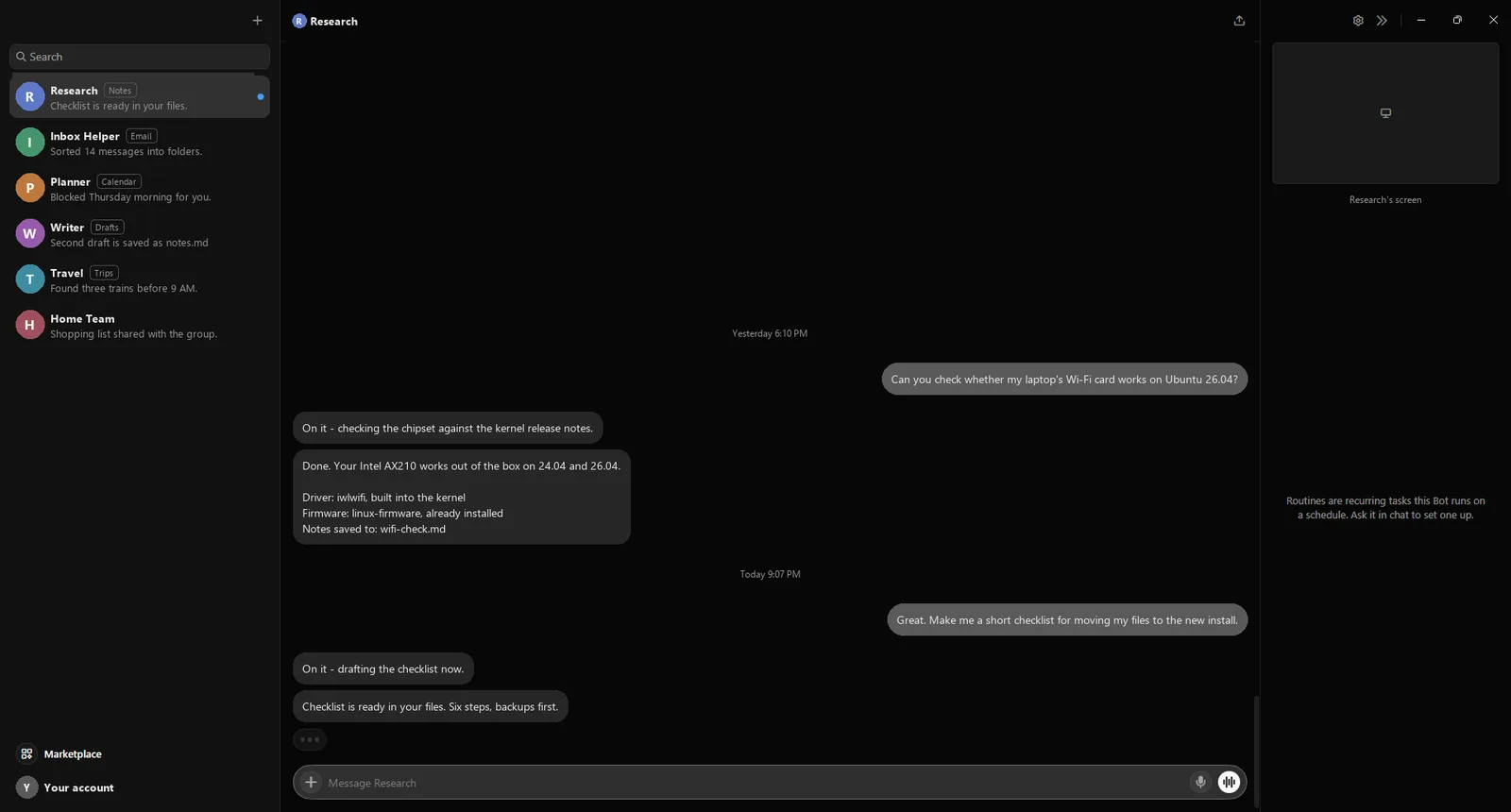
Grok Bot gives you AI helpers, called Bots, that do real work for you. Each has a name, a job and memory of what you asked before.
Every Bot works on a computer in the cloud. It has a browser, a terminal and files, so a Bot can sign in to sites, fill forms and save results for you. It keeps going when you close the app. Closing Grok Bot or your laptop does not stop a job. You step in only for passwords, two-factor codes and CAPTCHAs. Routines run on a schedule. Ask a Bot in chat to set one up.
Your Bots on the left, a conversation in the middle, and the Bot’s cloud screen on the right.
Plans: every paid Cursor plan includes it. So does a linked SuperGrok, SuperGrok Plus, SuperGrok Heavy or X Premium+ subscription. Each includes a set amount of use per week. Want the code editor too? Install Cursor on Ubuntu.
How Updates Reach You
New versions arrive with your system updates.
Update
Update everything, including Grok Bot
sudo apt update && sudo apt upgrade
Ubuntu’s Software Updater picks it up too. To see which version you have:
Check the installed version
apt policy grok-bot
The AppImage never updates. Download a new one to upgrade.
When Something Goes Wrong
What you see
Grok Bot exits at launch until the profile is loaded
FIX Run sudo apparmor_parser -r /etc/apparmor.d/grok-bot
The installer prints this on Ubuntu 24.04 and newer when a security permission did not load. This command loads it.
Ubuntu 24.04 and newer block it without a security permission, and only the installed package adds one.
What you see
dlopen(): error loading libfuse.so.2
FIX Run sudo apt install libfuse2t64
AppImage only. On 22.04 the package is libfuse2.
What you see
You signed in, but there is no Grok Bot access
FIX Upgrade to Pro, Pro+, Ultra or Teams, or link a SuperGrok or X Premium+ subscription.
The free Hobby plan does not include Grok Bot.
What you see
Grok Bot will not start on an account in Legacy Privacy Mode
FIX In your Cursor account settings, pick a privacy option that allows cloud storage.
Bots store their work in the cloud, which Legacy Privacy Mode does not allow.
Remove It
Remove Grok Bot
sudo apt remove grok-bot
That also deletes its repository entry and key. Your Bots and their files live in your account, not on this machine, so they are still there if you install it again.