

The short version: a critical flaw in how the Linux kernel handles IPv4 TCP connections, CVE-2026-98432, can let a remote attacker run code on an unpatched machine. It is rated 9.8 out of 10. Ubuntu has fixed kernels for 22.04 LTS, 24.04 LTS and 26.04 LTS waiting in the -proposed pocket while testing finishes. Here is how to check your kernel and what to do now.
What is CVE-2026-98432?
A bug in the TCP handshake: every TCP connection starts with a short handshake. The flaw is in how the kernel frees some IPv4 data attached to a new connection. Under the right timing, the kernel can use memory it has already freed, a bug class known as use-after-free. Because this happens while the kernel is accepting connections, an attacker does not need an account on your machine.
How serious it is: Ubuntu lists a CVSS 3.1 score of 9.8, which is Critical. The flaw has been in the kernel since Linux 4.4, and the upstream fix is already in Linux 7.3.
An exploit exists, but is not public: Ubuntu says the exploit was generated by Anthropic, is not yet released and is described as using Multipath TCP (MPTCP). The bug itself is not specific to MPTCP. At the time Ubuntu wrote its post, no other exploit was known to have been generated or published.
Who should worry most: servers and any PC that accepts incoming TCP connections over IPv4 are the most exposed. A desktop behind a home router is a smaller target, but it still needs the fix.
Which Ubuntu releases are affected
These statuses come from Ubuntu’s announcement. The version shown is the fixed kernel package for the main linux kernel on each release.
| Release | Status | Fixed kernel | Support |
|---|---|---|---|
| Ubuntu 26.10 Stonking |
Fixed | 7.3.0-10.10 |
Standard |
| Ubuntu 26.04 LTS Resolute |
In -proposed | 7.0.0-43.43 |
Standard |
| Ubuntu 24.04 LTS Noble |
In -proposed | 6.8.0-149.149 |
Standard |
| Ubuntu 22.04 LTS Jammy |
In -proposed | 5.15.0-203.213 |
Standard |
| Ubuntu 20.04 LTS Focal |
Fix pending | Not yet | ESM |
| Ubuntu 18.04 LTS Bionic |
Fix pending | Not yet | ESM |
| Ubuntu 16.04 LTS Xenial |
Fix pending | Not yet | ESM Legacy |
| Ubuntu 14.04 LTS Trusty |
Not affected | Not needed | ESM Legacy |
Cloud and special kernels: variants such as the AWS, Azure, GCP, Raspberry Pi and low-latency kernels have their own version numbers. Check the Ubuntu CVE page for the exact status of your kernel flavour.
Step 1: Check your kernel version
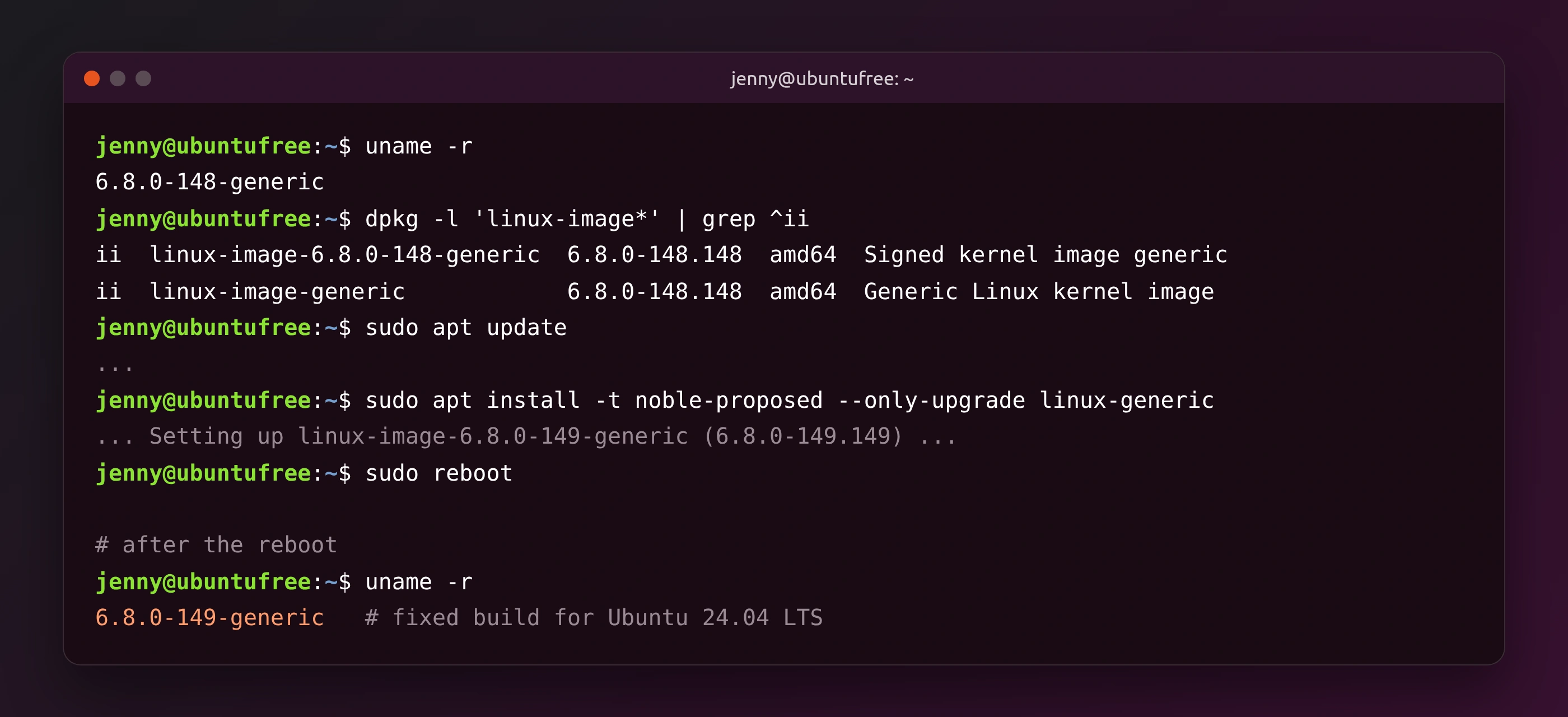
See what is running now: this prints the version of the kernel you booted. Compare it with the table above. For example, 6.8.0-149-generic on Ubuntu 24.04 LTS matches the fixed 6.8.0-149.149 package.
See what is installed: a new kernel can be installed but not yet running. This lists every kernel image package on your system:
Step 2: Choose how to get the fix
Option A: wait for -updates (best for most people)
The safe default: Ubuntu tests kernels on more than 2,000 certified servers and devices before they move from -proposed to the normal updates pocket. Once that is done, a regular upgrade installs the fix:
Keep an eye on it: run this again over the next few days, or let Software Updater do it for you. Our apt and snap commands guide explains what each command does.
Option B: install the kernel from -proposed now
For exposed servers and experienced users: Ubuntu offers this path for people who run their own kernel tests and cannot wait. Packages in -proposed are still in testing, so try it on one machine first and keep a backup.
1. Enable the -proposed pocket: this adds -proposed for the main component, which covers the kernel images.
Your other packages stay put: Ubuntu says packages from -proposed are not selected for upgrade by default, so enabling it does not swap your whole system to test packages. You have to ask for them by name.
2. Upgrade only the kernel: this command from Ubuntu’s post finds the kernel meta-packages you have installed and upgrades just those from your release’s -proposed pocket:
3. Turn -proposed off afterwards (optional): once the fix reaches -updates, you can disable it again in Software & Updates under Developer Options by unticking Pre-released updates.
Step 3: Reboot and confirm
A reboot is required: a new kernel only takes over after a restart. Save your work, then run:
Check again: after the restart, run uname -r once more and make sure the version matches the fixed kernel for your release.
If the new kernel misbehaves: your old kernel is still installed. Hold Shift (or press Esc) while booting to open the GRUB menu, choose Advanced options for Ubuntu and pick the older kernel. Our journalctl guide helps you find out what went wrong.
What about disabling MPTCP?
Not a real fix: some sources recommend disabling Multipath TCP because the known exploit uses it. Ubuntu points out that the bug is not specific to MPTCP, and its Security Team believes security updates are the only appropriate mitigation. The Ubuntu CVE page lists a packet-filtering rule that reduces the risk, but Ubuntu says it does not fully prevent exploitation.
Older Ubuntu releases and Ubuntu Pro
Standard support: Ubuntu 26.10, 26.04 LTS, 24.04 LTS and 22.04 LTS get these fixes as part of standard support.
Older LTS releases: fixes for Ubuntu 20.04, 18.04 and 16.04 will follow through Ubuntu Pro. 20.04 and 18.04 are covered by Expanded Security Maintenance (ESM), while 16.04 and 14.04 also need the Legacy add-on. Ubuntu Pro is free for up to 5 machines, or up to 50 for community members.
Other recent fixes: if you missed it, see our guide to the Ubuntu curl security update.
Bottom line
CVE-2026-98432 is about as serious as kernel bugs get, but a fix is close. Check your kernel with uname -r today. If your machine accepts connections from the internet, install the kernel from -proposed and reboot. Everyone else should install the update as soon as it reaches -updates.
Source: Ubuntu blog.