The short version: Canonical has restarted work on Ubuntu Core Desktop, the immutable, all-snap version of Ubuntu that first appeared as a developer preview in 2023 and then went quiet. A new dedicated team is on it, and Canonical says it will “mature into the default experience for Ubuntu Desktop over time”. Jon Seager, who leads Ubuntu at Canonical, announced the news on 28 October 2026.
What Canonical announced
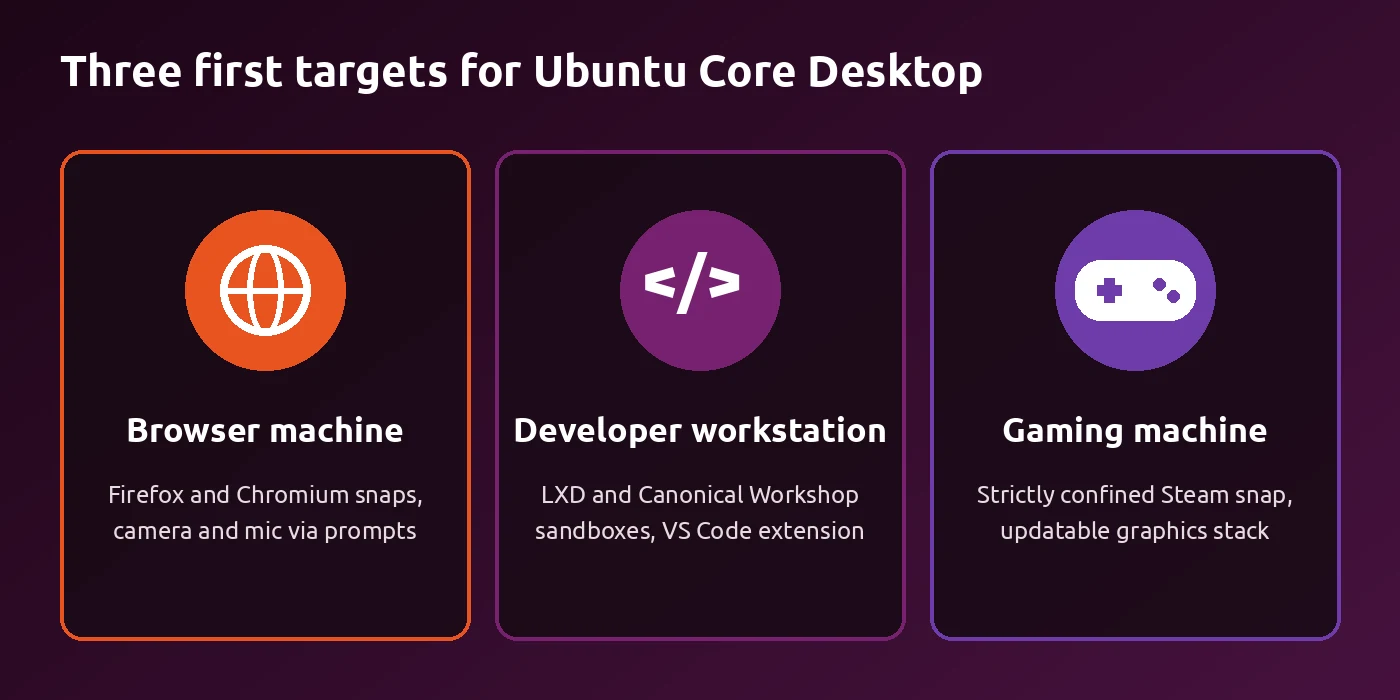
A project restarted: Ubuntu Core is Canonical’s immutable Linux system. It has run on IoT, embedded and robotics devices for almost ten years. Canonical showed a developer preview of a desktop version in 2023, but in Seager’s words the project “has since been dormant”. Now it has a dedicated team working toward three clear first use cases.
A big shift: Canonical calls Core Desktop “the most fundamental shift in Ubuntu’s desktop architecture to date”. Seager also says he has believed for some time that Ubuntu Core is the future of Ubuntu, and that his long-term goal is to make it the default Ubuntu experience on the desktop, in the data centre and at the edge.
Fixing the 2023 mistake: the old preview packed most of the desktop (the GDM login screen, GNOME and, early on, even Firefox) into one big alternative base snap. That worked as a quick proof of concept, but it broke the idea of a modular system. Splitting those pieces apart is now one of the team’s top priorities. The team has already rebuilt the old images and made good progress moving them onto the new core26 base.
What “immutable” and “everything is a snap” mean for you
Immutable, in plain words: on a normal Ubuntu install, the core system is a big pile of packages you can change one by one with apt. That gives you freedom, but a bad update or a wrong command can leave the system broken. An immutable system keeps that core locked and read-only. You do not edit it piece by piece. Instead, whole parts get swapped for new, tested versions.
Everything as a snap: on Ubuntu Core, every part of the system is a snap, including the bootloader, the kernel, the desktop environment, background services and all your apps. Canonical says that for users this means a desktop that is “harder to break, easier to recover” and more adaptable to different devices. It also gives you more control over what data your apps can see. If snaps are new to you, our apt and snap commands guide explains how they differ from regular packages.
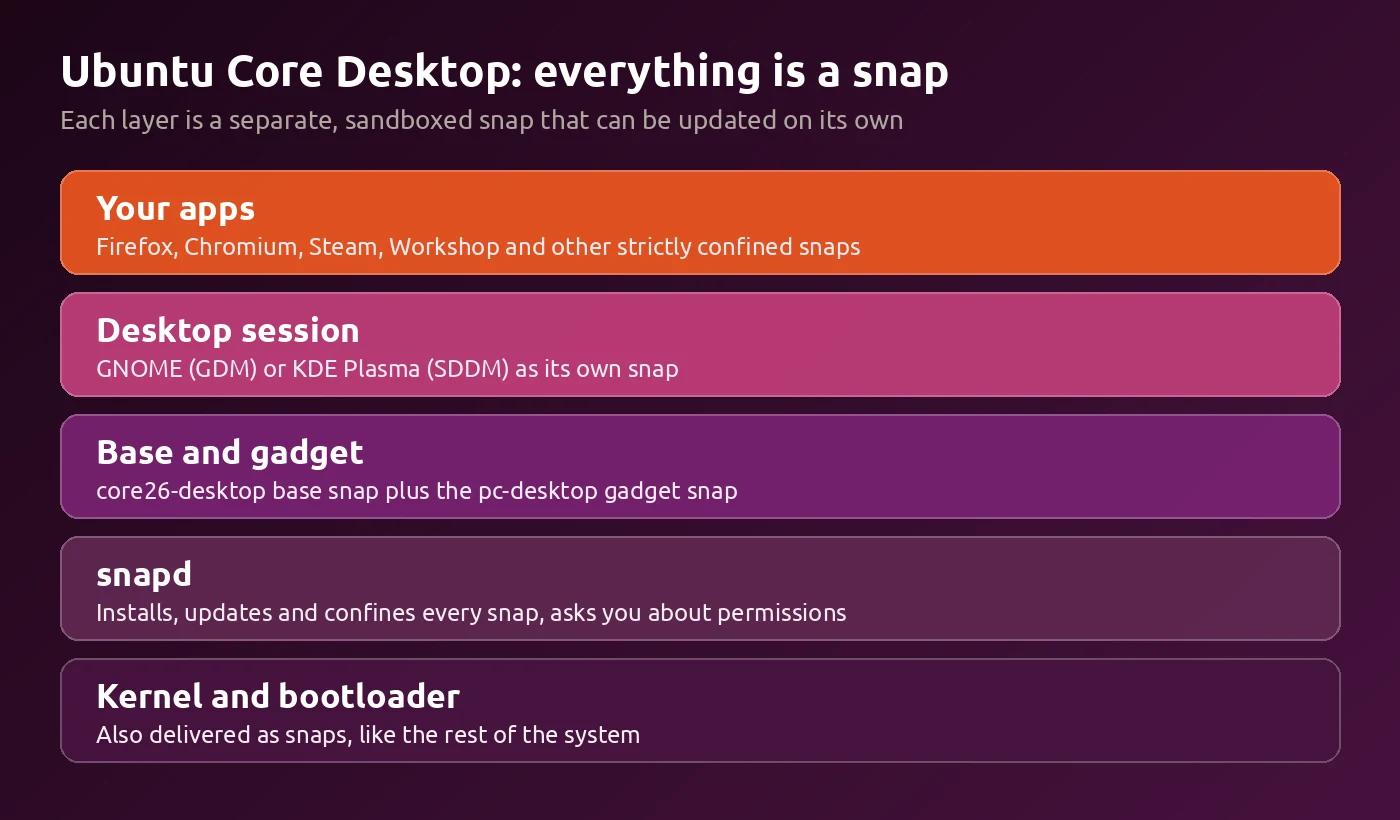
Parts that update on their own: Canonical wants clear interfaces between parts like the login screen, the desktop, sound and video servers and networking. That way each piece can be updated by itself, without rebuilding the whole operating system image every time something changes. Seager calls this one of the key differences from other immutable systems.
Permission pop-ups, like on your phone: on Core Desktop, apps run in a sandbox. When an app wants your camera, microphone or home folder, Ubuntu can ask you first. Canonical calls this permissions prompting, and it works without apps needing changes. Seager says a prompting system that people understand is “the key to Ubuntu Core’s success”, and points out that most users already know this from Android and iOS.
New to Ubuntu Core? Read our coverage of Canonical releasing Ubuntu Core 26, the version the new desktop images are built on.
The three first use cases
The browser-focused machine
The easy win: many people do almost everything in a web browser. Canonical expects this to be the quickest case to deliver, since the 2023 preview already shipped Firefox and the Chromium snap is available. Permissions prompting now also handles controlled camera and microphone access.
The developer workstation
Coding in sandboxes: Ubuntu Core does not work like the open filesystem developers are used to. Canonical’s answer is LXD (its container and virtual machine manager) and Canonical Workshop, which gives you sandboxed development environments, plus a Visual Studio Code extension. Seager also says sandboxes like this help keep AI coding agents away from your credentials and personal files.
Still in progress: Workshop and Visual Studio Code are currently classic snaps, which cannot run directly on Ubuntu Core. Canonical has work underway to move Workshop to strict confinement in the coming weeks.
The gaming machine
Steam snap gets attention again: Canonical maintains the Steam snap, and because it is strictly confined, it already meets Ubuntu Core’s rules. Seager admits the Steam snap has not had as much attention as he would have liked over the past two years, but says the team is now in a position to fix that.
Safer driver swaps: games running through Proton sometimes need a different Proton version, a newer Mesa or other drivers. On a normal system, a wrong move there can leave a PC unable to boot. Canonical wants a gaming stack, including graphics parts, that can be updated on its own without risking the rest of the system. It is also looking at modes beyond a normal desktop, since a dedicated gaming device may not need to boot into one at all. For another gaming-focused Linux system, see our SteamOS 3.9.5 coverage.
GNOME and KDE, not just one desktop
KDE is back on board: during the first round of work, Canonical teamed up with the KDE Neon Core team and enioka Haute Couture on a KDE Neon variant built on Ubuntu Core. They are partners again, and the work is being extended to the KDE Neon Core builds.
Room for flavours: Seager says Core Desktop “should not be limited to the GNOME ecosystem”. He notes that Ubuntu flavours are popular because they offer choice, and he does not want Core Desktop to take that away.
The hard parts
App availability: Ubuntu Core requires every app and service to be a strictly confined snap. There are over 11,000 snaps in the Snap Store and most work on Ubuntu Core, but classic snaps such as Visual Studio Code need extra work. Canonical’s current idea is to run such apps inside a Workshop and show their windows on your desktop, similar to how WSLg runs Linux apps on Windows.
apt, Flatpak and others: if you want apps from apt, nix, Flatpak or other package managers, Canonical’s advice will be to use containers and virtual machines, with desktop integrations to make that easy.
Can you try it yet?
Not as a normal download yet: there is no release you can install today. Canonical says that “over the coming weeks” it will have infrastructure ready for continuous testing and daily image builds of Ubuntu Core Desktop.
For testers in a VM: the project’s GitHub repository now builds Ubuntu Core 26 desktop images for GNOME (with GDM) and KDE (with SDDM). Its README explains how to boot a built image (two image files, including pc.img) as a virtual machine you can then manage in GNOME Boxes or virt-manager. Run this from the folder that holds the image files:
What to expect: the VM restarts once during setup, then the gnome-initial-setup wizard asks you to create a user. The README warns that the wizard currently fails to make that user an administrator, and that the root account is left open with a blank password as a stop-gap. Treat these images as test builds for a VM only, never for your main PC.
Will this replace regular Ubuntu?
Eventually, but not now: Seager is clear that “Ubuntu Desktop in its present form is not going away”. The plan is for Core Desktop to grow into the default over time. Over the coming release cycle, the team will break the desktop into well-defined modules, define the snap interfaces it needs and use the three use cases to test the new design.
Bottom line
Ubuntu Core Desktop is back, with a real team, GNOME and KDE builds and a long-term plan to become the default Ubuntu desktop. For now it is a project to watch, not something to install on your main PC. Keep an eye out for the daily images in the coming weeks if you want to test it in a virtual machine.
Source: Ubuntu Discourse.