

The short version: a flaw in APT, the package manager behind Ubuntu and Debian, can let an attacker swap a package APT has already checked for one of their own. That code then runs as root when the package is installed. The bug is tracked as CVE-2026-109518, and fixed APT builds for Ubuntu 26.10, 26.04 LTS, 24.04 LTS and 22.04 LTS reached the security archive on 4 November 2026. Here is how to check your APT version and update.
What happened
A swap after the check: APT verifies every package against signed archive data before it installs it. According to Ubuntu, an on-path attacker who can change the HTTP traffic between APT and the archive server, such as a malicious mirror or proxy, can get around that check. The attacker uses HTTP redirects and ordinary temporary server errors to make APT retry a download. Because APT reuses hard links for downloaded files, a package that already passed verification can be replaced with an unverified one before it is installed.
Why it matters: packages are installed with root privileges, so a swapped package gives the attacker full control of the machine. The attack runs when the computer installs a package.
How serious it is: Ubuntu rates the flaw as High priority with a CVSS 4.0 base score of 7.7. The APT developers call it critical. Ubuntu says distributions built on Debian and Ubuntu are affected as well.
What we know so far: the flaw was reported by Max Justicz. Ubuntu, Debian and the APT developers published advisories on 4 November 2026. None of them describe attacks using the flaw, and none offer a workaround for systems that cannot update yet.
Not the kernel bug: this is a separate issue from the Linux kernel TCP flaw we covered earlier. If you have not patched that one yet, see our guide to kernel flaw CVE-2026-98432.
Who is affected
The retry setting is the key: the attack only works when APT is set to retry failed downloads with a non-zero Acquire::Retries value. Ubuntu says the value 3 is the default starting with Ubuntu 22.04 LTS, so every release from 22.04 onward is exposed out of the box.
Older releases: Ubuntu 20.04 LTS and earlier are not exposed in a default setup. The APT developers warn that many scripts turn on Acquire::Retries anyway, so do not assume an older server is safe without checking.
These are the fixed APT builds Ubuntu published to its security archive at 14:25 UTC on 4 November 2026. Ubuntu’s CVE page may still list releases as vulnerable while it catches up.
| Release | Exposed by default | Fixed APT version | Support |
|---|---|---|---|
| Ubuntu 26.10 Stonking |
Yes | 3.3.3ubuntu0.1 |
Standard |
| Ubuntu 26.04 LTS Resolute |
Yes | 3.2.1ubuntu0.1 |
Standard |
| Ubuntu 24.04 LTS Noble |
Yes | 2.8.4ubuntu0.1 |
Standard |
| Ubuntu 22.04 LTS Jammy |
Yes | 2.4.15ubuntu0.1 |
Standard |
| Ubuntu 20.04 LTS Focal |
Only if retries on | Via Ubuntu Pro | ESM |
| Ubuntu 18.04 LTS Bionic |
Only if retries on | Via Ubuntu Pro | ESM |
| Ubuntu 16.04 LTS Xenial |
Only if retries on | Via Ubuntu Pro | ESM Legacy |
| Ubuntu 14.04 LTS Trusty |
Only if retries on | Available in Ubuntu Pro | ESM Legacy |
Check your own config: on an older release, this shows whether a retry value has been set anywhere in your APT configuration:
Reading the result: no output, or a value of 0, means retries are off. Any higher number means the flaw can be triggered on that machine.
How to check your APT version
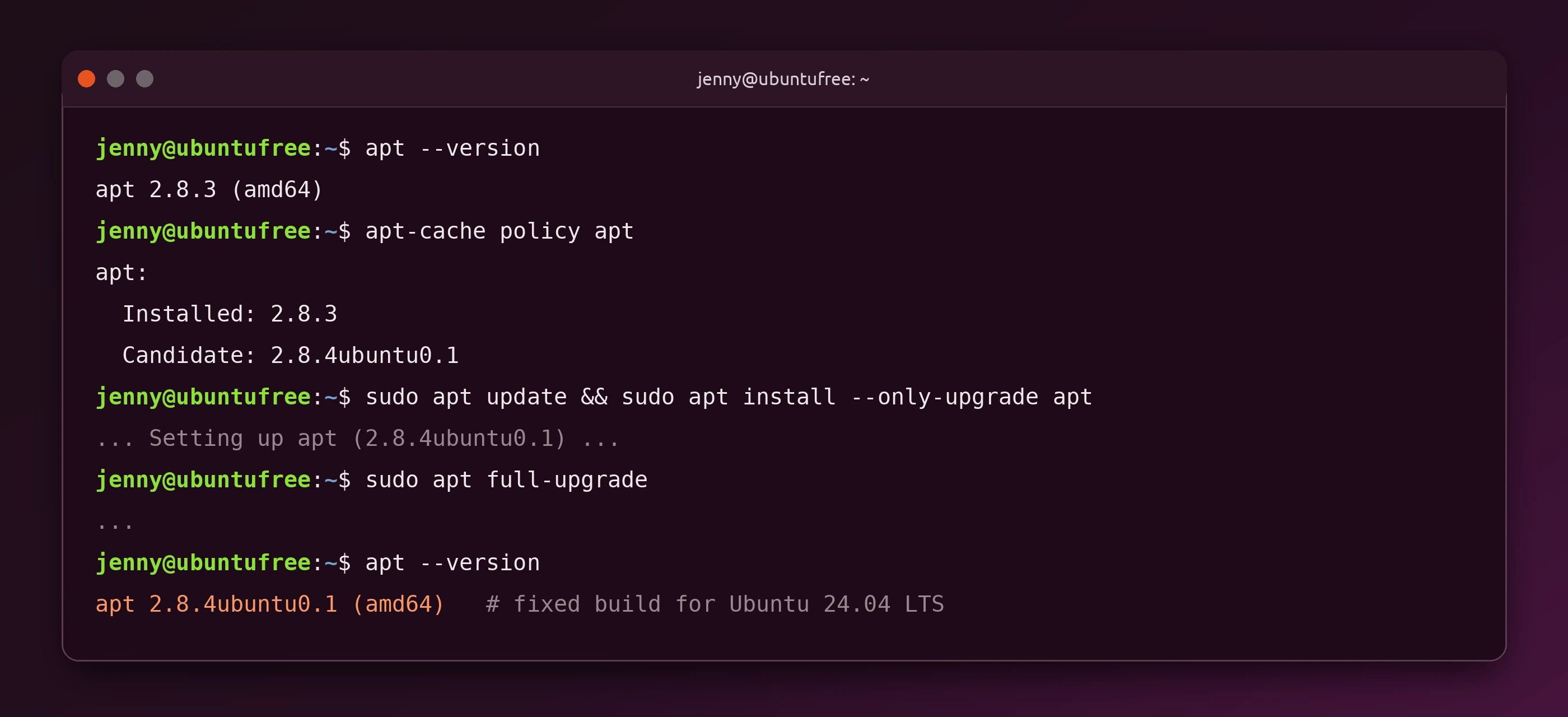
Quick check: this prints the APT version you have installed. Compare it with the table above.
Installed and candidate: after refreshing your package lists, this shows the version you have and the version Ubuntu offers. If the candidate is the fixed build and the installed version is older, you need to update.
How to update APT on Ubuntu
Use a network and mirror you trust: the attack depends on someone tampering with your package downloads, so avoid public Wi-Fi and unknown proxies while you patch. Update from your usual, trusted mirror or the official Ubuntu archive.
1. Upgrade APT first: this refreshes your package lists and installs only the fixed APT, without pulling in anything else yet.
2. Install the rest of your updates: once the fixed APT is in place, apply your other pending updates.
3. Confirm the fix: run apt --version again and make sure it matches the fixed build for your release.
New to these commands? Our apt and snap commands guide explains what each one does.
Should you switch to HTTPS sources?
Worth preferring, but not a guarantee: the advisories describe the attack over plain HTTP. They do not say whether package sources reached over HTTPS are exposed, so do not treat HTTPS as a fix. Using HTTPS mirrors makes it harder for someone on your network to change your downloads, which is a sensible extra layer. Installing the fixed APT is still the step that matters.
Older Ubuntu releases and Ubuntu Pro
Standard support: Ubuntu 26.10, 26.04 LTS, 24.04 LTS and 22.04 LTS get the fixed APT as a normal security update.
Older LTS releases: fixes for older releases come through Ubuntu Pro. The APT developers say Ubuntu Pro updates are being released, and Ubuntu 14.04 LTS users with Ubuntu Pro can already get one. Ubuntu 20.04 and 18.04 are covered by Expanded Security Maintenance (ESM), while 16.04 and 14.04 also need the Legacy add-on. Ubuntu Pro is free for personal use on up to 5 machines.
Source: Ubuntu CVE-2026-109518.