Edubuntu 26.04 LTS Resolute Raccoon ships GNOME 50 “Tokyo” on Wayland with Linux kernel 7.0. The headline changes are a completely rewritten Installer and Menu Administration tool, a new Cockpit module for school-wide network administration, nine new default applications, and full GNOME 50 parental controls for the first time. Below is a complete breakdown of every change worth knowing about since Edubuntu 24.04 LTS. Official release notes are on edubuntu.org.
Resolute Raccoon
GNOME 50. Wayland. Rewritten admin tools. Nine new apps. Every change since Edubuntu 24.04 LTS, explained plainly.
The Big Picture
Edubuntu 26.04 is a release that modernizes the tools underneath the experience. The desktop looks and feels noticeably different thanks to the new teal accent and GNOME 50, but the real work happened in the engine room: the two tools that school administrators rely on most – the Edubuntu Installer and the Menu Administration tool – have been rewritten from scratch. They are faster, more capable, and now speak 21 languages. A new Cockpit module means an IT administrator can configure age-group profiles across an entire school network from a browser.
At the same time, GNOME 50 brings something this project has needed for a long time: real parental controls, built into the desktop. Screen time limits, bedtime schedules, and automatic screen locking are now native features – not add-ons. For anyone deploying Edubuntu in a home or classroom where usage boundaries matter, this is the most meaningful GNOME upgrade in years.
Rewritten Installer and Menu Administration Tools
The two most important Edubuntu-specific tools have been completely rewritten for 26.04. Both were rebuilt from scratch in Python with two separate visual interfaces: one that fits GNOME desktops using GTK4, and one for other desktop environments using Qt6. Each tool detects your desktop automatically and opens the right interface without any configuration on your part.
Both tools now support 21 languages: Arabic, Chinese (Simplified), Czech, Estonian, French, German, Hindi, Italian, Japanese, Korean, Latvian, Lithuanian, Dutch, Polish, Portuguese, Brazilian Portuguese, Russian, Slovak, Spanish, Turkish, and Ukrainian. For a project used widely in non-English-speaking schools and institutions, this is a meaningful step forward.
• Auto-detects your desktop environment
• Select an age-group profile during installation
• Apply profiles after installation on any Ubuntu system
• 21-language interface support
• Disable terminal keyboard shortcuts for non-admin users
• Hide Ptyxis (terminal) from student accounts by default
• Per-user app lists kept aligned with the global list
• 21-language interface support
Edubuntu 26.04 adds a Cockpit module for web-based remote administration. Cockpit is an open-source server management tool that runs in the browser – the Edubuntu module extends it to let administrators configure age-group profiles, app lists, and Menu Administration settings across a school network without physically touching each machine.
To enable it, install the standard Cockpit package on each machine you want to manage:
Once installed, open a browser on any machine on the same network and go to https://[machine-ip]:9090 (for example, https://192.168.1.10:9090 or https://localhost:9090 on the same machine). Log in with an administrator account. The Edubuntu-specific admin controls for profiles, app lists, and Menu Administration settings appear in the Cockpit interface automatically – no additional configuration is needed after installing the package.
For individual home users, Cockpit is optional – the Edubuntu Installer handles local profile selection without it. For school IT teams managing labs of multiple Edubuntu desktops, it is the most significant time-saving addition in this release: one browser tab, the entire lab.
New and Replaced Default Applications
Nine applications are new or have replaced older defaults in Edubuntu 26.04. Some changes came with the Ubuntu 26.04 base; others are specific to Edubuntu’s educational software selection.
| Was | Now | Why |
|---|---|---|
| Geary | Thunderbird | Thunderbird is a full-featured email, calendar, and contacts client. Better suited for school and institutional use where multiple accounts, calendars, and contact lists are the norm. |
| Totem (Videos) | GNOME Showtime | GNOME Showtime is the new GTK4 video player in GNOME 50. Cleaner interface, better Wayland support, native dark mode. |
| GNOME Music | Rhythmbox | Rhythmbox offers a proper music library with playlists, ratings, and podcast support – a more complete experience for classrooms that use music as part of lessons. |
| Gnote | GNOME Notes (Bijiben) | GNOME Notes (also called Bijiben) is actively maintained and integrates with GNOME Online Accounts for syncing notes to cloud services. Gnote development has slowed significantly. |
| – (New) | Foliate | A GTK4 e-book reader for EPUB, MOBI, and other e-book formats. Relevant for schools using digital textbooks and students reading course materials on their devices. |
| – (New) | Paperboy | A GTK4 RSS/Atom news reader. Lets students and teachers follow news feeds and educational publications without a browser. |
| – (New) | Arduino IDE | The official development environment for Arduino microcontrollers. A natural addition for schools running electronics, robotics, and STEM programs that use Arduino hardware. |
| chemtool (removed) | GChemPaint | chemtool was removed because it depended on GTK2, which is no longer supported upstream. GChemPaint is the GTK3 replacement for 2D chemical structure drawing – same purpose, actively maintained. |
| – (New) | Raspberry Pi Imager | The official tool for writing Raspberry Pi images to SD cards. Pairs naturally with Edubuntu’s Raspberry Pi image and STEM classroom setups. |
What GNOME 50 “Tokyo” Brings
Edubuntu 26.04 runs on GNOME 50, released March 18, 2026. For Edubuntu users, several of the GNOME 50 changes land directly in the features that matter most for education and accessibility. Here is the breakdown of what is most relevant.
Parental Controls – Now Built Into GNOME
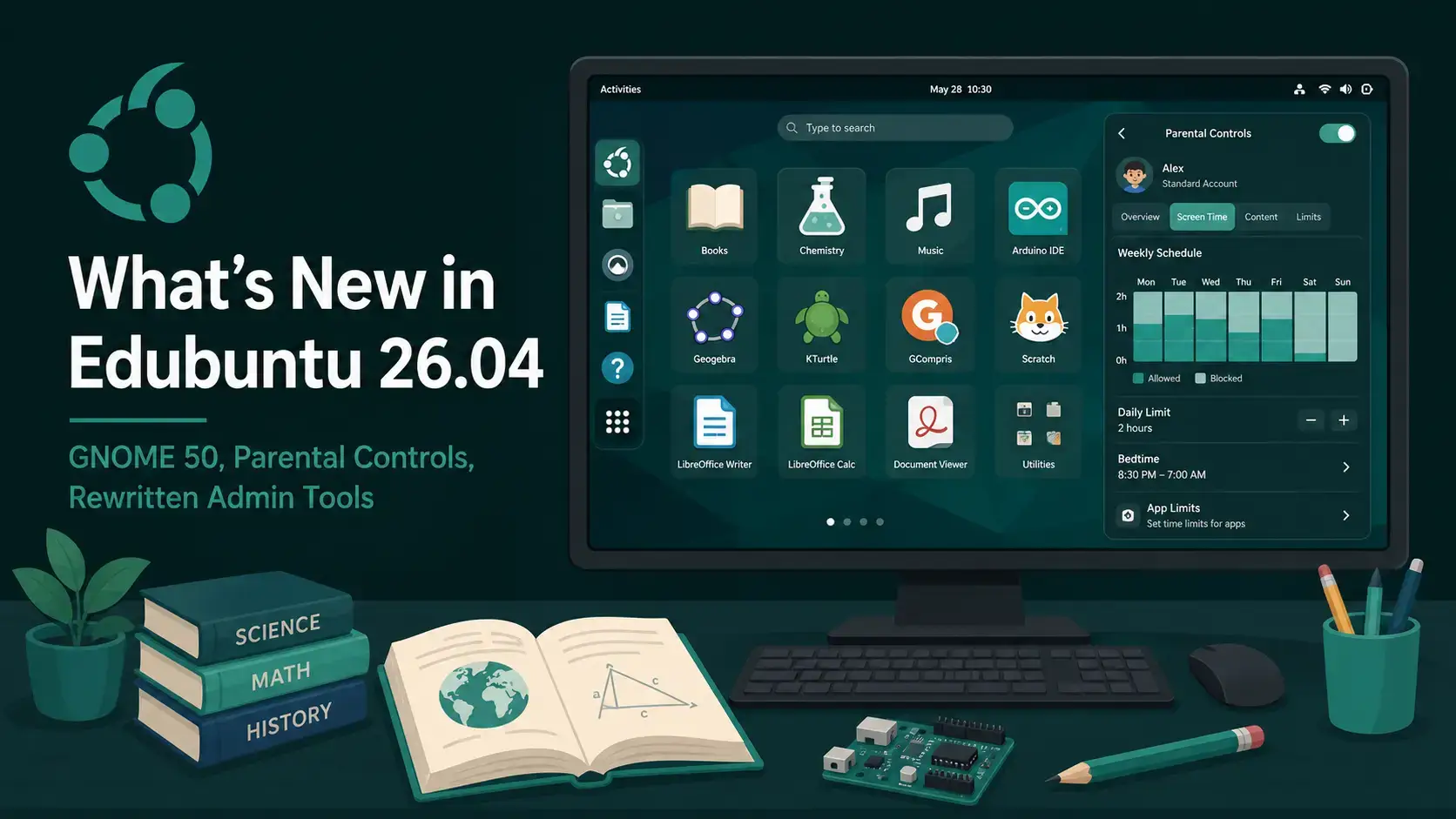
GNOME 50 introduces full parental control support for the first time. Parents and school administrators can set screen time limits and bedtime schedules for child accounts directly from System Settings. The screen locks automatically when a daily limit or a set bedtime is reached. Adults can extend time on the spot when needed, without modifying settings permanently.
Set a maximum number of daily screen hours for any child account. When the limit is reached, the session locks automatically. The account owner cannot unlock it – only a parent or administrator account can grant an extension.
Set a bedtime for any child account. At the scheduled time, the session locks and the child cannot log back in until the allowed hours resume. Useful for home setups where screen use after a certain hour is a concern.
The Parental Controls application has been redesigned with a modern interface. System Settings now links directly to it. All controls – screen time, bedtime, app restrictions – are in one place. The app also has a foundation for web content filtering built in; the full UI for that feature will arrive in a future update.
Orca Screen Reader – Redesigned for GNOME 50
The Orca screen reader received one of the largest sets of improvements in years. For students and users who rely on assistive technology, this is a meaningful upgrade.
Orca’s settings window has been redesigned to be more consistent with other GNOME apps. The new layout is cleaner and easier to navigate for users who are configuring the screen reader for the first time.
All Orca settings are now global by default. You no longer need to configure the screen reader separately for each application. You can still override settings on a per-app basis when needed, but the default is one consistent setup across your entire session.
Orca now switches its speech language automatically when reading web content or app interfaces written in a different language. Particularly useful in multilingual classrooms and for students learning in a second language.
Mouse Review, which reads out what is under the cursor as you move it around the screen, now works fully in Wayland sessions. In previous releases, this feature required an X11 session to function. On Edubuntu 26.04’s Wayland default, it works out of the box.
Files, Display, and Desktop Improvements
GNOME 50 also brings practical improvements to the Files app and the desktop display stack that benefit everyday use in a school environment.
Files (Nautilus) in GNOME 50 loads thumbnails and icons significantly faster, uses less memory overall, and adds multi-filter search – you can now search by type, date, and name at the same time. Batch Rename has been reworked and now highlights the text being replaced, making it easier to review changes before applying them.
A new Reduced Motion toggle in Accessibility settings reduces or eliminates interface animations across GNOME. For students with motion sensitivity, vestibular disorders, or attention difficulties, this is a practical accessibility improvement that required no third-party extensions before.
VRR and fractional scaling are now enabled by default in GNOME 50. On compatible monitors this means tear-free display without needing to enable experimental settings. Fractional scaling lets you choose 125% or 150% display scaling in Display Settings for sharper text on HiDPI screens – useful for aging lab monitors with varied resolutions.
The Document Viewer app (Papers) in GNOME 50 has an overhauled annotation system. Students can now add text notes, highlight passages, and draw lines directly in PDF documents with a color picker, adjustable line thickness, and an eraser. No external tool needed for basic PDF markup.
GNOME Calendar 50 adds attendee lists to events (see who is invited and whether attendance is required), ICS export for your entire schedule, and a more polished Month view. The first-day-of-week setting in System Settings is now respected consistently across Calendar and other GNOME apps.
Edubuntu ships the Alphabetical App Grid GNOME Shell Extension to keep the app drawer sorted A-Z rather than by recent use. This extension has been updated to v44.0 for full GNOME 50 compatibility. For student accounts where a predictable, sorted app list matters, this continues to work as expected.
Age-Group Profiles – Apps for Every Level
Edubuntu 26.04 ships seven metapackages that install curated sets of applications and desktop settings matched to a specific education level or role. You can choose one during installation using the Edubuntu Installer, or apply it afterward on any Ubuntu-based system.
Educational games and simple interactive apps designed for very young children. Emphasis on shapes, colors, letters, and basic counting activities.
Apps for primary-age students covering math, reading, typing, science, and basic programming. Includes Gradebook for teachers to track student progress.
A broader suite for secondary students including GChemPaint, Kalzium, KGeography, Marble, math tools, and LibreOffice. Includes Gradebook.
Tools for university-level students and researchers: advanced math, data analysis, reference management, document tools, and scientific applications. Includes Gradebook.
Apps for teachers preparing lessons, managing classes, and presenting content. Productivity tools, presentation software, and classroom management utilities.
A dedicated music education suite: fmit (tuner), gnome-metronome, Minuet (music theory), Solfege (ear training), and Pianobooster (sight-reading practice).
A curated set of fonts appropriate for educational materials and documents – legible, well-kerned typefaces suited for reading, writing, and printed worksheets.
Key Educational App Versions in 26.04
The table below lists the versions of notable educational applications in the Edubuntu 26.04 (Resolute Raccoon) archive. Versions are sourced from the Ubuntu resolute package archive. All apps listed are available via sudo apt install [package-name] on Edubuntu 26.04 or any Ubuntu 26.04-based system.
| Application | Package | Version | Purpose |
|---|---|---|---|
| GCompris-Qt | gcompris-qt | 26.1 | Educational activity suite for preschool and primary school – 130+ games covering math, reading, geography, science, and logic |
| Stellarium | stellarium | 25.4 | Planetarium software for astronomy lessons – renders realistic night sky, tracks planets, stars, and constellations in real time |
| TuxMath | tuxmath | 2.0.3 | Math drill game for primary school – covers addition, subtraction, multiplication, and division with adjustable difficulty |
| LibreOffice | libreoffice | 26.2.2 | Full office suite – Writer, Calc, Impress, Draw. Included in secondary, tertiary, and teaching profiles |
| Edubuntu Installer | edubuntu-installer | 1.0.6 | Rewritten Python tool for selecting and applying age-group profiles, with GTK4 and Qt6 frontends |
| Thunderbird | thunderbird | 128 ESR | Email, calendar, and contacts – replaces Geary. Extended Support Release ensures stability for institutional deployments |
| GChemPaint | gchempaint | 0.14.17 | 2D chemical structure drawing tool for chemistry lessons – replaces chemtool, which was removed due to GTK2 dependency |
| Raspberry Pi Imager | rpi-imager | 1.9.x | Official tool for writing Raspberry Pi images to SD cards. New default app in Edubuntu 26.04 |
Raspberry Pi in the Classroom
Edubuntu 26.04 ships a dedicated Raspberry Pi preinstalled image – a separate download from the main AMD64 desktop ISO. It supports the Raspberry Pi 3, 4, 5, Compute Module 4, and Zero 2 W. For Pi 5 users, your EEPROM firmware must be dated February 11, 2025 or later. If it is not, update it before writing the Edubuntu image.
The Pi image opens up low-cost classroom deployments. A Raspberry Pi 4 or 5 running Edubuntu 26.04 gives students the same educational software suite as a full desktop install – suitable for primary and secondary school STEM labs where acquiring a fleet of x86 computers is not feasible.
New Visual Identity – Yaru Prussian Teal
Edubuntu 26.04 introduces Yaru Prussian Teal as its accent color – #308280. This is a deliberate departure from Ubuntu’s standard orange accent. The teal palette is calm, distinctive, and avoids the commercial branding associations that orange carries. For an educational operating system used in neutral school environments, the choice makes sense.
The new accent appears across the login screen, window borders, highlights, and system interface elements. If you are upgrading from Edubuntu 24.04, the visual difference is immediately noticeable. This is not a theme option – it is the Edubuntu identity for this release cycle.
Free to download. Educational apps included. 3-year support for schools and homes.
Known Issues
System Requirements
| Component | Minimum | Recommended |
|---|---|---|
| RAM | 4 GB | 8 GB |
| Storage | 15 GB (minimal install) | 30 GB |
| Processor | 2 GHz dual-core, 64-bit | Modern quad-core |
| Raspberry Pi Storage | 64 GB SD card | 128 GB SD card or USB drive |
| Display | 1024 x 768 | 1920 x 1080 or higher |
Frequently Asked Questions
What is new in Edubuntu 26.04 LTS?
Edubuntu 26.04 LTS ships GNOME 50 “Tokyo” on Wayland with Linux kernel 7.0. The biggest changes are a completely rewritten Installer and Menu Administration tool in Python with GTK4 and Qt6 dual backends, a new Cockpit web administration module for school networks, 21-language interface support, nine new default applications including Thunderbird, Foliate, Paperboy, Arduino IDE, GChemPaint, and Raspberry Pi Imager, GNOME 50 parental controls with screen time limits and bedtime schedules, and the new Yaru Prussian Teal visual identity.
Does Edubuntu 26.04 use Wayland or X11?
Edubuntu 26.04 uses Wayland as the default session via GNOME 50. X11 applications continue to work through XWayland, which runs automatically in the background when needed. GNOME 50 has removed the GNOME-on-X11 session entirely, so Wayland is the only GNOME session available. Most educational software works correctly on Wayland. If you run an older application that has issues, XWayland handles compatibility transparently.
What age groups is Edubuntu 26.04 designed for?
Edubuntu 26.04 includes dedicated age-group metapackages for preschool, primary school, secondary school, tertiary education, and teaching staff. There is also a music education metapackage. Each profile installs a curated set of apps and desktop settings matched to that level. You can choose a profile during installation using the Edubuntu Installer, or apply it afterward on any Ubuntu-based system. The secondary, primary, and tertiary profiles also include Gradebook for tracking student progress.
Can Edubuntu 26.04 run on a Raspberry Pi?
Yes. Edubuntu 26.04 ships a dedicated preinstalled image for Raspberry Pi 3, 4, 5, Compute Module 4, and Zero 2 W. It is a separate download from the main AMD64 ISO. The Pi 5 requires EEPROM firmware from February 11, 2025 or later. Write the image using Raspberry Pi Imager – which is now included as a default app in Edubuntu. A 64 GB SD card is the minimum for the Pi image.
What are the GNOME 50 parental controls in Edubuntu 26.04?
GNOME 50 introduces full parental control support for the first time. Parents and school administrators can set screen time limits and bedtime schedules for child accounts directly from System Settings. The screen locks automatically when a daily limit or bedtime is reached. Administrators can extend time on the spot without changing the underlying settings permanently. The Parental Controls app has also been redesigned with a modern interface. A backend for web content filtering has been added as a foundation – the full UI for that feature will arrive in a future update.
What is the Cockpit module in Edubuntu 26.04?
Cockpit is an open-source server management tool that runs in a web browser. The Edubuntu 26.04 Cockpit module extends it to let school IT administrators configure age-group profiles, application lists, and Menu Administration settings across multiple machines on a school network – from a browser, without physically visiting each machine. For home users, the Cockpit module is optional. For schools managing labs with multiple Edubuntu desktops, it is the most significant time-saving addition in this release.
How long is Edubuntu 26.04 LTS supported?
Edubuntu 26.04 LTS is supported until April 2029 – three years from release. As an official Ubuntu flavor, it follows the standard three-year flavor support window, not the five-year window that Ubuntu Desktop receives. This means security patches and updates through April 2029, with no need to reinstall or upgrade your operating system during that period.
More Edubuntu 26.04 guides: Download · What’s New · Upgrade Guide · Wallpapers