 The best torrent clients for Ubuntu are qBittorrent, Transmission, Deluge, and Fragments. qBittorrent is the strongest all-round choice for most users. Transmission is the best option if you want something lightweight and simple. Deluge is the right pick if you need a web UI, plugin support, or headless server operation.
This guide covers ten tools across three categories: everyday desktop clients, power user and server clients with web UI support, and specialist options with specific trade-offs worth knowing about. Each tool card includes a privacy and trust rating, resource weight, encryption support, web UI availability, and an install command.
Top Picks at a Glance
- qBittorrent: Best overall – open source, no ads, built-in web UI
- Transmission: Best lightweight option – clean, fast, low resource use
- Fragments: Best for GNOME desktop users – native look, simple interface
- KTorrent: Best for KDE Plasma users – native KDE integration
- Deluge: Best for plugin users and server deployments
- rTorrent + ruTorrent: Best for headless VPS and seedbox setups
- aria2: Best for scripting and automated downloads via CLI
- Tixati: Best statistics and bandwidth analysis tools (closed source)
- BiglyBT: Best for users who need advanced features and I2P support
- Tribler: Best built-in onion routing (experimental, research-grade)
If you are not sure where to start, install qBittorrent. It covers almost every use case well. If you use the GNOME desktop and want something minimal, try Fragments. If you are setting up a home server or VPS and need remote access, use Deluge or rTorrent with ruTorrent.
Everyday Clients
These are the clients most Ubuntu users should install. They are actively maintained, open source, straightforward to use, and reliable for daily torrenting. No serious trade-offs required.
Best For: Most Ubuntu users who want a reliable, ad-free, open source torrent client with a web UI and no compromises.
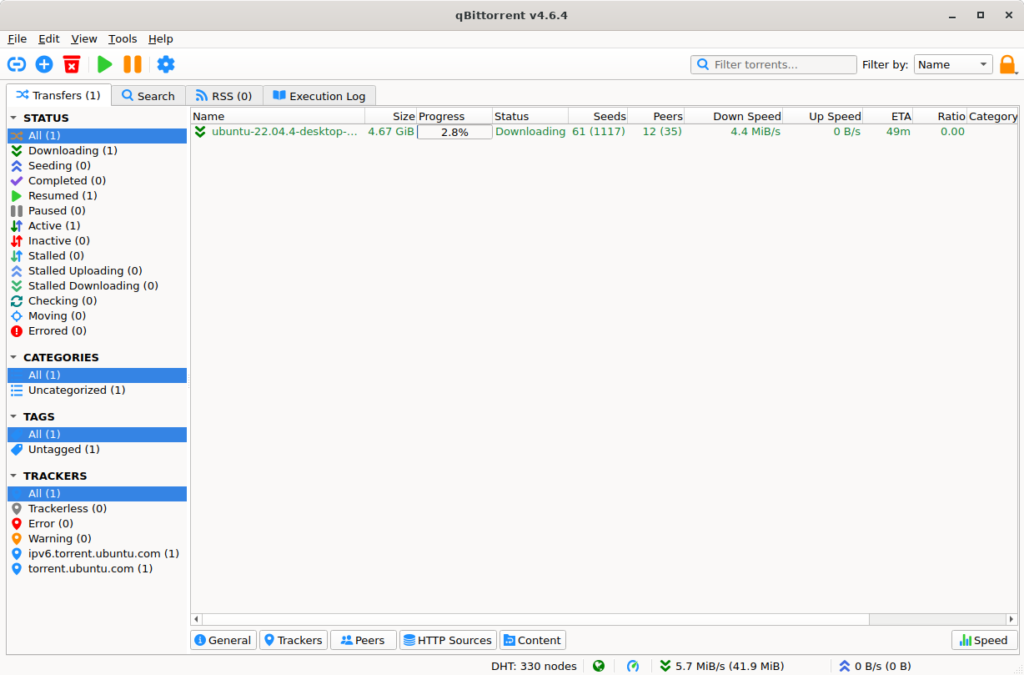
Why We Picked It: qBittorrent is the most complete open-source torrent client available on Ubuntu. It has no ads, no bundled software, no tracker history of any kind, and the development team ships regular updates – version 5.2.0 arrived in May 2026. The built-in web UI means it doubles as a remote or server client without any plugins. The only real weakness is that the interface can feel dense if you just want something simple.
- Privacy and Trust: Open source (GPL). No telemetry, no ads, no bundled software.
- Encryption: Full BitTorrent protocol encryption support. Forced, preferred, or disabled.
- Web UI: Built-in. Enable it in Tools – Preferences – Web UI. Access from any browser on your network.
- Resource Use: Lightweight. Runs well on older hardware with low RAM overhead.
- Latest Version: 5.2.0 (May 2026). ARM64 builds included for the first time.
- Headless Server Mode: Install
qbittorrent-noxinstead of the full GUI package to run qBittorrent as a background daemon with web UI only. No desktop environment required. Access the UI athttp://localhost:8080after starting the service. Useful for home servers and VPS deployments where you want qBittorrent without the overhead of a display server.
Quick Tip: If your ISP throttles torrent traffic, enable encryption in Tools – BitTorrent and set it to “Require encryption” to make your traffic harder to fingerprint.
Install Command:
Best For: Users who want a clean, no-fuss torrent client with low resource use and no configuration overhead.
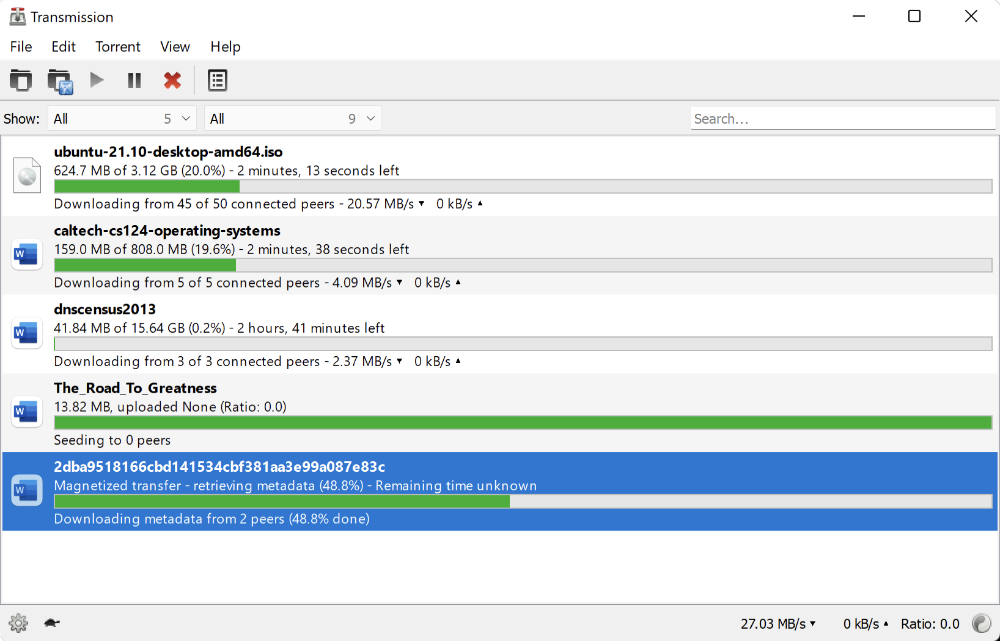
Why We Picked It: Transmission is the torrent client that gets out of your way. The interface has barely changed in years, and that is deliberate – it works, it is fast, and it uses almost no system resources. Version 4.1.0 shipped in January 2026 with sequential downloading, IPv6 support, and significant performance improvements. It has been the default torrent client on several Ubuntu spins for good reason.
- Privacy and Trust: Open source (GPL). Clean history. No ads or bundled software.
- Encryption: Supported. Toggle in preferences under Privacy.
- Web UI: Available via transmission-daemon. Lightweight, browser-based, suitable for home servers.
- Resource Use: Among the lowest of any full-featured torrent client on Linux.
- Latest Version: 4.1.0 (January 2026). Adds sequential download and dual-stack IPv6.
Quick Tip: For a headless home server setup, install transmission-daemon instead of the GUI version. You can then manage it through any browser using the built-in web interface on port 9091.
Install Command:
Best For: GNOME desktop users who want a clean, native-looking torrent client that fits the Ubuntu desktop without extra configuration.
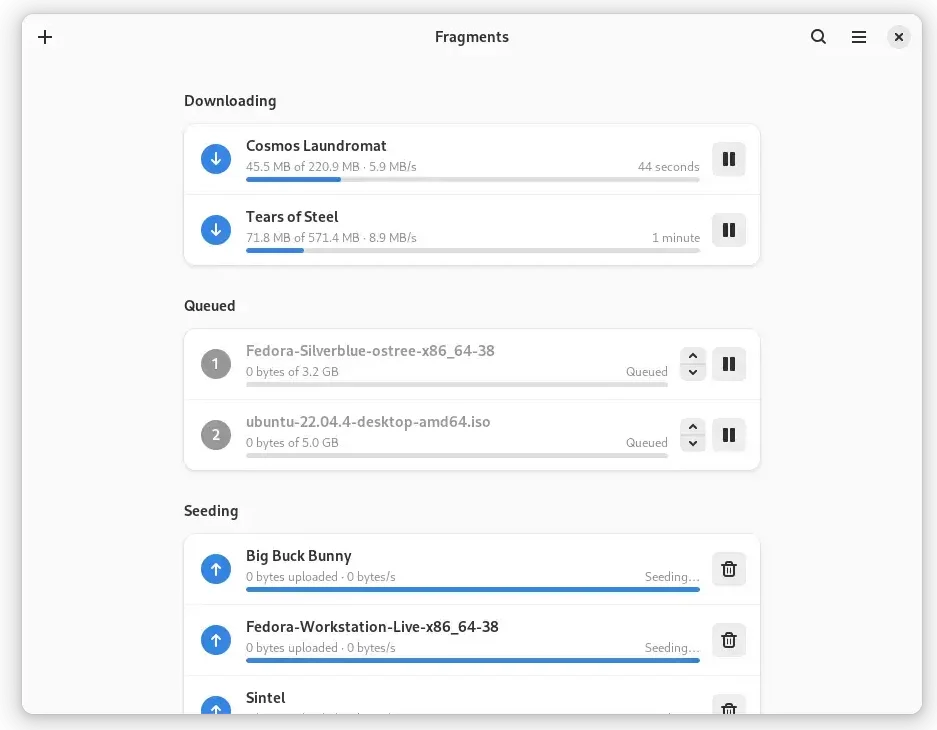
Why We Picked It: Fragments 3.0 is a GTK4/libadwaita app written in Rust that uses Transmission as its backend engine. It integrates with the GNOME desktop more naturally than any other torrent client. If you are on Ubuntu with the default GNOME shell and you want something that looks and behaves like a proper part of your system, Fragments is the right choice. It is not for power users – it intentionally keeps things simple.
- Privacy and Trust: Open source. Backed by the GNOME project ecosystem. No telemetry.
- Encryption: Inherited from the Transmission backend. Supported.
- Web UI: Not available. Desktop GUI only.
- Resource Use: Very lightweight. Rust-based with a minimal UI footprint.
- Latest Version: 3.0.1 (May 2024). Supports torrent file selection and remote Transmission sessions.
- Note: Limited feature set by design. Use qBittorrent or Deluge if you need advanced settings, scheduling, or a web UI.
Quick Tip: Fragments can connect to a remote Transmission session, which means you can use it as a clean front-end for a Transmission daemon running on another machine on your network.
Install Command:
Best For: Kubuntu and KDE Plasma users who want a torrent client that integrates natively with their desktop environment.
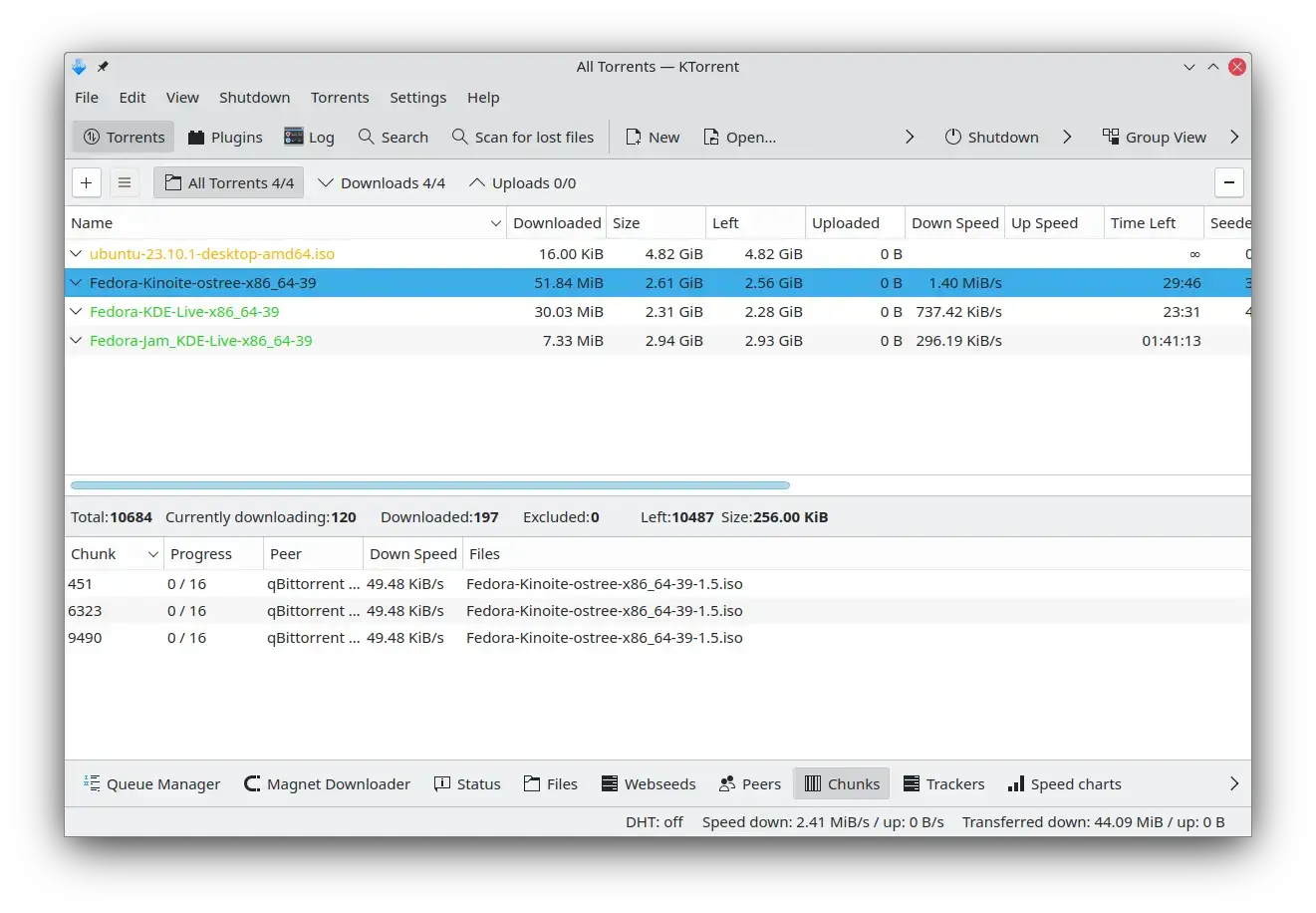
Why We Picked It: KTorrent is the KDE equivalent of Fragments – a native desktop client that fits its environment properly rather than feeling like a port. It is part of KDE Gear, ships on a regular release cadence (version 26.04.1 in May 2026), and integrates with KDE system notifications, Plasma widgets, and the KDE file manager. If you are on Kubuntu and want something that behaves like it belongs there, KTorrent is the answer. It has more features than Fragments – including a plugin system and a search interface – without becoming as complex as qBittorrent.
- Privacy and Trust: Open source (GPL). Part of the KDE project. No telemetry, no ads.
- Encryption: Supported. Configurable in connection settings.
- Web UI: Not available. Desktop GUI only.
- Plugin System: Yes. Includes plugins for IP filtering, search, scripting, and media info.
- KDE Integration: System tray, Plasma notifications, KDE file associations, KWallet support for tracker credentials.
- Latest Version: 26.04.1 (May 2026). Released as part of KDE Gear on a regular schedule.
Quick Tip: On Kubuntu, KTorrent is available directly from the Ubuntu Universe repository. On standard Ubuntu with GNOME, it will pull in a number of KDE dependencies – at that point qBittorrent or Transmission is the better choice unless you specifically want KTorrent.
Install Command:
Power User and Server Clients
These clients are built for users who need more control – remote access from a browser, plugin systems, daemon mode, or headless operation on a server or VPS. They take a little more setup but offer capabilities the everyday clients do not.
Best For: Users who need a plugin system, web UI for remote access, or a client that runs as a background daemon on a home server or VPS.
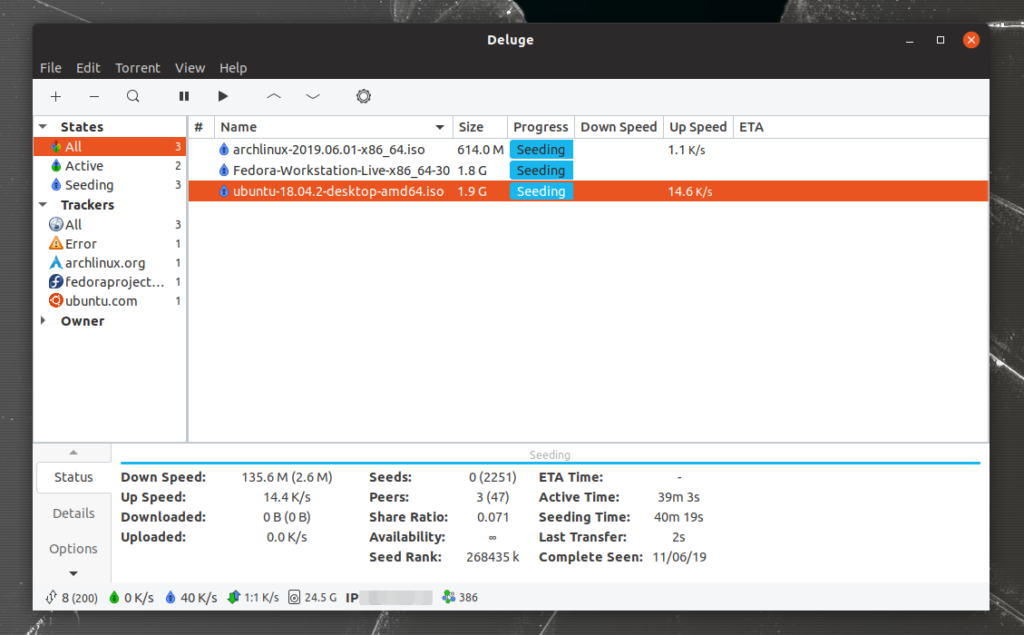
Why We Picked It: Deluge sits in a useful middle ground between the simplicity of Transmission and the complexity of rTorrent. It runs as a daemon in the background, exposes a web UI you can access from any browser, and supports a plugin system that lets you add features like automatic labelling, RSS feeds, scheduled downloads, and more. Development is slower than qBittorrent but the project is actively maintained – version 2.2.0 arrived in late 2025.
- Privacy and Trust: Open source (GPL). No telemetry, no ads. Clean history.
- Encryption: Full protocol encryption support. Configurable per connection.
- Web UI: Built-in. Enable via the Web UI plugin and access it through your browser on port 8112.
- Plugin System: Extensive. Plugins for labels, RSS, scheduler, execute (run scripts on events), and more.
- Resource Use: Moderate. More overhead than Transmission due to the daemon architecture, but manageable on most systems.
- Latest Version: 2.2.0 (December 2025). Actively maintained.
Quick Tip: Run Deluge in thin client mode – install deluge-web on your server and connect to it from your desktop or phone browser. You get full torrent management without a GUI app on the server.
Install Command:
Best For: Seedbox setups, headless VPS deployments, and power users who want maximum control over a server-based torrent environment accessed entirely through a browser.
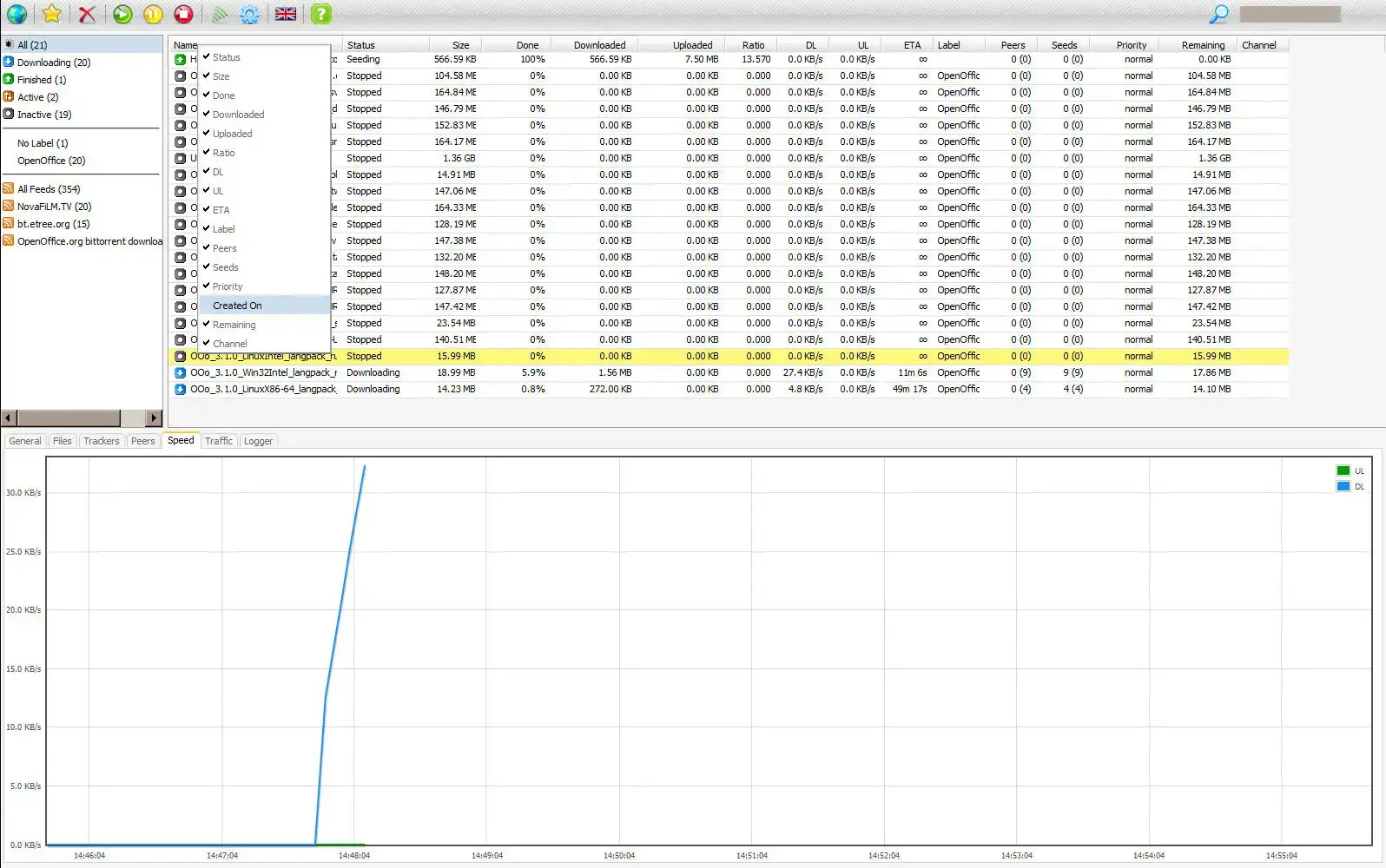
Why We Picked It: rTorrent is a terminal-based BitTorrent client that runs as a daemon with very low resource use – it can run on a Raspberry Pi or a minimal VPS without complaint. ruTorrent is a PHP web interface that connects to rTorrent and gives you full browser-based management. Together they are the standard setup for anyone running a private seedbox. This combination requires more setup than the other clients here, but nothing on this list comes close for server efficiency.
- Privacy and Trust: Both are open source. rTorrent is GPL. ruTorrent is GPL. No telemetry.
- Encryption: Supported in rTorrent. Configurable in the .rtorrent.rc config file.
- Web UI: ruTorrent is the web UI. Requires a web server (Apache or nginx) and PHP.
- Resource Use: rTorrent itself is extremely lightweight. ruTorrent adds a web server requirement but remains efficient overall.
- Setup Requirement: More involved than other options. Requires configuring rTorrent, a web server, and PHP. Not a beginner setup.
Quick Tip: If you are setting this up on a fresh Ubuntu VPS, install nginx and PHP first, then configure rTorrent to run as a systemd service. ruTorrent then runs as a web app served by nginx. Many seedbox panel projects automate the full install if you want a faster path. If you prefer a more modern interface than ruTorrent, Flood is a Node.js/React web UI that connects to rTorrent (and also supports qBittorrent and Transmission). It offers a cleaner, more responsive UI than ruTorrent at the cost of a slightly more involved Node.js setup. See the project at flood.js.org.
Install Command:
Best For: Scripted or automated torrent downloads on servers, headless systems, or anywhere you want to trigger downloads from the terminal or a script without a GUI running.
Why We Picked It: aria2 is not a torrent client in the traditional sense – it has no GUI and no persistent session. It is a multi-protocol download utility that handles HTTP, FTP, SFTP, Metalink, and BitTorrent from a single command. Where it earns its place on a server-focused list is raw efficiency: it uses 4 to 9MB of RAM for active torrent downloads, supports parallel multi-source downloading, and can be driven entirely from shell scripts or via its JSON-RPC API. If you are building an automation pipeline – say, a cron job that pulls new Linux ISOs from a torrent feed – aria2 is the right tool. It is not a replacement for qBittorrent or Deluge for general use.
- Privacy and Trust: Open source (GPL). No GUI, no telemetry, no network calls beyond what you explicitly ask for.
- Encryption: Supports BitTorrent protocol encryption.
- Web UI: No native UI. Can be controlled via JSON-RPC from third-party front-ends like webui-aria2 or Aria2NG.
- Resource Use: Extremely lightweight. 4-9MB RAM during active BitTorrent downloads.
- Multi-Source: Downloads from multiple trackers and HTTP sources simultaneously in a single session.
- Protocols: HTTP/HTTPS, FTP, SFTP, BitTorrent (.torrent files and magnet links), and Metalink.
Quick Tip: To download a torrent from the command line, pass the .torrent file or magnet link directly: aria2c linux-distro.torrent or aria2c "magnet:?xt=urn:...". Add --seed-time=0 to stop seeding immediately after the download completes, or --seed-ratio=1.0 to seed until you have uploaded as much as you downloaded.
Install Command:
Specialist and Niche Clients
These clients serve specific use cases and come with trade-offs worth understanding before you install them. Neither is the right first choice for most users, but both are genuinely useful in the right situation.
Best For: Power users who want deep bandwidth statistics, channel management, and detailed transfer analytics, and are comfortable using closed-source software.
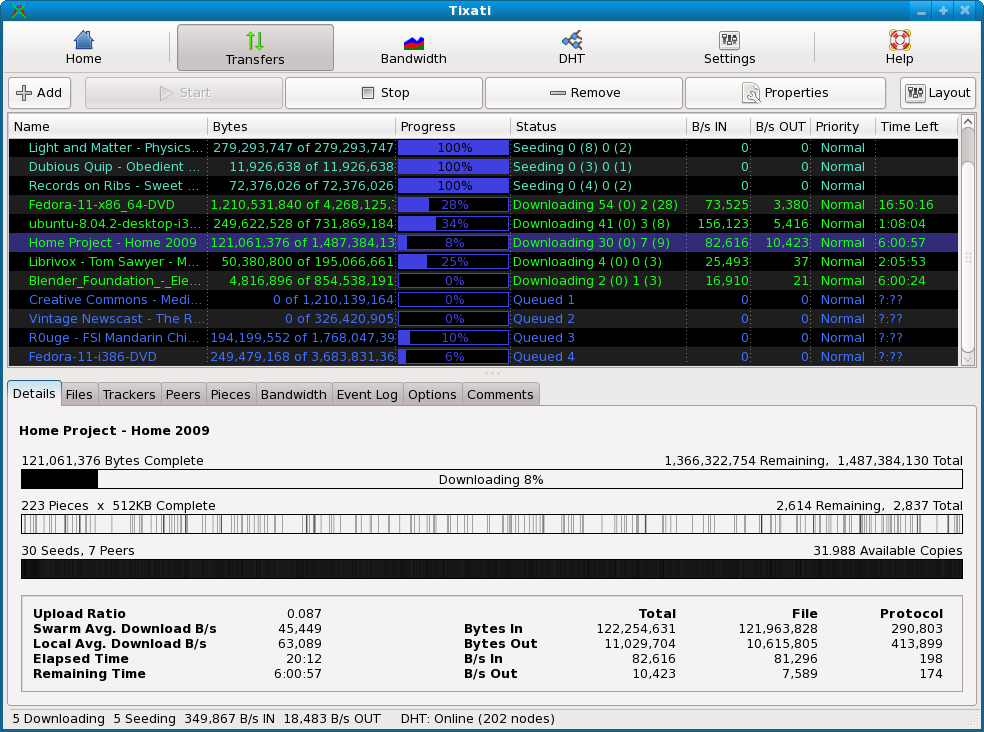
Why We Picked It: Tixati earns its place on this list because its statistical analysis tools are genuinely unique. No other client on Ubuntu gives you this level of per-peer, per-channel bandwidth breakdown and visual charting out of the box. It is actively maintained (version 3.42, December 2025), ad-free, and has no known history of malware or bundled software. The significant caveat: Tixati is closed source. You cannot inspect what it does internally, and that is a real consideration for privacy-conscious users. If source transparency matters to you, use qBittorrent instead.
- Privacy and Trust: Closed source freeware. No ads. No known malware history. No independent code audit possible.
- Encryption: Supported. Configurable in network settings.
- Web UI: Not available in the traditional sense. Has a local web interface option for basic remote access.
- Statistics: Best-in-class. Per-peer speed graphs, channel bandwidth history, transfer logs, and detailed session analytics.
- Resource Use: Lightweight. Efficient despite the feature set.
- Latest Version: 3.42 (December 2025). Actively developed.
Quick Tip: Tixati’s channel system lets you group peers into categories and apply separate bandwidth limits to each group. Useful if you are seeding multiple private tracker communities with different ratio requirements.
Install Command:
sudo dpkg -i tixati-[version]-1.amd64.deb
Best For: Users who need I2P anonymous downloading, WebTorrent support, a deep plugin system, and every advanced feature imaginable – and do not mind running a Java application.
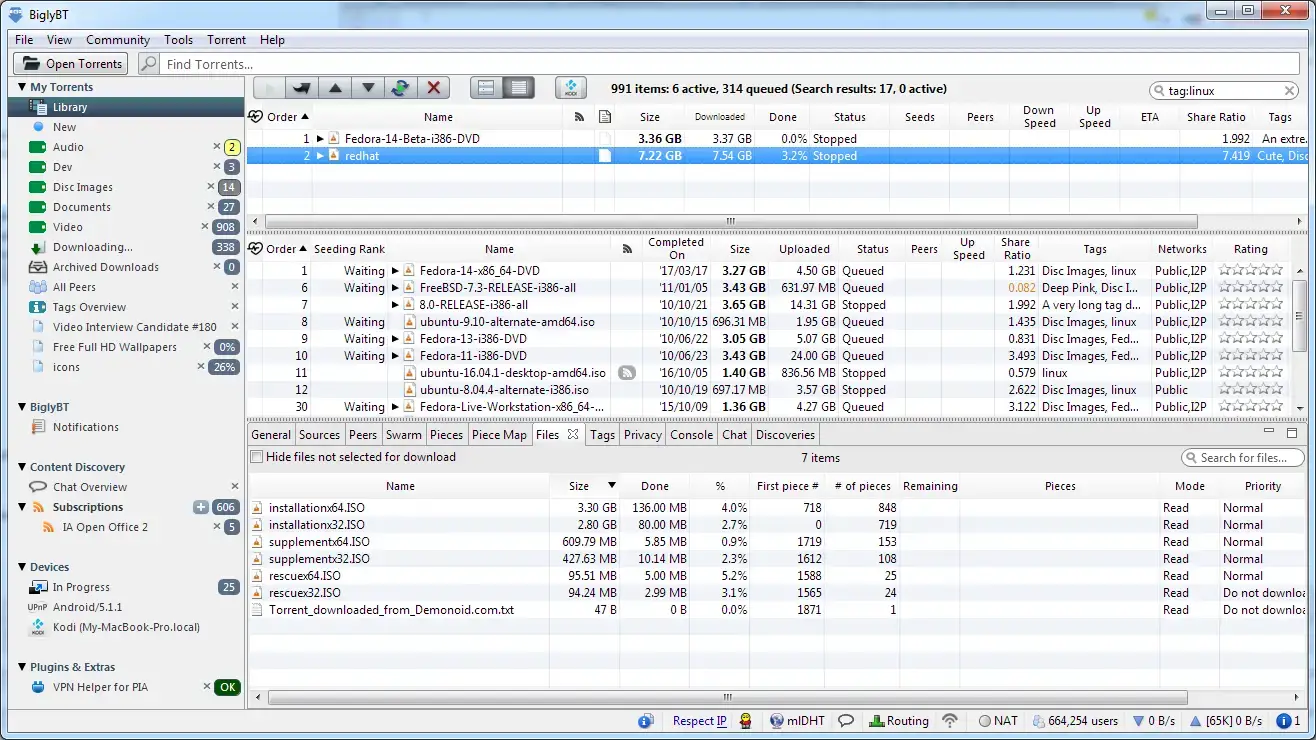
Why We Picked It: BiglyBT is the open-source continuation of Vuze (Azureus), maintained by two of the original developers. It dropped the ads and proprietary modules that made Vuze a poor recommendation, and added I2P DHT support for anonymous downloading – something no other client on this list offers. It is Java-based, which means higher resource use and a heavier install, but if you specifically need I2P, WebTorrent peer support, or the feature depth that only Azureus-lineage clients have, BiglyBT is the only open-source option that delivers it on Ubuntu.
- Privacy and Trust: Open source (GPL v2). Ad-free. Maintained on GitHub. I2P support for anonymous downloads.
- Encryption: Full protocol encryption supported.
- Web UI: Available via plugin.
- I2P Support: Built-in I2P DHT – allows downloading from the I2P anonymous network without a separate I2P client.
- WebTorrent: Can download from and seed to WebTorrent peers, bridging the gap between browser-based and desktop clients.
- Resource Use: Heavy. Java runtime required. Uses significantly more RAM than qBittorrent or Transmission.
Quick Tip: If you are coming from Vuze, BiglyBT can import your existing Vuze configuration and torrent library directly. The migration is straightforward and preserves your settings, labels, and active torrents.
Install Command:
Best For: Users who want built-in anonymous downloading through onion routing without relying on a separate VPN or the Tor browser.
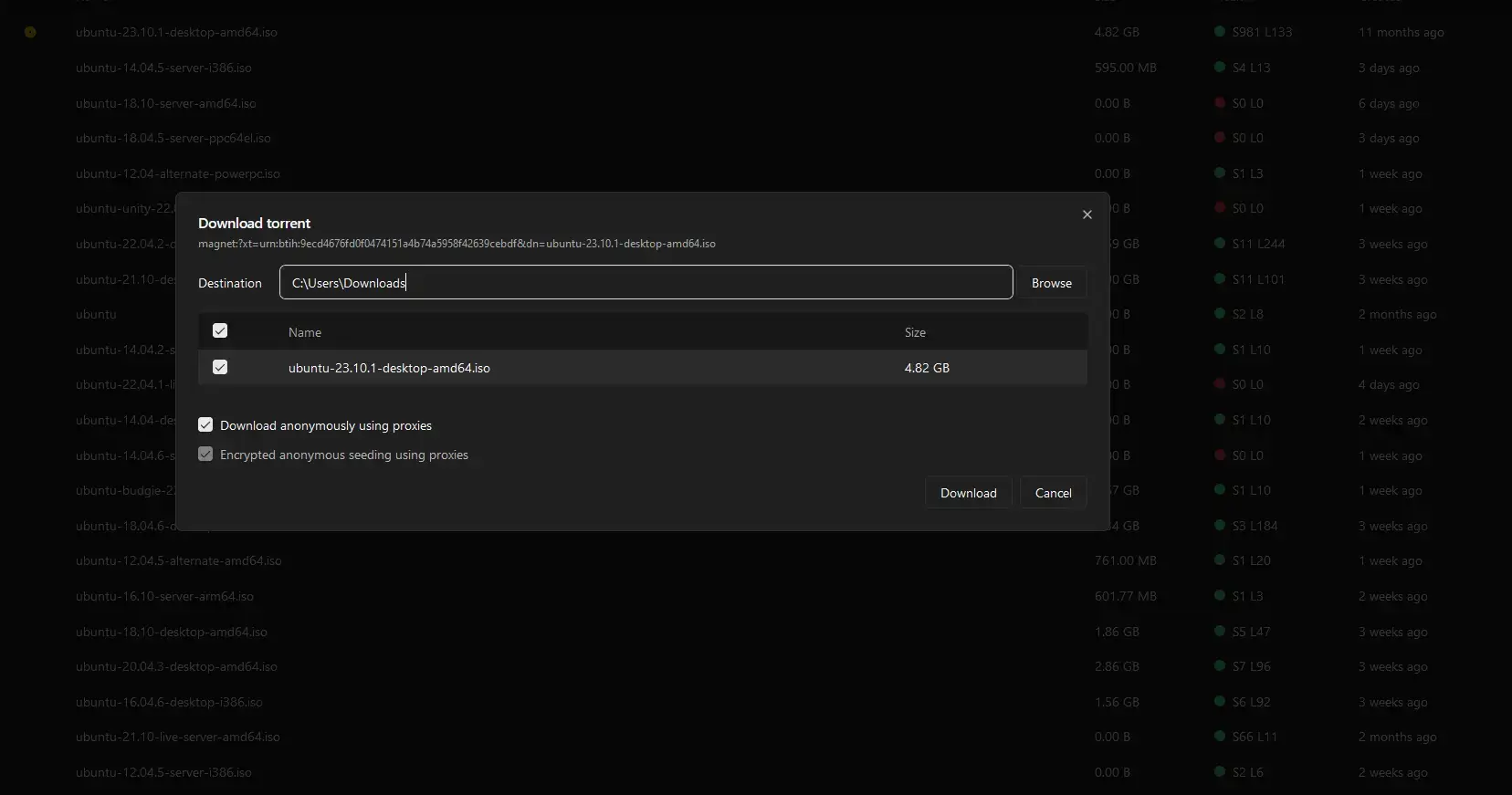
Why We Picked It: Tribler is an academic research project from Delft University of Technology that has grown into a real, usable torrent client with a genuinely unique feature: its own Tor-inspired onion routing network dedicated entirely to torrent traffic. Unlike BiglyBT’s I2P integration, Tribler built its own anonymity layer from scratch and routes your downloads through multiple hops inside its own peer network. It is open source, has a .deb package for Ubuntu, and is actively maintained. The honest caveat – which the developers state themselves – is that the anonymity is experimental and not yet at the level of Tor. Do not treat it as a replacement for a properly configured VPN. Treat it as a client with a meaningful privacy layer that is more than what standard protocol encryption offers.
- Privacy and Trust: Open source (LGPL). University research project. Anonymity is experimental – not production-grade. No third-party audits published.
- Encryption: Yes, with multi-hop onion routing for anonymous mode. Standard BitTorrent encryption for non-anonymous mode.
- Web UI: Not available. Desktop GUI only.
- Anonymity Network: Its own dedicated Tor-like network, separate from the Tor browser network. Anonymous mode routes through three hops by default.
- Resource Use: Moderate. More overhead than Transmission due to the anonymity routing layer.
- Note: Anonymous downloads are slower than standard mode due to the routing overhead. This is expected behaviour, not a bug.
Quick Tip: Tribler lets you switch between anonymous and non-anonymous mode per download. Use anonymous mode for downloads where privacy matters, and standard mode for open content like Linux ISOs where routing overhead is not worth the speed cost.
Install Command:
sudo dpkg -i tribler_[version]_amd64.deb
sudo apt -f install
Torrent Client Comparison
| Client | License | Web UI | Encryption | Resource Use | Install Method |
|---|---|---|---|---|---|
| qBittorrent | GPL (Open Source) | Built-in | Yes | Lightweight | apt |
| Transmission | GPL (Open Source) | Via daemon | Yes | Lightweight | apt |
| Fragments | GPL (Open Source) | None | Yes (via Transmission) | Lightweight | Flatpak |
| Deluge | GPL (Open Source) | Built-in | Yes | Moderate | apt |
| rTorrent + ruTorrent | GPL (Open Source) | ruTorrent (PHP) | Yes | Lightweight | apt + manual setup |
| Tixati | Closed Source Freeware | Limited | Yes | Lightweight | .deb from website |
| BiglyBT | GPL v2 (Open Source) | Via plugin | Yes | Heavy (Java) | Flatpak |
| KTorrent | GPL (Open Source) | None | Yes | Lightweight | apt |
| aria2 | GPL (Open Source) | Via JSON-RPC (e.g. AriaNg) | Yes | Extremely lightweight | apt |
| Tribler | LGPL (Open Source) | Built-in browser UI | Yes | Moderate | .deb from website |
Which Torrent Client Is Right for You?
Install qBittorrent. It handles almost every use case well, has no ads, and is actively maintained. Install it and never think about it again.
Transmission is the most resource-efficient full-featured client on Ubuntu. It is clean, fast, and stays out of your way.
Fragments is the only GTK4/libadwaita torrent client. It looks and behaves like a proper GNOME app rather than a port.
Deluge runs as a daemon, has a browser-based web UI, and supports a wide plugin ecosystem. Good for home server and NAS setups.
rTorrent + ruTorrent is the standard choice for headless server deployments. It is efficient, browser-managed, and highly configurable.
Tixati has the best statistical tools of any client here. Be aware it is closed source – if transparency matters, use qBittorrent instead.
BiglyBT is the only client on this list with built-in I2P DHT support. It is Java-based and resource-heavy, but nothing else open source matches it for this use case.
KTorrent integrates naturally into the KDE desktop. It uses KDE frameworks, follows Plasma visual conventions, and feels like a first-party app on Kubuntu.
aria2 is controlled entirely from the command line or via its JSON-RPC API. It integrates with shell scripts, automation tools, and front-ends like AriaNg without a GUI process running in the background.
Tribler is the only client here with built-in onion routing. It is experimental and not equivalent to Tor in maturity, but it is the most privacy-focused option on this list that does not require a separate VPN or I2P setup.
Torrenting Privately on Ubuntu: VPN and Kill Switch Basics
Protocol encryption (the option built into most clients on this list) makes your torrent traffic harder to fingerprint, but it does not hide it. Your ISP can still see that you are connecting to BitTorrent peers. If privacy matters to you, the practical solution is a VPN with a kill switch.
A kill switch blocks all internet traffic if the VPN connection drops unexpectedly. Without one, a brief VPN disconnect exposes your real IP to every peer in the swarm. Most serious VPN providers on Linux support this via a firewall rule, not a GUI toggle.
Most VPN clients on Linux implement the kill switch using iptables or nftables rules that block all traffic not routed through the VPN interface (usually tun0 or wg0). When the VPN drops, those rules are still active, so no traffic leaks out on your real interface.
Providers that handle this well on Ubuntu include Mullvad (has a native Linux app with a reliable kill switch), ProtonVPN (open-source Linux client, kill switch built in), and IVPN (similar). WireGuard-based VPNs also work well because the protocol itself has lower reconnect latency than OpenVPN, which reduces the window of exposure if the tunnel drops.
If you prefer to configure it yourself, the following iptables rules block all non-VPN traffic. Replace tun0 with your VPN interface name if it differs:
Basic iptables kill switch (add to your VPN up/down scripts):
sudo iptables -P OUTPUT DROP
sudo iptables -A OUTPUT -o lo -j ACCEPT
sudo iptables -A OUTPUT -o tun0 -j ACCEPT# Allow VPN connection itself (replace with your VPN provider’s IP range)
sudo iptables -A OUTPUT -d YOUR_VPN_SERVER_IP -j ACCEPT# To remove (when VPN is connected and working):
# sudo iptables -F OUTPUT
# sudo iptables -P OUTPUT ACCEPT
A few practical notes for Ubuntu users. First, these rules reset on reboot unless you save them with iptables-save or use a tool like ufw to manage them persistently. Second, binding your torrent client to the VPN interface is a cleaner alternative to system-wide kill switch rules – qBittorrent supports this directly in Advanced settings under “Network interface”. Set it to tun0 and qBittorrent will refuse to connect through any other interface. Third, check for DNS leaks after setting up your VPN. Your torrent client will resolve tracker hostnames, and if DNS requests are still going to your ISP’s servers, your activity is visible regardless of the VPN tunnel.
Frequently Asked Questions
What is the best torrent client for Ubuntu overall?
qBittorrent is the best torrent client for most Ubuntu users. It is open source, ad-free, actively maintained, includes a built-in web UI, and supports full protocol encryption. Transmission is the better pick if you want something lighter with less configuration to think about.
Is qBittorrent safe on Ubuntu?
Yes. qBittorrent is open source under the GPL, has no ads, no bundled software, and no history of malware or spyware. The source code is publicly available and reviewed by the community. It is one of the most trusted torrent clients available on any platform.
Can I run a torrent client on a headless Ubuntu server?
Yes. Deluge and rTorrent both support headless operation with browser-based management. Deluge has a built-in web UI you can enable via its plugin system. rTorrent paired with ruTorrent gives you a full browser interface. Transmission also has a daemon mode with a lightweight web UI accessible on port 9091.
What is the lightest torrent client for Ubuntu?
Transmission is the lightest full-featured torrent client for Ubuntu. It uses minimal RAM and CPU, integrates cleanly into most desktop environments, and has been the default in several Ubuntu spins for years. If you want something even more minimal, Fragments is a GNOME-native option that uses the Transmission backend but provides a simpler interface.
Should I use uTorrent on Ubuntu?
No. The official uTorrent Linux client has not been updated since around 2018 and is effectively abandoned. Running it on modern Ubuntu means running an unmaintained binary with no security patches. qBittorrent, Transmission, and Deluge are all actively maintained open-source alternatives that are better choices in every way.
Do torrent clients on Ubuntu support encryption?
Yes. qBittorrent, Deluge, Transmission, rTorrent, Tixati, and BiglyBT all support BitTorrent protocol encryption. It is important to understand what this means: protocol encryption obfuscates your torrent traffic to make it harder for ISPs to identify, but it does not make you anonymous. For stronger privacy, use a VPN alongside your torrent client.
Is Tixati open source?
No. Tixati is closed-source freeware. It is free to use and has no ads, but the source code is not publicly available, so there is no independent way to verify what it does internally. It has no known malware history, but privacy-conscious users should prefer open-source alternatives like qBittorrent or Deluge where the code can be inspected.
Can aria2 be used as a torrent client on Ubuntu?
Yes, but it is not a traditional torrent client with a GUI. aria2 is a command-line download utility that supports BitTorrent alongside HTTP, FTP, and Metalink downloads. It has no graphical interface of its own, but it exposes a JSON-RPC API that front-ends like AriaNg can connect to for browser-based management. It is best suited to users who want to integrate torrent downloading into shell scripts or automated pipelines rather than managing downloads manually.
Is Tribler safe and does it actually make you anonymous?
Tribler is open source and maintained by Delft University of Technology, with no known malware history. Its built-in onion routing provides a degree of anonymity, but it is not equivalent to Tor. The Tribler network is much smaller, latency is higher, and the anonymity implementation is still considered experimental by its own developers. It is a worthwhile option if you want built-in anonymity tooling without setting up a separate VPN or I2P client, but you should not treat it as a complete privacy solution for sensitive activity.
More Ubuntu software guides: Best Web Browsers for Ubuntu · Best Software for Ubuntu · Best Media Players for Ubuntu