

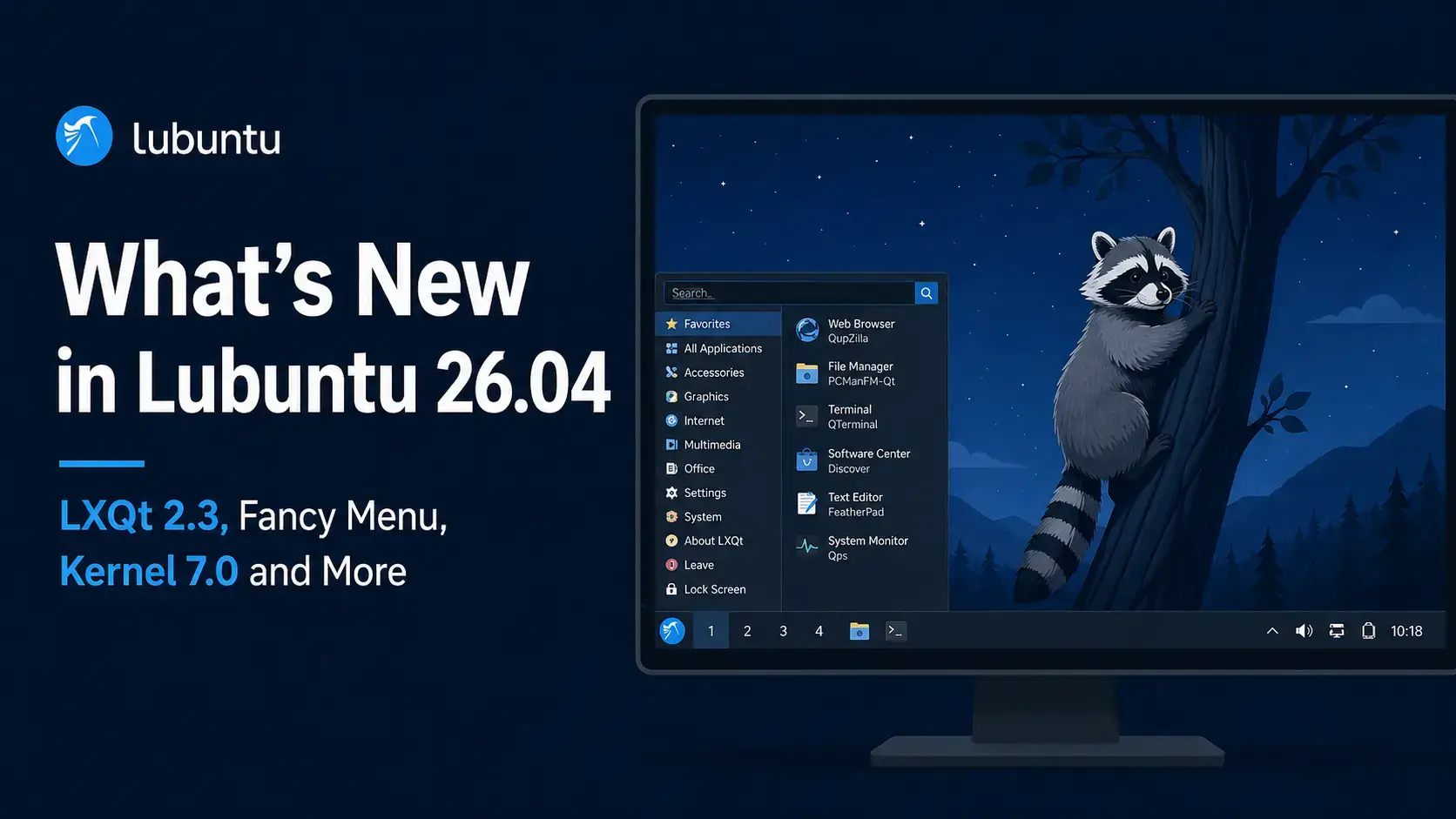

Resolute Raccoon
Every major change in this LTS release – from LXQt 2.3 and the new Fancy Menu to kernel 7.0, Rust coreutils, and improved app defaults.
LXQt 2.3 – The Desktop Upgrade
Lubuntu 26.04 ships LXQt 2.3, released in November 2025. This is also the first LTS release of Lubuntu to ship with a primarily Qt 6-based environment – meaning the desktop, its tools, and third-party Qt apps are all themed consistently for the first time. In previous LTS releases, Qt 6 applications often appeared with plain, unstyled interfaces because the theming engine had not yet caught up. That is fixed in 26.04. For the full technical changelog, see the official Lubuntu 26.04 release notes.
The default application launcher is now Fancy Menu, replacing the older LXQt menu. Fancy Menu offers a more modern layout with proper application categories, inline search, and faster navigation between installed apps. It has been available in LXQt for several cycles but Lubuntu 26.04 is the first LTS to make it the default.
Lubuntu 26.04 switches from Breeze to Kvantum as its theming engine. Kvantum provides better Qt 6 compatibility, which means third-party Qt 6 applications now inherit the system theme correctly instead of rendering with default unstyled widgets. The visual result is a more coherent desktop where all apps feel like they belong together.
The LXQt Panel’s Desktop Switcher now supports Wayland compositors that implement the ext-workspaces-v1 protocol. This covers labwc and niri, two of the most actively developed Wayland compositors for lightweight desktops. If you are testing a Wayland session, virtual desktop switching now works correctly.
PCManFM-Qt gains two useful context menu additions: Safely Remove for connected drives and external storage devices, and Extract Here for archives. Both were previously missing from the right-click menu, requiring extra steps. They are now accessible directly from where you need them.
The LXQt image viewer now supports animated WebP files. WebP has become a common format for web-sourced images and short animations. Previously, LXImage-Qt would display only the first frame of an animated WebP. In 26.04 it plays the animation correctly.
QTerminal adds support for emoji flag sequences – the two-character regional indicator sequences used to display country flags as emoji. If you work with scripts or tools that output emoji flags, QTerminal in Lubuntu 26.04 will now render them correctly instead of showing placeholder characters.
Wayland – Progress, But Not Default Yet
Wayland is not the default session in Lubuntu 26.04. The default desktop remains X11, which is stable and fully supported. However, meaningful Wayland progress has been made: the Desktop Switcher now works with Wayland compositors, and the Lubuntu team has publicly stated this is the last cycle Wayland will be delayed. Users who want to test Wayland today can do so with labwc or niri as the compositor.
| Component | Wayland Status in Lubuntu 26.04 |
|---|---|
| Desktop Switcher (LXQt Panel) | Now supports ext-workspaces-v1 Wayland compositors (labwc, niri). |
| Default session | X11. Stable and unchanged. Wayland is opt-in only. |
| Most X11 applications | Run natively on X11. No change needed. |
| Future outlook | The Lubuntu team has stated this is the last cycle Wayland is delayed. Expected as default in a future release. |
Linux Kernel 7.0
Lubuntu 26.04 ships with Linux kernel 7.0, the same kernel as Ubuntu 26.04 LTS. This is a significant jump from kernel 6.8 in Lubuntu 24.04 and brings hardware support for components that did not exist when 24.04 shipped.
Application Changes – 24.04 vs 26.04
Here is a direct comparison of the key application versions between Lubuntu 24.04 and 26.04.
| Application | Lubuntu 24.04 | Lubuntu 26.04 | Notes |
|---|---|---|---|
| Desktop environment | LXQt 1.4 | LXQt 2.3 | Qt 6 environment, Fancy Menu, Kvantum theming |
| Linux kernel | 6.8 | 7.0 | NTSYNC gaming driver, improved AMD/Intel GPU support |
| Qt | 6.6.x | 6.10.2 | Major Qt update, better Wayland protocol support |
| Firefox | Snap | 149 (Snap) | Significant version jump from 24.04 baseline |
| LibreOffice | 24.2 | 26.2 | Two major version cycles of improvements |
| VLC | 3.0.20 | 3.0.23 | Incremental stability and codec improvements |
| Featherpad | 1.4.x | 1.6.2 | Improved syntax highlighting, Qt 6 port complete |
| Discover | 5.27.x | 6.6.3 | Software center now on Qt 6 / Plasma 6 stack |
| sudo | sudo (C) | sudo-rs (Rust) | Memory-safe Rust rewrite. Everyday usage is identical. |
Lubuntu 26.04 vs Ubuntu 26.04 – How They Differ
Both Lubuntu 26.04 and Ubuntu 26.04 share the same base: identical Ubuntu repositories, the same Linux kernel 7.0, the same security update schedule. The difference is the desktop layer and the resource footprint.
| Feature | Lubuntu 26.04 | Ubuntu 26.04 |
|---|---|---|
| Desktop environment | LXQt 2.3 | GNOME 50 |
| Default display session | X11 (Wayland in progress) | Wayland only |
| RAM usage at idle | ~400-600 MB typical | ~1.2-1.5 GB typical |
| Minimum RAM to install | 2 GB | 4 GB |
| LTS support | 3 years (until April 2029) | 5 years (until April 2031) |
| Best for | Older hardware, users who want a fast, traditional desktop | Modern hardware, users who want the full GNOME experience |
System Changes – Rust, Security, and Tooling
Lubuntu 26.04 inherits Ubuntu 26.04’s platform-level upgrades. Two of these are firsts for any Ubuntu LTS release.
Ubuntu 26.04 replaces the traditional GNU coreutils and the C-based sudo with Rust rewrites. This transition began in Ubuntu 25.10 and carries forward into the 26.04 LTS. For everyday use, the commands work identically – sudo, ls, cp, rm, and the rest behave the same way. The benefit is under the hood: Rust’s memory safety model eliminates entire classes of vulnerabilities that have historically affected C-based system tools.
If you have shell scripts that rely on edge-case behaviors specific to GNU coreutils, test them before upgrading from 24.04. In the vast majority of cases there is no difference.
APT moves from 2.7 to 3.2. The new version includes rollback commands via apt history-rollback, a new dependency solver, and OpenSSL-backed TLS for repository connections. Package management stays the same from a user perspective.
LXQt 2.3 adds LZ4 archiver support to the desktop. LZ4 is a fast compression format used increasingly in modern Linux packaging and data pipelines. You can now work with LZ4 archives directly from the LXQt desktop without installing additional tools.
The Lubuntu team has updated the Lubuntu Manual to cover 26.04. It is accessible directly from the desktop via the Lubuntu Manual icon. The manual covers installation, application usage, configuration, and contributing – written for both new and experienced users.
Free. Open source. LXQt 2.3. Supported until April 2029.
Known Issues in Lubuntu 26.04
The following issues are documented in the official release notes. Both are relatively minor and have workarounds.
KWallet and KWalletManager are being installed by default in Lubuntu 26.04 instead of gnome-keyring. This is a known packaging issue. If an app prompts you to create a KWallet password that you were not expecting, this is why. The issue is tracked and a fix is expected in a future package update. In the meantime, KWallet works correctly – it is just not the originally intended credential manager for this release.
Alacritty, a GPU-accelerated terminal emulator, is being installed alongside QTerminal in Lubuntu 26.04. QTerminal remains the default terminal for the LXQt desktop. Alacritty should not appear unless you installed it intentionally, but if you notice an extra terminal in your app list, this is the cause. It can be removed with sudo apt remove alacritty if you prefer a cleaner install.
Upgrading From Lubuntu 24.04 – What to Know First
You can upgrade to Lubuntu 26.04 from Lubuntu 24.04 LTS or 25.10 using the standard sudo do-release-upgrade command. Before you log in to the upgraded desktop, there is one step worth taking.
The LXQt 2.3 configuration format differs from older LXQt versions. Configuration files from Lubuntu 24.04 can occasionally cause layout issues, missing panel items, or theme glitches when the upgraded desktop loads. Backing up your config folder before logging in gives you a safety net.
Run this before logging into the new desktop:
rm -rf ~/.config
This backs up your existing config to ~/.config-backup-24.04 before clearing it. LXQt will regenerate a clean configuration on first login. If you want to recover specific settings, refer to the backup.
System Requirements – Has Anything Changed?
The minimum hardware requirements for Lubuntu 26.04 are the same as 24.04. LXQt 2.3 does not require more resources than LXQt 1.4. If your machine ran Lubuntu 24.04 comfortably, it will run 26.04 comfortably.
- CPU: 1.5 GHz dual-core
- RAM: 2 GB
- Storage: 20 GB free
- Display: 1024 x 768
- CPU: 4-core 64-bit processor
- RAM: 4 GB or more
- Storage: 40 GB SSD
- Display: 1920 x 1080
Frequently Asked Questions
What is the biggest change in Lubuntu 26.04?
The biggest changes are LXQt 2.3 and the move to a fully Qt 6-based environment. LXQt 2.3 introduces the Fancy Menu as the default application launcher, replaces Breeze with Kvantum as the theming engine, adds Wayland compositor support to the Desktop Switcher, and improves PCManFM-Qt, QTerminal, and LXImage-Qt. Lubuntu 26.04 is also the first Ubuntu LTS to ship Rust-based coreutils and sudo-rs.
What version of LXQt does Lubuntu 26.04 use?
Lubuntu 26.04 ships with LXQt 2.3, running on Qt 6.10.2. This is the first LTS release of Lubuntu to ship with a primarily Qt 6-based environment. Qt 6 applications are now themed consistently across the desktop rather than appearing with default unstyled widgets as they did in older releases.
Does Lubuntu 26.04 support Wayland?
Wayland support is still in progress. The default session remains X11. The LXQt Desktop Switcher now supports Wayland compositors that implement the ext-workspaces-v1 protocol, covering labwc and niri. The Lubuntu team has stated this is the last cycle Wayland will be delayed. Most users should stay on X11 for now – it is fully stable and unchanged.
What kernel does Lubuntu 26.04 use?
Lubuntu 26.04 ships with Linux kernel 7.0. This is the same kernel as Ubuntu 26.04 LTS and brings the NTSYNC gaming driver, improved AMD and Intel GPU support, updated Wi-Fi and Bluetooth drivers for newer hardware, and the sched_ext scheduling framework. It is a significant jump from the 6.8 kernel in Lubuntu 24.04.
What is the Fancy Menu in Lubuntu 26.04?
Fancy Menu is the new default application launcher in Lubuntu 26.04. It replaces the older LXQt menu with a more modern layout that includes better application categorization, inline search, and faster navigation. It has been available in LXQt for several releases but Lubuntu 26.04 LTS is the first LTS release to ship it as the default launcher.
Can I upgrade to Lubuntu 26.04 from 24.04?
Yes. You can upgrade from Lubuntu 24.04 LTS or 25.10 using sudo do-release-upgrade. Before logging into the upgraded desktop, back up your LXQt configuration with cp -r ~/.config ~/.config-backup-24.04 then remove ~/.config. Old LXQt config files can cause layout or theme issues on first login after the upgrade.
How long is Lubuntu 26.04 LTS supported?
Lubuntu 26.04 LTS receives free security updates and critical fixes until April 2029 – three years of support. This is the standard window for Ubuntu flavors, which is shorter than the five years offered for the main Ubuntu desktop. Extended support beyond April 2029 is not available for Lubuntu through Ubuntu Pro.
More Lubuntu 26.04 guides: Lubuntu 26.04 Download · Upgrade to Lubuntu 26.04 · Lubuntu 26.04 Wallpapers · Kubuntu 26.04 Download